
Claris recently revised its licensing model, including new tier names, revised benefits, and updated access methods. Whether you are a long-time FileMaker user or considering a switch to the platform, choosing the right hosting option for your business is important.
Read along to learn some of the main points, and to see our objective comparison of the key hosting options.
Option 1: Claris FileMaker Cloud
FileMaker Cloud provides a deployment option with Claris-managed infrastructure and automatic updates.
- Reduced overhead costs compared to managing an in-house server.
- No hardware installation required – easy access through your FileMaker software.
- Enterprise-grade security with industry-standard features and global data centers.
- Plentiful, automated data backups.
- 24/7 dedicated support available.
- Always up to date with the latest FileMaker version.
Option 2: Claris FileMaker Server (on premise)
FileMaker Server allows hosting on your own infrastructure, providing the greatest control over the environment. Automated off-site backups will be available soon.
- Offers your team full control over hardware, operating system (OS), and setup.
- More flexible when your organization requires customization.
- Strict control when requirements mandate a local hosting environment.
- Requires dedicated resources to manage infrastructure and performance.
- Enterprise-grade security and updates are available when FileMaker software is current.
Option 3: Third-party Claris FileMaker hosting
Working with a Claris Partner like Portage Bay Solutions offers expert management of FileMaker solutions, balancing control with convenience.
- FileMaker experts handle setup and regular maintenance.
- Identify and design the best path for scaling with future growth.
- Enterprise-grade security with consistent monitoring of your data.
- Deploy updates and enhancements automatically as needed.
- Deep understanding of your business to support the improvement and expansion of your FileMaker workflows.
Pricing differences and options
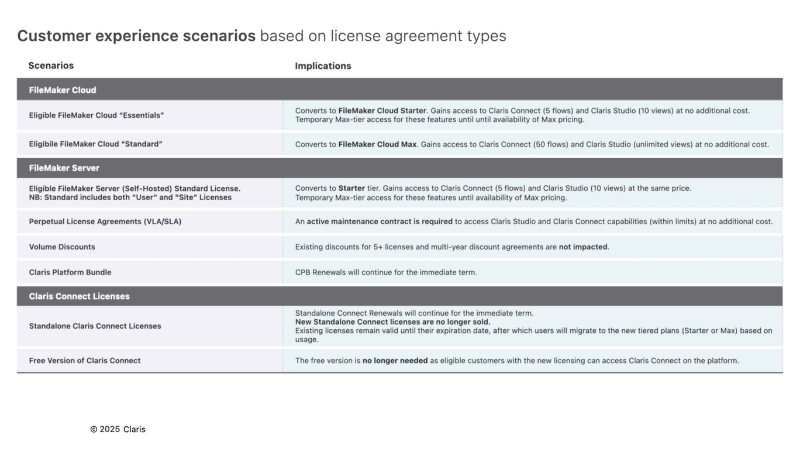
The names of each pricing tier have been updated, but their benefits remain the same. Essentials has become Starter, and Standard has become Max.
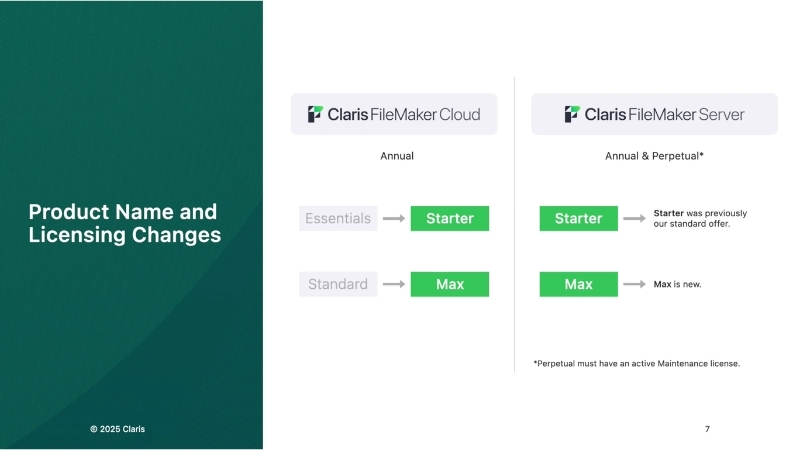
FileMaker Cloud pricing – includes licensing
Starter (Formerly Essentials)
$22 per user, per month (billed annually)
5-10 users only
- Host up to 3 applications
- 2 GB of FileMaker data storage per user per year; No upgrades available.
- 2 GB outbound data transfer of FileMaker Data API/OData per user per month
- Compute: Large (2 CPU, 8 GB); No upgrades available.
- Claris Connect integration: 5 active flows*
- 10 native Claris Studio web views published for consumption
Max (Formerly Standard)
$45 per user, per month (billed annually)
5-99 users
- Host up to 256 applications
- 6 GB of FileMaker data storage per user per year; Upgrades available.
- 2 GB outbound data transfer of FileMaker Data API/OData per user per month
- Compute: Varies based on number of users; Upgrade available.
- Claris Connect integration: 50 active flows*
- Unlimited native Claris Studio web views published for consumption
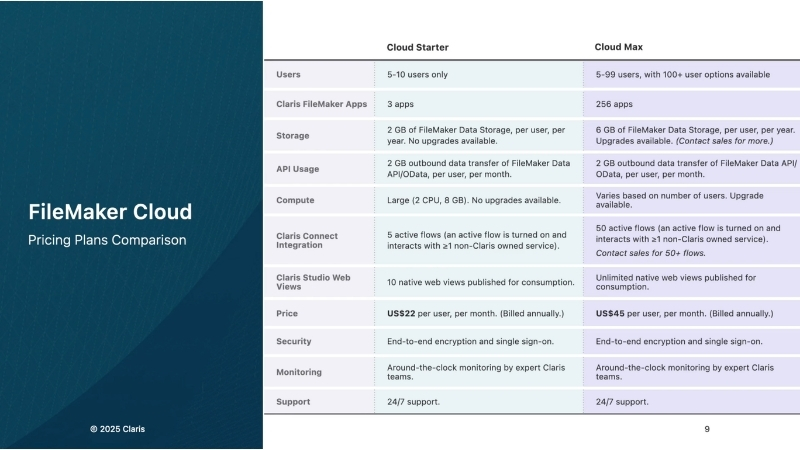
FileMaker Server pricing – licensing additional
With either plan, all users now receive access to Claris Connect and Claris Studio, in addition to the usual access to Claris FileMaker Pro, Go, and WebDirect. You can use up to 3 on-premise servers to run your solutions
Starter
$17.50 per user, per month (billed annually)
5-99 users
- Claris Connect integration: 5 active flows*
- Claris Studio web views: 10 native web views published for consumption
Max
$22.00 per user, per month (billed annually)
5-99 users
- Claris Connect integration: 50 active flows*
- Claris Studio web views: unlimited native web views published for consumption
*A flow is active when interacting with a third-party connector.
Third-party hosting pricing – licensing additional
This cost varies depending on the provider you choose and is dependent on a variety of factors such as total size of your files and the backup and support strategy you are interested in. This type of hosting is highly customizable, to dial in exactly what works best for your company. Portage Bay Solutions is a licensed Claris reseller and we’d be glad to provide a quote for you.
Which one is right for me?
We can help you decide which scenario will best fit your organization’s needs.
FileMaker Cloud scales automatically based on usage. FileMaker Server and third-party hosting allow performance control via self-managed infrastructure or a service provider.
All FileMaker hosting options utilize enterprise-grade security. FileMaker Cloud handles updates and backups, while FileMaker Server and third-party hosting permit custom control over these processes.
FileMaker Cloud is suited for simplicity, automation, and remote access. FileMaker Server is ideal for organizations with internal IT managing systems and specific local requirements, while third-party hosting provides setup and maintenance expertise.
Below is a chart comparing the features of each hosting option.
| Feature | FileMaker Cloud | Self-hosting with FileMaker Server | Third-party FileMaker hosting |
| Setup | Quick and easy, no hardware or OS installation | Requires hardware, OS, and manual setup | Managed setup with expert support |
| Maintenance | Automatic updates and backups managed by Claris | Manual updates and backups required; FileMaker Remote Backup coming soon | Managed maintenance and support |
| Scalability | Easy to scale based on business needs | Determined by hardware and network capabilities | Flexible scaling options |
| Security | Enterprise-grade security, global AWS data centers | Enterprise-grade security that’s dependent on infrastructure and IT practices | Enhanced security with expert management |
| Plug-ins | Not supported | Supported | Supported |
| Cost | Subscription-based pricing | Upfront hardware, network, and ongoing maintenance costs; annual or perpetual license | Subscription or service-based pricing |
| Ideal for | Teams seeking simplicity and reliability | Organizations with dedicated IT resources | Businesses wanting expert management without overhead |
Next steps: Is it time for a change?
With the updated Claris licensing and hosting options, it might be time for your business to consider a change. The decision comes down to balancing control, convenience, and your organization’s internal resources.
- FileMaker Cloud is the ideal choice if you prioritize simplicity, immediate remote access, and automated maintenance, effectively offloading all server management to Claris. The pricing can’t be beat for companies with under six users, and fewer than three FileMaker files. Larger organizations will see higher costs, but may find the ease of operation to be worth it.
- FileMaker Server is the right fit if your organization has dedicated IT resources to handle setup, monitoring, maintenance, and offsite backups and requires the maximum level of control over hardware, operating system, and a local hosting environment.
- Third-Party FileMaker Hosting offers a valuable middle ground, providing the customization and control similar to a self-hosted server, but with the convenience of expert, managed maintenance and support.
At Portage Bay Solutions, we will be glad to evaluate your organization’s technical needs, budget, and long-term growth strategy to determine which hosting option is right for you. We have the expertise to design, implement, and manage your hosting to ensure your custom FileMaker apps run securely and efficiently. Contact us for a free consultation.
This piece represents a collaboration between the human authors and AI technologies, which assisted in both drafting and refinement. The authors maintain full responsibility for the final content.