

Most organizations don’t realize they’re relying on a legacy system until it becomes noticeably difficult to maintain. A database that once served the team well begins to feel slow, rigid, or incapable of supporting new demands. Staff develop workarounds to compensate for limitations. Integrations that once seemed optional become necessary. Eventually, the system can no longer keep up with the pace of the business. Modernizing or replacing it with a structured plan solves this and helps the organization move forward with confidence.
Why legacy systems become a problem
Legacy software rarely fails all at once. Instead, it becomes outdated gradually as the business grows, technology evolves, or the original developer moves on. What starts as a small inconvenience—a missing feature, a report that takes too long to generate, or difficulty onboarding new users—accumulates into more significant operational challenges.
Common issues include:
- Slow performance or downtime during busy periods
- Difficulty integrating with newer tools
- Limited mobile access for field staff
- Security vulnerabilities in older technologies
- Outdated user interfaces that complicate training
- Increasing maintenance costs due to aging infrastructure
- Inability to support new workflows or compliance requirements
Organizations often don’t notice the full impact until a process breaks or a major update becomes impossible.
A realistic scenario
Imagine a company still relying on a database built over a decade ago. The system contains years of customer history, service records, internal notes, and custom fields that no off-the-shelf tool can easily replicate. As the team grows, the software struggles with the increased volume. Reports generate more slowly, integrations with cloud tools fail, and staff begin keeping separate spreadsheets to fill the gaps.
When the original developer is no longer available, updating the system becomes complicated. A simple change requires hours of trial and error. Training new staff becomes more difficult because the interface and workflows no longer reflect how the business actually operates. The system technically still works—but it holds the organization back in ways that become more visible each year.
Understanding your modernization options
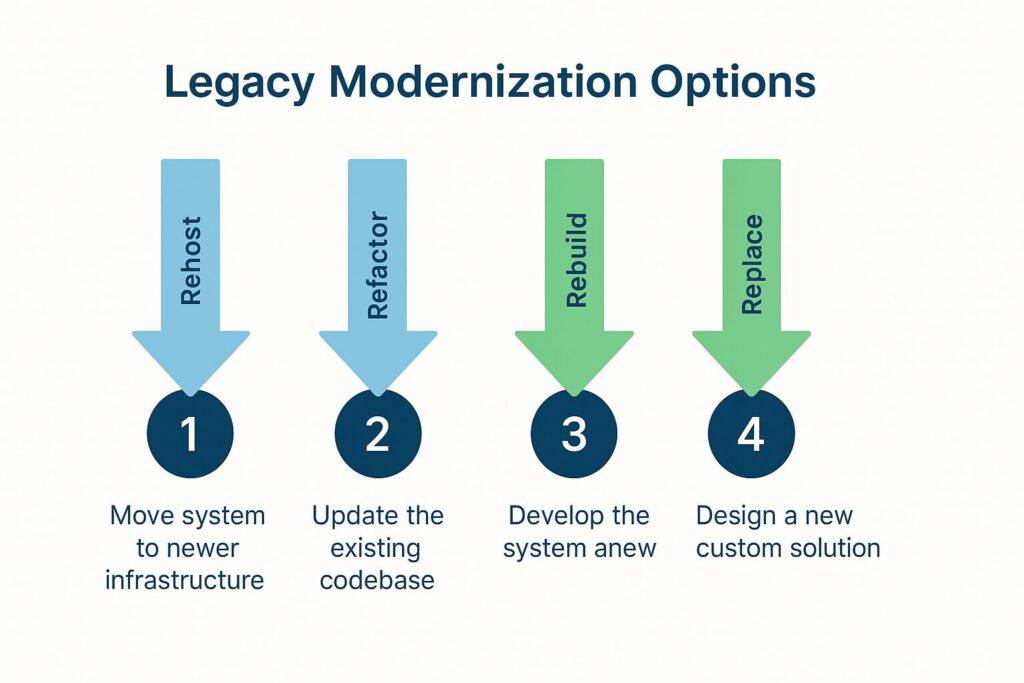
Legacy modernization doesn’t always mean a complete rebuild. Depending on the system’s age, architecture, and role within your organization, there are several viable paths forward. Most organizations choose one of the following:
1. Rehost or “lift and shift”
Move the existing system to newer infrastructure without changing functionality.
Good for performance but limited in long-term impact.
2. Refactor to improve structure
Update underlying components while keeping workflows intact.
Useful when the core logic still works but the technology is outdated.
3. Rebuild with modern tools
Recreate the system using current frameworks while preserving business logic.
This is the most flexible—and often the most cost-effective long term.
4. Replace with a new custom system
Design a modern solution built around current needs instead of legacy constraints.
Ideal for organizations whose processes have evolved significantly.
The right choice depends on the system’s purpose, the stability of the current codebase, and how much the business has changed since the software was created.
Where FileMaker fits into legacy modernization
FileMaker offers a unique balance for organizations with aging systems that handle specialized workflows. It allows you to move away from fragile, custom-coded legacy apps without losing the flexibility your team relies on.
A FileMaker modernization can:
- Recreate existing workflows with updated logic
- Replace spreadsheets, Access databases, or outdated custom apps
- Support mobile and offline access
- Integrate with modern APIs and cloud systems
- Provide a secure, future-ready platform
- Allow incremental modernization rather than an all-at-once rebuild
- Maintain familiar structure while improving usability
This makes it easier to preserve what still works about your legacy system while addressing what no longer does.
What improves when legacy systems are modernized
Modernization brings benefits that extend beyond technology:
- Faster workflows with fewer errors
- Better visibility and reporting
- More reliable integrations with accounting, CRM, and operational tools
- Stronger security and data protection
- Shorter onboarding time for new staff
- Reduced dependence on a single developer or aging code
- Ability to adapt to future operational changes
Modern systems don’t just run better—they support a healthier, more resilient business.
A safer path forward
A thoughtful modernization plan protects the value in your legacy system while giving your organization room to grow. It doesn’t require throwing away everything you’ve built. Instead, it helps you translate your expertise, processes, and data into a platform designed for today’s needs.
If you’re exploring what to do with an aging FileMaker, Access, or custom-built system, we can help you determine the best approach—whether that means a partial update, a full rebuild, or a tailored replacement. If you’d like to discuss modernization options that fit your organization, contact us to schedule a free consultation.