

Last round, we took the Web Viewer blob apart and gave the pieces names. FileMaker assembled those pieces into a Web Viewer, built an explicit context payload, and pushed that payload into JavaScript. The renderer drew what it received. It did not query FileMaker, invent a second copy of application state, or develop opinions about which record should be current.
Everybody stayed in their lane. It was almost suspiciously well behaved.
That is where we left things:
FileMaker -> Web ViewerThat one-way arrangement was deliberate. FileMaker owned the selected movie, the selected genre, the payload, and the timing; JavaScript owned the rendering. Clean boundary. Easy to inspect. Also read-only.
That is fine for a chart or a status panel. It becomes a little harder to defend after we draw a button. A button is a promise. If clicking it does nothing, we have not built an interaction; we have decorated a rectangle.
So this pass gives the viewer one disciplined way to talk back.
We will add two buttons to the context card. When the user clicks one, JavaScript will package the intent into a small JSON envelope and hand it to one FileMaker script. FileMaker will validate the envelope, show us exactly what arrived, update a few demo fields, and push an acknowledgement back into the viewer that is already loaded.
By the end, we can follow the whole trip without asking either side to take our word for it:
FileMaker context
  -> Web Viewer render
  -> JavaScript action
  -> FileMaker handler
  -> context acknowledgement
Calling a FileMaker script from JavaScript is an established FileMaker capability, but we have not used it in this series yet. Last round stopped at the one-way context push. Here we add the return call and, more importantly, decide what happens around it: once JavaScript can talk back, who owns the decision?
Our answer stays simple:
JavaScript reports intent.
FileMaker decides what that intent means.
The viewer can say, “The user clicked Mark Movie for this id.” It does not get to decide what is marked, which record changes, or whether the request is allowed. In this demo, FileMaker validates the request, records it in visible global fields, and acknowledges it without changing production data.
That ownership boundary is the work. Everything else is plumbing with better labels.
You Are Not Expected To Hand-Write This JavaScript
If JavaScript is not part of your daily FileMaker work, the code ahead may look like the series has quietly changed its admission requirements. It has not.
The JavaScript in this demo was developed with an AI co-developer. I defined the job: the context shape, the action-envelope contract, the FileMaker handler name, the allowed return values, and the state the Web Viewer is not allowed to own. The AI helped produce and revise the JavaScript inside those boundaries. My part is to review the result against the contract and test the completed path in FileMaker; generated code is a draft, not evidence that the feature works.
That is part of why the module structure matters. “Make the Web Viewer interactive” is a broad request with excellent opportunities for confident improvisation. “Add WV.sendAction to module 25; emit this JSON shape; call this FileMaker script; do not mutate application state” gives the AI a smaller job and gives us something specific to review.
We are not going to unpack that entire collaboration loop here. The prompting, context we give the AI, code review, native FileMaker testing, and revision cycle deserve their own pass. We will cover that workflow in an upcoming round.
For now, read the JavaScript as an implementation of the contract we are building—not as an entrance exam. You should understand what crosses the boundary and who owns the result. You do not need to produce every function from a blank editor and a determined expression.
Why One-Way Context Was Not Enough
A read-only Web Viewer is not a failed Web Viewer. Plenty of useful surfaces never need to send anything back: charts, summaries, dashboards, status panels, the occasional stern warning nobody reads.
But the moment we add a button, selectable row, filter control, or drill-down target, the user can express intent inside JavaScript. We need a path for that event to reach FileMaker.
An Action Is Intent, Not State
Let us be slightly fussy about one word: intent.
The Web Viewer knows what the user did inside the viewer. It can tell us:
- the user clicked
Inspect Context - the user clicked
Mark Movie - the click happened while movie
MOVIE-...and genreGENRE-...were in the current context
What it should not decide is:
- which FileMaker record becomes current
- whether a movie field should be modified
- whether a transaction should commit
- whether a different layout should open
- whether the action is even allowed
Those are FileMaker decisions.
In a tiny demo, this can look like ceremony. Both sides live in one file. One person wrote the code. We could let the click handler call whatever script it likes and be home in time for dinner.
The boundary earns its keep later: when the action changes a real record, when privilege sets matter, when the current layout is not the one the renderer expected, or when the same Web Viewer module turns up somewhere else. Boundaries are often most annoying five minutes before they become useful.
So instead of claiming that it changed anything, the renderer sends this:
{
  "__wv_action": {
    "version": 1,
    "source": "wv.renderer.framework.context",
    "page": 62,
    "ts": "2026-07-20T02:44:24.933Z"
  },
  "type": "demo.mark_movie",
  "payload": {
    "movie_id": "MOVIE-D1B6EDFD-71C1-4904-B08B-350754D7DFDC",
    "genre_id": "GENRE-303185A0-4C08-48BC-95D3-932558B1DF5A"
  }
}
FileMaker receives that object and decides what demo.mark_movie means here.
For now it means: validate the envelope, display it, increment a counter, update a status field, and push acknowledgement context back to the loaded viewer.
That is all. No movie record is harmed in the making of this demonstration.
The action name may sound more ambitious than the result. This is intentional. The demo proves that FileMaker received the request; it does not use an article about messaging contracts as an excuse to smuggle in record mutation wearing a novelty moustache.
The Action Envelope
“Action envelope” sounds grander than the object deserves. It is a small JSON object with three parts:
| Path | Purpose |
|---|---|
__wv_action | framework metadata used for versioning and debugging |
type | stable name for the user intent |
payload | values needed for FileMaker to interpret that intent |
The metadata tells us which contract version we are looking at, which module sent it, which page was active, and when the browser created it. The payload carries stable FileMaker ids. The dotted action type gives the intent a name we can recognize six months from now without consulting the original author, a séance, or both.
None of this is especially glamorous.
Good.
Boring contracts are easier to inspect, log, validate, and replay. Exciting contracts are how integrations become oral tradition.
We keep the envelope small on purpose. It does not contain a copy of every viewer state value. It does not tell FileMaker to execute arbitrary logic. It does not pretend the client timestamp is authoritative. It carries enough context for FileMaker to understand the request and then stops talking.
Two action types are enough here:
| Button | Action type | Payload |
|---|---|---|
Inspect Context | demo.inspect_context | current title, movie id, and genre id |
Mark Movie | demo.mark_movie | current movie id and genre id |
The first action makes the contract easy to inspect. The second gives us an action that sounds like a state change while still leaving the decision with FileMaker.
The viewer never says, “I marked the movie.”
It says, “The user asked to mark this movie.”
That one verb tense is doing useful architectural work.
One JavaScript Bridge For Viewer Actions
When the page is running inside a FileMaker Web Viewer, FileMaker exposes window.FileMaker.PerformScript. The first argument is the FileMaker script name. The second is text that the script receives through Get ( ScriptParameter ).
That makes the most direct implementation tempting:
markButton.addEventListener("click", function () {
  var ctx = WV.getContext();
  var defaults = ctx.defaults || {};

  var action = {
    "__wv_action": {
      "version": 1,
      "source": "wv.renderer.framework.context"
    },
    "type": "demo.mark_movie",
    "payload": {
      "movie_id": defaults.movie_id || "",
      "genre_id": defaults.genre_id || ""
    }
  };

  window.FileMaker.PerformScript(
    "WV__Demo_Handle_Action",
    JSON.stringify(action)
  );
});
The call is valid. The problem is making every renderer remember the handler name, envelope shape, serialization, bridge check, and error behavior. Those details will drift; six months later, the routing diagram is archaeology.
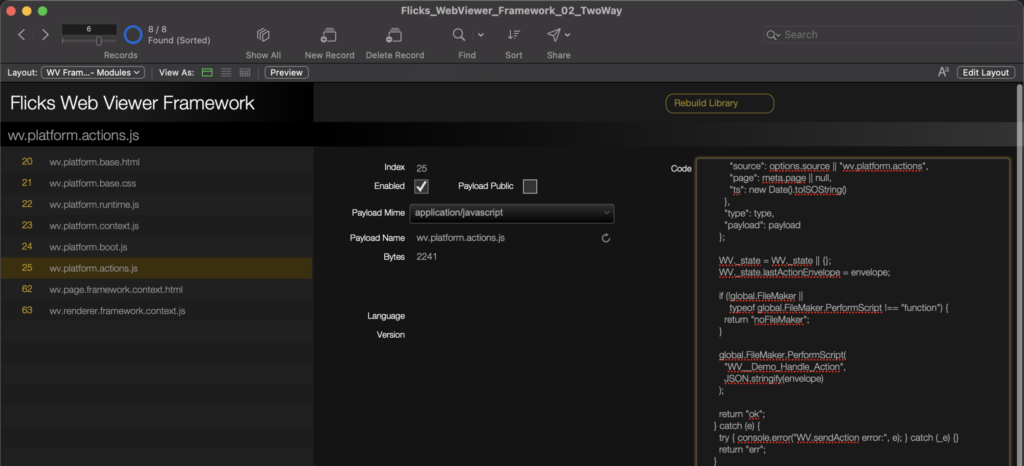
We give that work one home instead. Module 23, wv.platform.context.js, continues to handle context coming in. A new action module handles intent going out.
Instead, we add one small platform module for the other direction:
| Index | Module | Purpose |
|---|---|---|
25 | wv.platform.actions.js | build action envelopes and send them to a FileMaker handler |
Keeping context-in and actions-out separate is not a sacred law. It is simply easier to inspect two modules with one job each than one bridge module with a growing collection of errands.
The context module owns WV_FM_PUSH and current viewer context. The action module owns WV.sendAction. A renderer can consume both without knowing the details of either bridge.
The public API is small:
WV.sendAction(type, payload, options)The complete source is preserved with the article files. The bridge-critical portion is smaller than the module header surrounding it:
// Returns: "ok" | "badType" | "noFileMaker" | "err"
WV.sendAction = function (type, payload, options) {
  try {
    options = isObject(options) ? options : {};
    payload = isObject(payload) ? payload : {};
    type = typeof type === "string" ? type.trim() : "";

    if (!type) {
      return "badType";
    }

    var meta = currentMeta();
    var envelope = {
      "__wv_action": {
        "version": 1,
        "source": options.source || "wv.platform.actions",
        "page": meta.page || null,
        "ts": new Date().toISOString()
      },
      "type": type,
      "payload": payload
    };

    WV._state = WV._state || {};
    WV._state.lastActionEnvelope = envelope;

    if (!global.FileMaker ||
        typeof global.FileMaker.PerformScript !== "function") {
      return "noFileMaker";
    }

    global.FileMaker.PerformScript(
      "WV__Demo_Handle_Action",
      JSON.stringify(envelope)
    );

    return "ok";
  } catch (e) {
    try { console.error("WV.sendAction error:", e); } catch (_e) {}
    return "err";
  }
};
The function normalizes the payload, rejects an empty action type, remembers the envelope for debugging, and checks for the FileMaker bridge.
Its return value needs one distinction: ok means the call was placed, not accepted. FileMaker acknowledgement arrives later through context. Outside FileMaker, the function returns noFileMaker.
The complete action module remains available for inspection; the published argument needs the contract and handoff, not every line required to make the module polite in production JavaScript.
The Renderer Reports Intent
The good news for module 63, wv.renderer.framework.context.js, is that it does not get promoted. It remains the context-card renderer we already built. We give it two buttons and a small acknowledgement area; we do not give it a working knowledge of FileMaker script architecture.
It does not learn how FileMaker scripts work. It does not call FileMaker.PerformScript directly. It calls the platform action API.
The relevant renderer excerpt looks like this:
function addActionButton(label, type, payload) {
  var button = el("button", "wv-context-action", label);
  button.type = "button";

  button.addEventListener("click", function () {
    var result = typeof WV.sendAction === "function"
      ? WV.sendAction(type, payload, {
          source: "wv.renderer.framework.context"
        })
      : "noBridge";

    actionNote.textContent = "Action send result: " + result;
  });

  actionBar.appendChild(button);
}

addActionButton("Inspect Context", "demo.inspect_context", {
  title: defaults.title || "",
  movie_id: defaults.movie_id || "",
  genre_id: defaults.genre_id || ""
});

addActionButton("Mark Movie", "demo.mark_movie", {
  movie_id: defaults.movie_id || "",
  genre_id: defaults.genre_id || ""
});
Notice where the payload values come from: the current context FileMaker already supplied. The renderer does not query FileMaker again at click time. It renders one context and reports intent against that same context. Fewer moving targets; fewer opportunities to debug a value that changed somewhere between looking at it and clicking it.
This keeps the path inspectable:
FOCUS fields
  -> context JSON
  -> renderer values
  -> action payload
  -> FileMaker handler
If the wrong movie id comes back, there are only a few sensible places to look. This is what a contract buys us: not an absence of bugs, but fewer square miles in which they can establish a settlement.

FileMaker Receives The Envelope
On the FileMaker side, we give the Web Viewer one front door:
WV__Demo_Handle_Action
The script receives Get ( ScriptParameter ) as raw text. We do not assume it is valid because it came from our own viewer. Client input remains client input even when the client is sitting politely inside a FileMaker layout and using our variable names.
The handler does four things:
- Validate the root object and required envelope fields.
- Store the formatted action JSON and action type in visible global fields.
- Increment the handled-action count and update status.
- Rebuild and push context so the viewer can render FileMaker’s acknowledgement.
The visible action fields are evidence, not an action-history data model. They show the last valid envelope, its type, the handled-action count, and FileMaker’s status so we can inspect the boundary without opening a debugger and developing a theory about timing.
The reusable handler contract is more important than this demo’s field names:
| Check or action | Why it belongs in FileMaker |
|---|---|
| Parse the raw script parameter and require a JSON object | Client input remains client input, even when the client is our own Web Viewer. |
| Require an action type, payload object, metadata object, version, and source | A predictable outer shape gives every later action the same front door. |
| Reject unknown action types | A well-formed surprise is still a surprise. |
| In production, validate the action-specific payload | Stable envelope structure does not make every payload meaningful or authorized. |
| Record the accepted action and update FileMaker-owned state | JavaScript reports intent; FileMaker decides what the request means. |
| Rebuild and push context | The viewer receives authoritative acknowledgement through the path already established. |
The completed demo validates the outer envelope and accepts only demo.inspect_context and demo.mark_movie; it does not claim to provide production payload authorization. A valid demo action follows this path:
raw script parameter
  -> validate JSON and envelope shape
  -> reject or accept the named action
  -> update visible FileMaker status
  -> rebuild context
  -> push acknowledgement to the loaded viewer
After the validation branches, the accepted-action path in WV__Demo_Handle_Action is compact enough to see the ownership handoff directly:
Set Variable [ $_count; Value:GetAsNumber ( GetField ( "FOCUS::g_wv_action_count" ) ) + 1 ]
Set Variable [ $_status; Value:"Handled " & $_type ]

Set Field By Name [ "FOCUS::g_wv_action_json"; $_formatted ]
Set Field By Name [ "FOCUS::g_wv_action_type"; $_type ]
Set Field By Name [ "FOCUS::g_wv_action_count"; $_count ]
Set Field By Name [ "FOCUS::g_wv_action_status"; $_status ]

Perform Script [ “WV__Demo_Build_Context”; Parameter: "" ]
Perform Script [ “WV__Demo_Push_Context”; Parameter: "" ]
Set Variable [ $_push_result; Value:GetAsText ( Get ( ScriptResult ) ) ]

Exit Script [ Result: JSONSetElement ( "{}"
  ; [ "ok" ; 1 ; JSONBoolean ]
  ; [ "type" ; $_type ; JSONString ]
  ; [ "count" ; $_count ; JSONNumber ]
  ; [ "push_result" ; $_push_result ; JSONString ]
) ]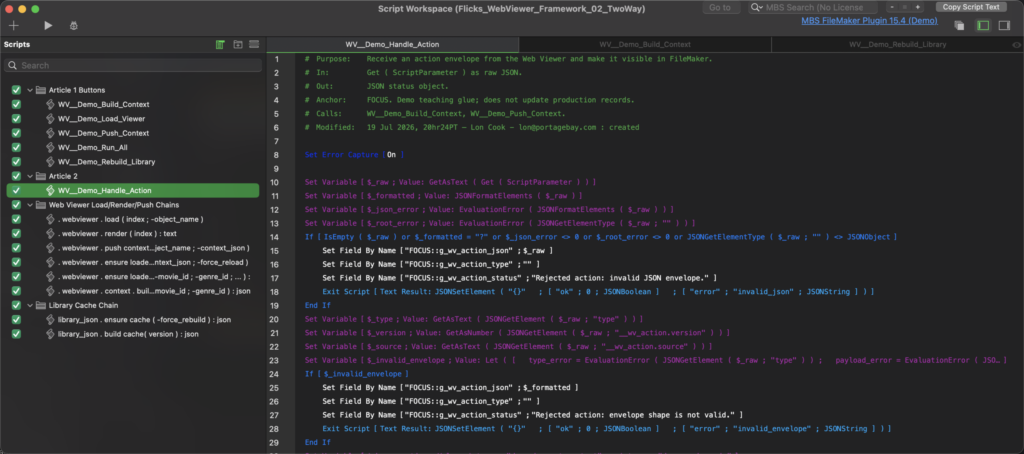
The native script keeps those validation branches visible. They are the code that keeps “but the button only sends valid JSON” from becoming an incident report.
This is not a complete production authorization layer. A production handler would also validate each action’s payload, check current record and privilege context, route the request to focused scripts, and return or log more specific errors. The source and build evidence retains the exact demo fields, exported handler, and construction sequence; the published lesson is the boundary they prove.
FileMaker Acknowledges Through Context
There is one small wrinkle. JavaScript starts the FileMaker handler, but FileMaker.PerformScript does not hand the script result back as a neat synchronous reply. The button knows it placed the call. It does not know what FileMaker decided.
Fortunately, we already have a return path. FileMaker can push new context.
The context we built last time gains one small actions object:
{
  "__wv": {
    "page": 62,
    "source": "article_02_demo",
    "ts": "7/19/2026 7:44:24 PM"
  },
  "defaults": {
    "genre_id": "GENRE-303185A0-4C08-48BC-95D3-932558B1DF5A",
    "movie_id": "MOVIE-D1B6EDFD-71C1-4904-B08B-350754D7DFDC",
    "title": "Flicks Web Viewer Framework"
  },
  "actions": {
    "count": 2,
    "last_type": "demo.mark_movie",
    "status": "Handled demo.mark_movie"
  }
}
The action envelope and the context acknowledgement are different objects with different owners.
| Object | Built by | Meaning |
|---|---|---|
| action envelope | JavaScript | “The user expressed this intent.” |
| context acknowledgement | FileMaker | “FileMaker handled the intent and this is the resulting viewer state.” |
That distinction prevents the renderer from congratulating itself too early, a habit software acquires remarkably quickly when ok is available as a string.
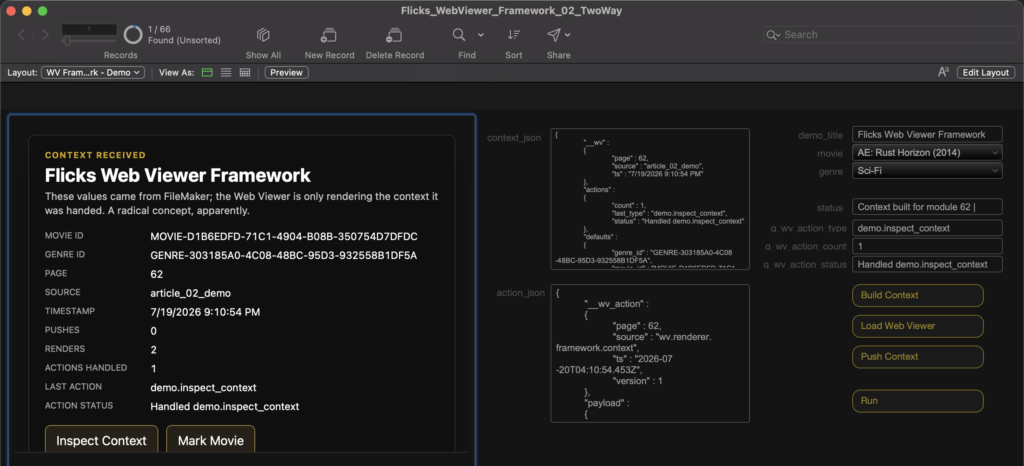
When the user clicks Mark Movie, the button can display Action send result: ok immediately. That means the bridge call was made. The acknowledgement area changes only after FileMaker validates the envelope, updates its fields, rebuilds context, and pushes that context back.
The full loop is now visible:
FileMaker owns current context
  -> JavaScript renders it
  -> user clicks a viewer button
  -> JavaScript reports intent
  -> FileMaker validates and records the action
  -> FileMaker pushes acknowledged context
  -> JavaScript renders the new context
We have two-way communication without two competing owners.

Loading Order Matters
There is one easy way to make the new buttons look completely useless: load the renderer before the action module it calls.
Module 25 has to exist before module 63 asks for WV.sendAction.
The previous demo used this dependency closure:
62 -> 20, 63
20 -> 21, 22, 23, 24
This version adds module 25 between the base package and renderer:
62 -> 20, 25, 63
20 -> 21, 22, 23, 24
The page root still owns the demo-specific assembly. The base shell still owns its CSS, runtime, context bridge, and boot code. We are adding one dependency.
Nothing else about loading changes. The cache contract established last round still applies: commit the module record, rebuild the cached library, and reload the viewer before expecting changed code to appear. This pass keeps that machinery visible, but it does not reteach it; the new contract is the position of module 25 before any renderer that calls it.
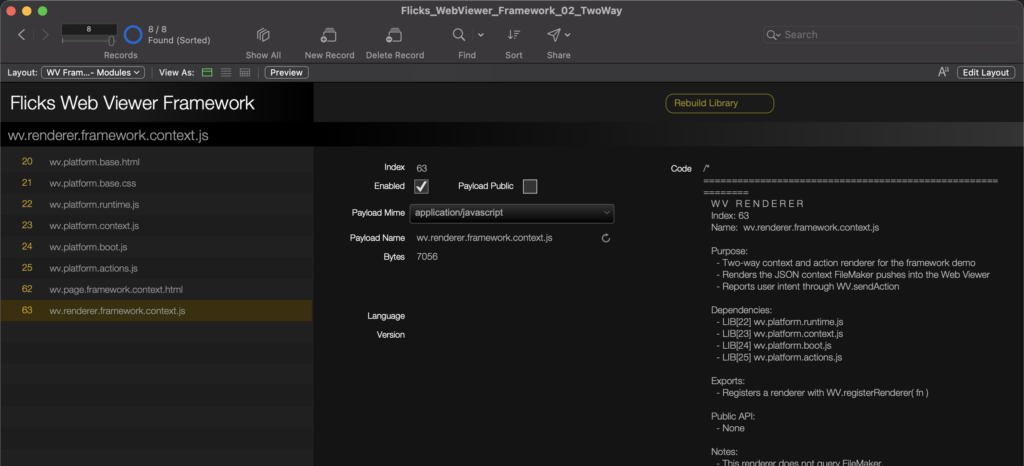
Walkthrough: Complete The Round Trip
If you skipped ahead to see the button actually do something, welcome. This is the payoff. The envelopes, module boundaries, and ownership rules above exist so the next few clicks are understandable rather than merely impressive.
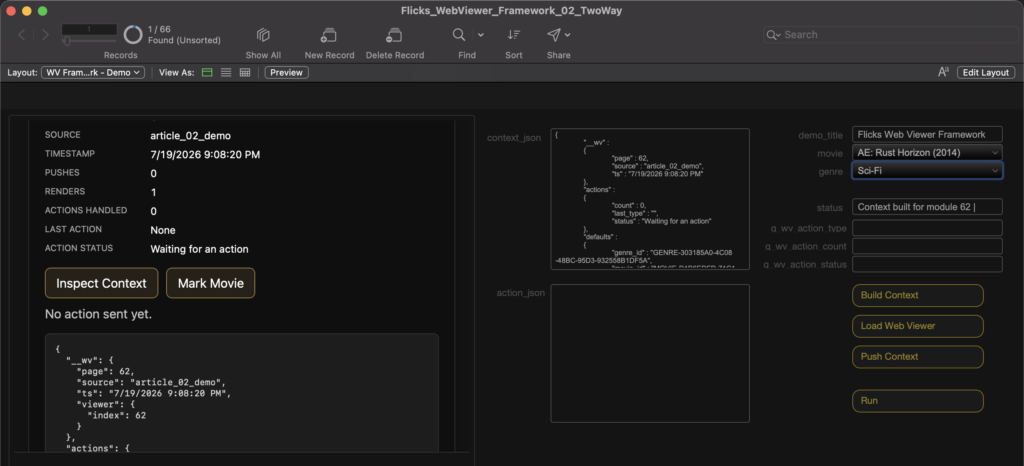
Open WV Framework - Demo in Flicks_WebViewer_Framework_02_TwoWay.fmp12. Keep the context JSON and action JSON visible; they are the receipts for the two directions:
context JSON into the viewer
action JSON out of the viewer
Before the first run:
- Select
wv_mainin Layout mode. - Open Format > Web Viewer Setup….
- Enable
Allow JavaScript to perform FileMaker scripts. - Save the layout.
The one-way demo had no reason to grant that permission, so the inherited checkbox is off. This is the sort of perfectly sensible default that can consume an indecent amount of afternoon.
Establish The Existing Context Path
Those familiar operations were the subject of the previous walkthrough; here they are setup for the new return trip.
- Choose a movie and genre.
- Click
Build Context. - Click
Load Viewer. - Confirm that the page shell says
Waiting for context. If the debug HUD is enabled, it should reporthasRenderer: true; the assembled package is present, but no current context has been pushed. - Click
Push Context. - Confirm that the card shows the selected ids, acknowledgement values, and both action buttons. The action count should still be zero. We have installed a doorbell; nobody has pressed it.

If the values appear but the buttons do not, inspect module 63, module 25, and their dependency order before editing the FileMaker handler. The handler cannot remove a button it has never met.
Inspect Context From The Viewer
- Click
Inspect Contextinsidewv_main. - Confirm the FileMaker layout:
FOCUS::g_wv_action_typebecomesdemo.inspect_context.FOCUS::g_wv_action_countincrements.FOCUS::g_wv_action_statusbecomesHandled demo.inspect_context.FOCUS::g_wv_action_jsonshows the full formatted envelope.
- Confirm the viewer:
- The local note first shows
Action send result: ok. - After FileMaker pushes acknowledgement context, the action count and last action values update.
- The local note first shows
- Watch the order. The first status belongs to JavaScript: the call was placed. The second belongs to FileMaker: the envelope was accepted and new context came back. They are related; they are not the same claim. That distinction is easy to lose when both messages happen quickly and everything is feeling cooperative.
Send A State-Looking Action
- Click
Mark Movie. - Confirm the FileMaker layout:
FOCUS::g_wv_action_typebecomesdemo.mark_movie.FOCUS::g_wv_action_countincrements again; if you began with zero, it is now2.FOCUS::g_wv_action_statusbecomesHandled demo.mark_movie.FOCUS::g_wv_action_jsonshows the formatteddemo.mark_movieenvelope with the current movie and genre ids.
- Confirm the viewer:
Actions handledbecomes2.Last actionbecomesdemo.mark_movie.Action statusbecomesHandled demo.mark_movie.
- Compare
defaults.movie_idanddefaults.genre_idin the context JSON withpayload.movie_idandpayload.genre_idin the action JSON. They should match. The first object is what FileMaker supplied; the second is the intent JavaScript handed back. - Inspect the selected movie record.
It should be unchanged.
The button reported intent. The demo handler chose a harmless teaching response. FileMaker kept ownership of the decision, including the decision not to mutate anything.
This is not a missing feature. It is the feature being demonstrated.
Debugging The Two Directions Separately
Once the arrows point both ways, the usual debugging instinct is to stare at the entire loop and announce that “the Web Viewer” is broken. This is accurate in the broadest possible sense and useful in no sense at all.
Instead, ask how far the message traveled.
The Button Does Nothing
First confirm that the viewer is running inside FileMaker.
If the same page is open in a browser harness, window.FileMaker will not exist and WV.sendAction should return noFileMaker. That is expected. A browser preview can test rendering and local event wiring; it cannot manufacture the native FileMaker bridge through enthusiasm.
Inside FileMaker, inspect the local button note:
noBridgemeans the renderer cannot seeWV.sendAction; check module25and dependency order.badTypemeans the renderer passed an empty action type.noFileMakermeans the native bridge is unavailable.errmeans the send function threw; inspect the Web Viewer console.okmeans JavaScript calledFileMaker.PerformScript; continue on the FileMaker side.
If the note says ok but the FileMaker fields remain unchanged, check wv_main in Format > Web Viewer Setup… and confirm Allow JavaScript to perform FileMaker scripts is enabled. The JavaScript bridge can accept the call while the Web Viewer object is still not permitted to run the script. Both sides are behaving as configured, which is rarely as comforting as it sounds.
FileMaker Receives Bad JSON
Inspect FOCUS::g_wv_action_json before changing renderer layout code.
If the root JSON is invalid, inspect JSON.stringify(envelope) and the raw script parameter. If the JSON is valid but the handler rejects the shape, inspect type, payload, and __wv_action.
Do not start by changing CSS. CSS has many talents. Repairing a malformed JSON envelope is not among them, despite what some debugging sessions seem to imply.
FileMaker Fields Change But The Viewer Does Not
The action-out path worked.
Check the acknowledgement path:
- Does
WV__Demo_Build_Contextincludeactions.count,actions.last_type, andactions.status? - Did it write the new JSON to
FOCUS::g_wv_context_json? - Did
WV__Demo_Push_Contextreturnok? - Is the renderer reading
ctx.actions?
Do not rewrite WV.sendAction. The request already arrived.
The Action Contains The Wrong Id
Compare the values in this order:
FOCUS::g_wv_context_json- the values rendered in the context card
payloadinFOCUS::g_wv_action_json
The first mismatch tells you which boundary failed. This is more productive than staring at the completed loop and declaring it “some kind of timing issue,” the traditional blessing placed upon integrations when evidence has become inconvenient.
FileMaker Still Owns The Application
This is the moment when the ownership boundary gets tested. It was easy to say FileMaker owned the application while JavaScript could only render. Now JavaScript has a voice. It still does not get the keys.
FileMaker owns:
- native records and relationships
- current layout and record context
- selected movie and genre values
- context construction
- action validation
- action authorization and routing
- resulting application state
- acknowledgement context
JavaScript owns:
- rendering the context it receives
- local DOM event handling
- packaging user intent into an action envelope
- handing that envelope to the named FileMaker script
- rendering later acknowledgement context
The action envelope is not an instruction JavaScript is entitled to have obeyed. It is a request crossing a boundary. FileMaker can accept it, reject it, reinterpret it, or decide that the current record context makes it irrelevant.
That becomes especially important when the actions stop being harmless. A later handler may select a FileMaker record, open a detail card, update a rating, or change a ranking. The renderer can still report a stable action type and payload. FileMaker can evaluate privileges, current state, record locking, validation, and transaction rules where those concerns already live.
The Web Viewer remains a strong interface surface. It does not need to become a second application tier with a partial memory of FileMaker rules and a very confident event listener.
Where The AI Co-Developer Fits
We are deliberately keeping the AI workflow in the background for now, but it is not a secret ingredient. The action module and renderer changes were developed with AI assistance.
The important connection here is the boundary. Without WV.sendAction, an AI-generated renderer can scatter direct FileMaker.PerformScript calls through click handlers, each with its own script name, parameter shape, and assumptions. Everything may still work, but the renderer is slowly becoming an unlabeled switchboard—every button has its own line into FileMaker, and the only routing diagram is the memory of whoever wired it. Memory, as usual, has not been versioned.
With one action API, the AI has a constrained job: call the named function with a known action type and payload. The FileMaker handler keeps validation and application decisions on the FileMaker side. That gives generated code a landing zone and gives us a reviewable contract.
In an upcoming pass, we will slow down and show the actual co-development loop: how the task is framed, what module and payload context the AI receives, how the output is reviewed, what gets tested in the native file, and how the next revision is constrained. For this pass, the reader only needs to know where the JavaScript came from and why we did not ask it to design the application while it was here.
What We Are Not Adding Yet
This pass stops before native record arrays, the Flicks ranked-list renderer, production record mutation, automatic cache triggers, smart loading, application chrome, or a general-purpose action router. Those are not rejected ideas; they belong to later contracts.
Add them here and the return path disappears under the furniture. The demo needs one bridge, one handler, two harmless actions, and visible acknowledgement—enough machinery to prove the round trip without giving the machinery a commemorative wing.
Where This Goes Next
Next pass, the context gets something more substantial to carry.
FileMaker will shape native records into a richer JSON payload, and the Web Viewer will move toward the ranked-list surface from Flicks. The action envelope we just added comes with us; a row click or filter change can report intent through the same bridge while FileMaker continues to own native state.
That is why we stop here. We want the return path settled before repeated rows, selected-state rules, and real record data arrive. Otherwise the interesting renderer will get all the attention while the ownership contract quietly wanders off, which is how we end up maintaining two applications and insisting one of them is “just the Web Viewer.”
Takeaway
We started with a viewer that could receive context and render it. Now it can talk back. The important part is that talking back does not create a second owner.
JavaScript packages user intent into a small action envelope. FileMaker validates the envelope, decides what it means, and pushes new context when the viewer needs to see the result. The Web Viewer gets to be interactive without becoming a second application tier that knows almost—but not quite—enough about the rules.
That is the pattern:
Context in.
Actions out.
FileMaker owns the result.
Next pass, the payload gets native FileMaker records and the renderer finally earns something more interesting to draw. The action bridge comes with us; the custody arrangement does not change.

About the Author
Lon Cook joined Portage Bay with nearly three decades of FileMaker development experience and a background as eclectic as it is creative. With a degree in interior design, he’s worked in architectural model building, mold making, and visual effects for film before turning his focus to database development. He has collaborated with enterprise clients—including FileMaker Inc.—bringing a thoughtful, user-focused approach to every project. Lon specializes in efficient data structures, intuitive interfaces, and smooth user experiences. Outside of work, he enjoys landscape photography, tiki culture, and spending time with his spirited pack of chihuahuas.
This piece represents a collaboration between the human authors and AI technologies, which assisted in both drafting and refinement. The authors maintain full responsibility for the final content.