
Claris is taking another bold step toward combining data, automation, and artificial intelligence. Built on Anthropic’s open protocol, the new Claris MCP Server for FileMaker standardizes how AI systems connect to external tools and databases.
Claris’ implementation introduces a way for developers and businesses to interact with FileMaker databases using natural language—no custom API development, middleware, or external scripting required.
This evolution doesn’t replace FileMaker’s traditional tools. It enhances them by creating a standardized bridge between FileMaker data, business logic, and modern AI assistants.
MCP (Model Context Protocol) and why it matters
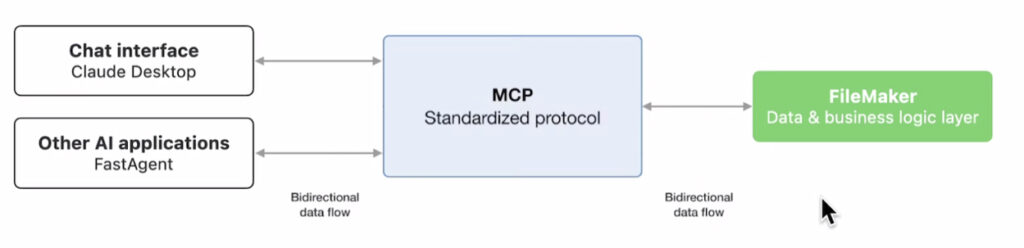
MCP defines a common interface by which large language models (LLMs) or AI assistants can call into external systems — reading data, executing functions, returning structured responses — without each system reinventing the integration wheel.
Think of MCP as a USB-C port for AI—a universal connector for different models and tools to plug into business logic and data sources.
In the context of FileMaker, this means your database, scripts, layouts, and workflows are no longer isolated behind a UI. They can become callable tools from an AI assistant, subject to permissions and business rules you define.
What is Claris MCP Server?
The MCP (Model Context Protocol) Server is a remote service hosted by Claris that allows FileMaker developers to expose specific tables and scripts as callable tools to large language models (LLMs), such as Claude or ChatGPT. Once registered, these tools can be safely accessed by AI assistants, enabling real-time queries, actions, and updates directly within a FileMaker environment.
It requires FileMaker Server 2025 (version 22.0.2 or later) and the OData/Data API must be enabled.
Rather than granting unrestricted database access, MCP Server provides a structured, permission-aware interface. Developers define exactly which data and scripts the AI can interact with—maintaining full control over business logic and security boundaries.
Some examples of what this integration can do include instructing the LLM to:
- Summarize records,
- Create new tasks
- Run existing scripts
How it works
The Claris MCP Server acts as a translation layer between FileMaker and an AI model. It standardizes how FileMaker data is described and delivered so that LLMs can understand the business context behind queries or requests.
Developers register tables, fields, and scripts within MCP as callable resources. When an AI receives a prompt—such as “How many open invoices do we have?” or “Create a new project record for client Delta”—the model queries MCP, which interprets the request and returns a structured response or executes a corresponding FileMaker script.
This process gives FileMaker the ability to:
- Respond to natural language queries (“How many orders did we ship last week?”)
- Execute business logic through scripts (“Update invoice status to paid”)
- Provide real-time context to AI assistants, improving accuracy and relevance
Developer control and security
MCP doesn’t mean AI roams free inside your databases. It provides controlled exposure. Each table, field, or script registered with MCP is explicitly defined by the developer. Access permissions follow the same FileMaker security model, ensuring that sensitive data or restricted operations remain protected.
Because MCP is hosted by Claris, organizations also benefit from a managed infrastructure—removing the need to maintain separate AI gateways or connectors. The service ensures encrypted communication, predictable API behavior, and compatibility with future FileMaker versions.
A new kind of FileMaker experience
The MCP Server moves FileMaker beyond form-based and script-triggered workflows into conversational interaction. Imagine a user simply asking, “Generate a summary of all overdue invoices,” or “Add a new contact from this email,” and the system doing it—through FileMaker logic—without opening a layout or running a manual script.
For businesses, this means:
- Faster, more intuitive access to operational data,
- Reduced training time for non-technical users, and
- Expanded integration potential with LLM-powered apps and agents
What it means for developers
For developers, MCP represents an entirely new interface layer for FileMaker solutions. Instead of building custom APIs or integrations for every external app, you can register the relevant FileMaker structures directly with Claris MCP Server and immediately make them available to compliant AI models.
This standardized approach could unify how FileMaker interacts with AI ecosystems—offering a consistent, secure protocol for data access, analysis, and workflow automation.
This Introduction to Claris MCP guide has helpful details.
The future of FileMaker and AI
Claris MCP Server aligns with the broader direction of the platform: integrating FileMaker’s reliability and business logic with the flexibility of modern AI systems. It’s a pragmatic step that preserves FileMaker’s strengths—security, structure, and control—while opening it to natural-language-driven innovation.
MCP promises to make FileMaker databases not just AI-ready but AI-active: responsive, contextual, and capable of carrying out human requests through the power of natural language.
Talk with us about how AI can be integrated into your solution
Our developers are keenly interested in this burgeoning realm of AI. We’ve been enjoying plentiful discussions among our team, and have been learning and exploring right along with the rest of the world. Schedule a time to talk with us about your solution, to see how certain AI integrations can lighten the load for you and your staff.
This piece represents a collaboration between the human authors and AI technologies, which assisted in both drafting and refinement. The authors maintain full responsibility for the final content.