

If you don’t read the full article, at least read this part:
The proliferation of AI tools has enabled a heightened level of hacking attempts across the tech industry. Due to recent events, we strongly encourage you to change the passwords for your FileMaker systems to keep your data secure.
This notice isn’t meant to be scary. But we are sharing a legitimate security concern, not just a random recommendation. We take this seriously and want to make sure you do as well.
Why is there a concern?
You may have heard that the more widespread use of AI may allow hacking attempts at a broader scale than the IT industry has seen before. That is proving to be factually true. The industry has recently had to deal with serious issues regarding .php and Node.js. Claris is not exempt and is seeing some automated “password-spraying” attacks specifically targeting FileMaker servers, which are trying to find “easy” passwords.
What we are doing
If we are hosting your FileMaker files, we are actively handling the server-side defenses – managing firewalls, keeping server software updated, and ensuring solid backups are in place.
However, for a lot of the solutions we work with, we inherited the files as-is. Managing who has access to your FileMaker solution, and what those passwords are, is handled by you.
What you should do
We strongly recommend you take a few minutes to do the following:
- Reset all passwords: All current passwords should be replaced, even if they already seem strong. Do not use simple passwords.
- The National Institute of Standards and Technology (NIST) has these recommendations for password strength.
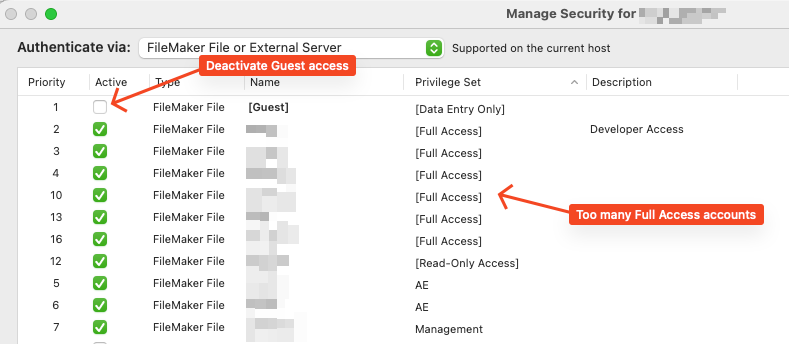
- Audit [Full Access] accounts: Review who is on a Full Access privilege set. This level should be kept to a bare minimum, reserved only for people who truly need design-level access to the system.
- Disable easy entry: Turn off auto-login and remove any guest access from your files.
- Remove password-free access: Do not allow any logins to have only an account name but no password.
- Do not use shared access passwords: Each person should have their own unique login.
Questions?
If you have any questions about how to update these settings or want to talk through your system’s security, let us know. We’re happy to advise!