

Author: Lon Cook
FileMaker developers have been using Web Viewers for a long time. Maps, charts, help screens, dashboards, status panels, little HTML widgets tucked into a layout because native objects were not quite enough; none of this is new territory.
We are not here to discover that FileMaker can run web code.
It is about what happens after that first satisfying prototype starts to become a liability.
The first version is usually direct. A calculation returns HTML. That HTML contains a little CSS. The CSS grows. A script block appears. Then another. A FileMaker value gets substituted into the middle. Then six more values. Eventually the whole thing works, which is both a success and the beginning of the problem.
You now have a giant calculated blob.
That blob is attractive because it is fast. It proves the idea. It gives you something to show. Nobody schedules a meeting to admire your clean dependency model; they schedule the meeting because the thing on the screen works. Fair enough. The trouble starts when the proof of concept quietly receives tenure.
But the blob also puts the page shell, style system, runtime state, rendering logic, FileMaker bridge, and sample data into one large string; very democratic, in the sense that everything is equally hard to review and everyone gets to suffer equally.
That pattern does not become easier when AI enters the workflow. AI can generate useful interface code quickly, but a useful paste is still a paste. A bigger paste with nicer indentation is not architecture; it is just a better-groomed liability. If the boundaries are not visible, the review burden shifts from “is this module doing the right thing?” to “what exactly is happening inside this impressive wall of text?”
The goal of this series is to move beyond the Web Viewer blob.
Not away from Web Viewers. Not away from JavaScript. Not into pretending FileMaker should become a miniature web framework because we found a shiny thing and would now like to drive it through the living room. We have all seen that demo. It usually has gradients.
The goal is narrower and more practical: use AI to help develop capable Web Viewer interfaces while keeping FileMaker in charge of the application, letting the Web Viewer be a strong rendering surface, and making the code that connects them inspectable.
The module code and demo interfaces in this series were developed with AI assistance. That assistance is part of the story from the beginning, but it is not the architecture. The human work is still defining the module boundary, the data contract, the ownership rules, and the acceptance test. AI can help write and revise the code inside those boundaries; without them, it mainly helps us produce the original problem at a more impressive speed.
The Blob Is A Delivery Problem
The Web Viewer is not the weak point here. The delivery pattern is.
FileMaker gives us a very convenient path: calculate some text, point a Web Viewer at it, and let the platform render the result. That is one of the reasons Web Viewer prototypes are so effective. You can move quickly without setting up a separate web server, build pipeline, deployment target, or any of the other rituals that cause otherwise reasonable people to whisper at terminal windows and call it engineering culture.
The trouble begins when the calculated text stops being a small page and starts being a small application.
A typical blob grows in layers:
- The original HTML shell.
- A style block to make it presentable.
- A few FileMaker substitutions.
- A JavaScript function to redraw something.
- A FileMaker bridge function.
- A little state object.
- A second renderer.
- A helper copied from somewhere else.
- A fix for a layout-specific edge case.
- A fix for the fix.
- A comment that says “temporary” and then quietly buys property.
Each step can be reasonable. The accumulated result is not.
When everything lives in one calculated expression, several things become harder than they need to be:
- You cannot easily tell which code owns the page shell, the visual theme, the runtime, or the renderer.
- Reusing one piece means copying more than you intended.
- Debugging means searching generated text instead of inspecting named parts.
- Versioning gets muddy because the unit of change is “the whole blob.”
- AI-generated revisions are harder to review because the boundaries are hidden.
None of that means the first blob was wrong. Prototypes are allowed to be rough. That is practically in the job description. The problem is letting the prototype harden into the architecture, then acting surprised when it starts making architectural decisions.
The Framework Shift
The shift in this series is modest:
Treat the Web Viewer as a small package assembled by FileMaker, not as one pasted artifact.
In the demo file, the Web Viewer package is built from named records in LIBRARY_CODE. Each record owns one piece of the web surface. FileMaker assembles those records in dependency order, loads the Web Viewer, then pushes explicit context into it.
That gives us three useful boundaries:
- FileMaker owns data, script flow, and application state.
LIBRARY_CODEowns reusable Web Viewer modules.- JavaScript owns rendering the context it receives.
Those boundaries are simple, but they help. They make the demo easier to explain. They make the code easier to inspect. They also give AI-assisted development a clearer place to land, because generated code can be reviewed inside a module with a purpose instead of pasted into a general-purpose text cavern and admired for its confidence.
The retained module set is intentionally small:
| Index | Module | Purpose |
|---|---|---|
| 20 | wv.platform.base.html | Base HTML shell assembled into the Web Viewer. |
| 21 | wv.platform.base.css | Base CSS/theme layer used by the shell. |
| 22 | wv.platform.runtime.js | Runtime namespace and shared viewer state. |
| 23 | wv.platform.context.js | Context manager and FileMaker-facing push bridge. |
| 24 | wv.platform.boot.js | Startup behavior after the assembled page loads. |
| 62 | wv.page.framework.context.html | One-way context page for the first demonstrator. |
| 63 | wv.renderer.framework.context.js | Renderer that reads context and draws the visible card. |
The indexes are not decorative. They reserve ranges for different kinds of modules, which keeps dependency order visible. FileMaker will not enforce this for us, because FileMaker has its own hobbies, so the numbering convention is ours to keep honest.
For this series, the working ranges are:
| Range | Reserved for | Notes |
|---|---|---|
20-29 | platform/base modules | Shell, base CSS, runtime, context and action bridges, and boot code. These load before page-specific code. |
30-39 | shared utilities | Small reusable JavaScript helpers, formatters, or adapters if later installments need them. This first demo does not. |
40-49 | data/view pages | Heavier page modules, including later native-data or ranked-list views. Kept out of this first demo on purpose. |
50-59 | feature interaction modules | Reserved for feature-specific interaction helpers or controllers if a later interface needs them. Shared bridge behavior remains in the platform range. |
60-69 | teaching/demo pages and renderers | Small demonstrator surfaces. This demo uses 62 for the context page and 63 for its renderer. |
70-89 | future visualization modules | Reserved for richer reusable visualizations as the demo files accumulate. |
90-99 | diagnostics and test harness modules | Debug panels, smoke-test views, or development-only helpers if they become useful. |
Only 20-24 and 62-63 are needed here. The rest of the ranges are set aside so later demo files can grow without turning the index column into a junk drawer with numbers.
The base framework modules load first. Page and renderer modules load later. When the file grows in later installments, that ordering will matter more; it is much easier to preserve a convention than to reconstruct one after the demo file has already become “just one more quick thing.”
Three Contracts Before The Walkthrough
Before opening the demo, it helps to separate three ideas that are easy to blur together when everything happens behind one button.
The Library Cache Is The Code Package
The enabled LIBRARY_CODE records are assembled into a cached JSON library. Page modules refer to other modules by index; the render path expands those dependencies from one stable cache rather than wandering through records every time the viewer needs to load.
That cache is code state. Editing a module record does not automatically change it, and rebuilding it does not automatically change a Web Viewer that is already loaded. Those distinctions may feel fussy while there are seven modules. They become considerably less fussy when the alternative is wondering which version of the code is currently smiling back from the layout.
FileMaker Owns Context
FileMaker owns the selected records, ids, filters, privileges, and application state. It packages the facts the viewer needs into an explicit JSON context. JavaScript receives that context and renders it; it does not go hunting through FileMaker for a more interesting answer.
The context is deliberately visible in the demo. A visible payload gives both the developer and an AI assistant something concrete to inspect: either FileMaker sent the wrong value, or the renderer mishandled the right one. That is a much better argument than “the Web Viewer looks odd.”
Loading Code Is Not Pushing Data
Loading installs the assembled HTML, CSS, runtime, page, and renderer in the Web Viewer. Pushing context sends new JSON into that already loaded package.
Committed module records
  -> cached JSON library
  -> assembled viewer package
  -> loaded Web Viewer

FileMaker application state
  -> context JSON
  -> existing Web Viewer
  -> renderer update
The first path changes the interface code. The second changes what the interface is showing. A viewer can load once and receive context many times; rebuilding the house because someone changed the furniture remains optional.
The walkthrough will make all three contracts visible. Later installments will automate more of the work, but the production machinery belongs in the final pass. First we should know which verbs the machine is concealing on our behalf.
The source Flicks file has richer Web Viewer surfaces than this first demo shows. We will get to those after the framework has somewhere to stand.
So the first demonstrator is smaller. It shows a context card. It shows FileMaker assembling the viewer and pushing context into it. Later demos will use the same separation with more complex interfaces: load the application once, then push small context changes into it without rebuilding the entire Web Viewer. That is where the approach becomes visibly useful; the interface can be substantial without becoming sluggish every time FileMaker state changes.
The Demo Is Evidence
The demo file is a scaffold, not a working solution.
It borrows enough from Flicks to make the example concrete, then strips the rest down to the concept being taught: FileMaker assembles a modular Web Viewer and pushes explicit context into it. That is the job. Not ratings. Not pairwise comparison. Not production navigation. Not a tiny museum of everything the source file once knew how to do.
The demo files attached to later installments build on this one. This first file keeps the surface intentionally thin so the framework can be inspected without production navigation, unrelated schema, or interface chrome standing around asking whether they can help.
Two layouts matter: WV Framework - Modules, where the code library lives, and WV Framework - Demo, where FileMaker builds context, loads wv_main, and pushes the payload. The exact fields, scripts, and reconstruction notes remain in the downloadable file and source exports. Here, they matter only when they expose one of the framework contracts.
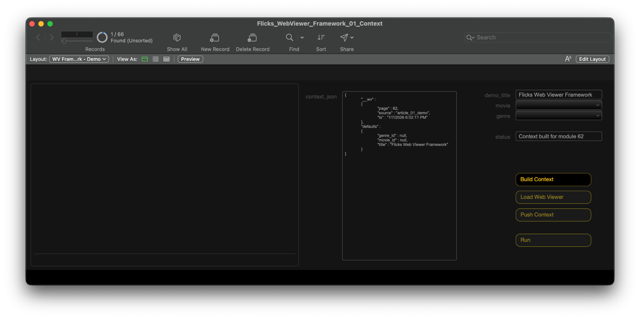
The separate controls are there for teaching. A reader can stop after the context is built, after the viewer is loaded, and after the payload is pushed. Run All performs the same path for convenience once the individual operations are understood. Otherwise we are back to “click the magic button and trust me,” which is how too many internal tools introduce themselves.
Module Records, Not Mystery Text
The LIBRARY_CODE table is the library. Each record has an index, a language or type, and the code body. The framework does not ask the developer to read one enormous calculated expression and divine where the runtime ends and the renderer begins. It asks the developer to open the module that owns the behavior.
That distinction matters when maintaining a FileMaker/Web Viewer hybrid:
- CSS changes belong in the theme module.
- Runtime state belongs in the runtime module.
- FileMaker bridge behavior belongs in the context manager.
- Page structure belongs in the page module.
- Drawing behavior belongs in the renderer.
This is not abstraction for sport. Sport abstraction is how simple problems get promoted into internal platforms and acquire a logo. Here, the split exists because each module has a job the reader can inspect.
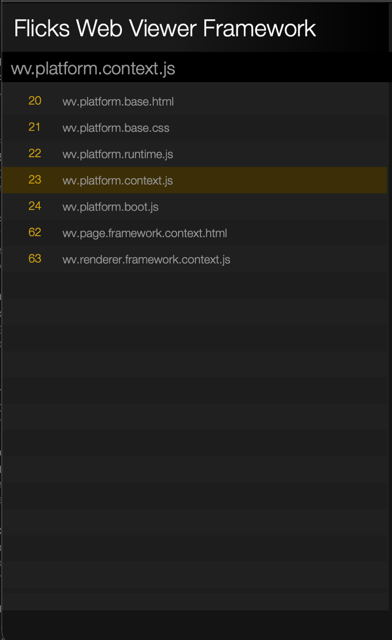
The base modules carry the shared framework:
20 is the base HTML shell. It provides the document structure and the places where other modules are inserted.
21 is the base CSS/theme module. It owns the shared visual language: background, type, spacing, panels, and the Flicks-like surface treatment.
22 is the Web Viewer runtime. It creates a stable place for viewer state and functions.
23 is the context manager and FileMaker bridge. It defines how FileMaker pushes context into JavaScript.
24 is the boot module. It handles startup behavior after the assembled page loads.
The demo-specific surface starts at 62 and 63:
62 is the framework context page. It defines the visible page structure for the first demo.
Dependencies:
     - LIB[20] wv.base.shell.html
     - LIB[21] wv.platform.base.css
     - LIB[22] wv.platform.runtime.js
     - LIB[23] wv.platform.context.js
     - LIB[24] wv.platform.boot.js
     - LIB[63] wv.renderer.framework.context.js
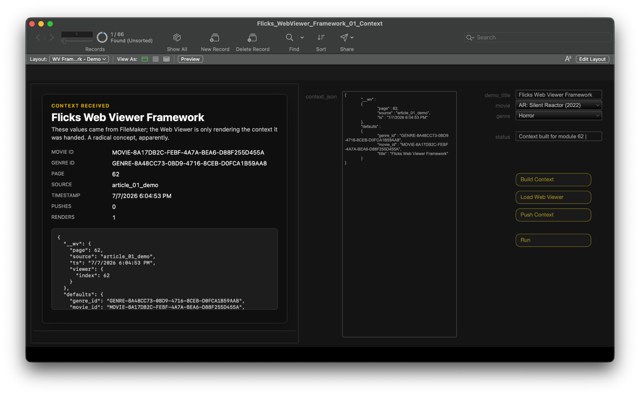
63 registers a renderer. The framework hands that renderer the current context; the renderer reads ctx.defaults and ctx.__wv, then writes those values into the visible card. No query back to FileMaker. No record update. Just context in, render out.
function render(ctx) {
  ctx = ctx || {};

  var root = document.getElementById("wv-root");
  if (!root) {
    root = document.createElement("div");
    root.id = "wv-root";
    document.body.appendChild(root);
  }

  ensureStyles();

  var meta = ctx.__wv || {};
  var defaults = ctx.defaults || {};
  var state = WV._state || {};

  root.innerHTML = "";
  root.classList.add("wv-theme-gold");

  var page = el("section", "wv-context-page");
  var card = el("div", "wv-context-card");

  card.appendChild(el("div", "wv-context-eyebrow", "Context received"));
  card.appendChild(el("h1", "wv-context-title", text(defaults.title, "Untitled context")));
  card.appendChild(el("p", "wv-context-note", "These values came from FileMaker; the Web Viewer is only rendering the context it was handed. A radical concept, apparently."));

  var grid = el("div", "wv-context-grid");
  addRow(grid, "Movie ID", defaults.movie_id);
  addRow(grid, "Genre ID", defaults.genre_id);
  addRow(grid, "Page", meta.page);
  addRow(grid, "Source", meta.source);
  addRow(grid, "Timestamp", meta.ts);
  addRow(grid, "Pushes", state.pushCount || 0);
  addRow(grid, "Renders", state.renderCount || 0);

  card.appendChild(grid);

  var raw = el("pre", "wv-context-json");
  raw.textContent = WV.safeJsonStringify ? WV.safeJsonStringify(ctx, "{}") : JSON.stringify(ctx, null, 2);
  card.appendChild(raw);

  page.appendChild(card);
  root.appendChild(page);
}

if (typeof WV.registerRenderer === "function") {
  WV.registerRenderer(render);
} else {
  WV.render = render;
  WV._state = WV._state || {};
  WV._state.hasRenderer = true;
}
This split gives us a practical review model. If the card is rendering the wrong value, look at the renderer and the payload. If the whole viewer fails to load, look at the shell, dependency expansion, and cache. If FileMaker pushes context but JavaScript never receives it, look at the bridge. The problem may still be annoying; annoyance remains a durable platform feature. But at least it has a smaller address and fewer places to hide.
The Module Header
Each module should start with a short standard header.
Use this template at the top of each LIBRARY_CODE::code record:
/* ============================================================
   W V   {{MODULE ROLE}}
   Index: {{LIBRARY_CODE::index}}
   Name:  {{LIBRARY_CODE::name}}

   Purpose:
     - {{one-sentence purpose}}
     - {{optional second purpose line}}
     - {{optional third purpose line}}

   Dependencies:
     - LIB[{{index}}] {{module name}}
     - LIB[{{index}}] {{module name}}

   Exports:
     - {{registered renderer, function, CSS contract, DOM region, or none}}

   Public API:
     - {{public function name, FileMaker-callable JavaScript function, or none}}

   Notes:
     - {{short maintenance note}}
     - {{runtime boundary or demo-scope note}}
   ============================================================ */
For example:
/* ============================================================
   W V   R E N D E R E R
   Index: 63
   Name:  wv.renderer.framework.context.js

   Purpose:
     - Article One renderer for the one-way context demo
     - Renders the JSON context FileMaker pushes into the Web Viewer
     - Makes selected FileMaker input values visibly change the viewer

   Dependencies:
     - LIB[22] wv.platform.runtime.js
     - LIB[23] wv.platform.context.js
     - LIB[24] wv.platform.boot.js

   Exports:
     - Registers a renderer with WV.registerRenderer( fn )

   Public API:
     - None

   Notes:
     - This renderer does not query FileMaker.
     - This renderer does not send actions back to FileMaker.
     - Article One is context in only; all the fun mess comes later.
   ============================================================ */
The exact fields can change as the framework matures, but the intent should stay recognizable. A module header answers the questions a developer asks before touching code:
- What is this record?
- Why does it exist?
- What must load before it?
- What does it expose to the rest of the viewer?
- What FileMaker script or JavaScript function calls into it?
- What payload shape does it expect?
- What should I rebuild or retest after changing it?
That may sound like documentation overhead. It is not. It is a seatbelt for code stored inside FileMaker records. Yes, seatbelts are less exciting than cleverness; that is one reason they work.
In a normal web project, the file system gives you some clues. A file named contextBridge.js in a runtime folder is already carrying meaning. A FileMaker code library table has less ambient context. The code lives in records; the surrounding clues are fields, indexes, names, and whatever discipline the developer bothers to keep. The module header puts the first layer of discipline directly where the reader needs it.
The header is especially helpful for dependency order. If module 63 assumes WV.getContext() exists, the header should say that it depends on the context manager. If module 23 exposes WV_FM_PUSH(rawJson), the header should say that it provides the FileMaker-facing entry point. Then a dependency-cycle error is not just a blank screen with a bad attitude and a monospace insult; it is something you can compare against the intended order.
It also helps when AI is assisting. A useful prompt can include the module header and the current payload shape:
Revise only the renderer in module 63. Keep the public API unchanged.
It consumes WV.getContext() and renders the one-way context card.
Do not change WV_FM_PUSH or FileMaker bridge behavior.
That instruction is much sharper than “fix the Web Viewer.” The latter is how you get confident nonsense with indentation and possibly a new state manager nobody asked for.
The header is not the runtime source of truth. FileMaker still assembles by records, indexes, and dependency references. JavaScript still succeeds or fails based on actual functions. The header is a human contract: small, visible, and close enough to the code that it can stay useful.
Here, the header has one more job. It makes the module boundary visible. We are not merely moving the blob from a calculation into a table; that would be relocation, not architecture. We are giving each piece a name, a role, and a review boundary.
Cache Rebuilds Stay Visible
The demo does not ask the render scripts to wander through LIBRARY_CODE records every time the Web Viewer loads. Instead, it builds a cached library map from enabled module records and stores it in a global field, SOLUTION::library_code_json. Render scripts read that JSON when they expand LIB[...] references and assemble the final Web Viewer package.
The cache has a few practical benefits.
First, the render path stays predictable. The render script can load the cached JSON once, then resolve module references from that in-memory structure. For a seven-module demo this is not a heroic performance win; for a larger framework it avoids turning every load into a tiny scavenger hunt.
Second, the cache gives dependency expansion a stable snapshot. If module 62 expands LIB[20], and module 20 expands LIB[21], LIB[22], LIB[23], and LIB[24], all of those lookups come from the same cached library state. That matters. Debugging a Web Viewer is enough fun without wondering whether the shell came from one version of the table and the renderer came from another.
Third, the cached JSON is inspectable. If the Web Viewer renders the wrong thing, the developer can check whether the module record is wrong, the cache is stale, or the render script expanded the wrong dependency. Those are three different problems. Lumping them together under “the Web Viewer is broken” is traditional, but not especially informative.
Finally, the cache gives the framework one place to invalidate and rebuild. The final production pass will make that smarter with dirty markers, version tokens, and commit triggers. For now, the rebuild action stays visible so the reader sees the contract before the file starts being helpful on their behalf.
That usefulness creates one simple rule: changing a module record is not the same thing as changing the cache. Until the cache is rebuilt, the Web Viewer may still be loading yesterday’s module code with today’s confidence. Computers enjoy this sort of prank; we do not have to encourage them.
In this demo, editing a module does not silently rebuild the cache. The reader edits LIBRARY_CODE, commits the record, clicks Rebuild Library, then reloads the Web Viewer.
That is intentionally manual. Everyone will survive.
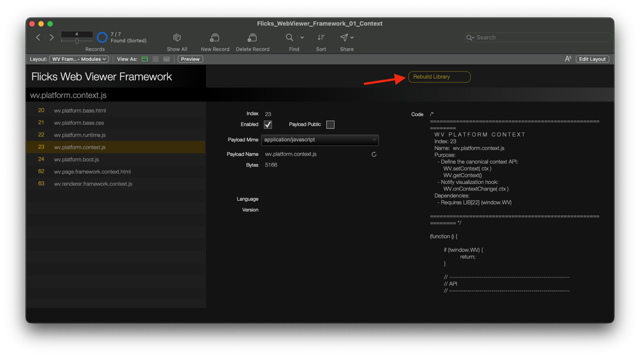
The utility button calls WV__Demo_Rebuild_Library. The script commits the current record, forces the library cache rebuild, clears the loaded-viewer map, and returns a small status object.
Commit the current module record
  -> force the cached library to rebuild
  -> clear the loaded-viewer map
  -> return structured status
Could this be more automatic? Of course. The final production pass will add the full pattern: commit trigger, dirty/version token, cache rebuild, loaded-map reset, and reload only when needed.
But we should show the moving parts before hiding them. Hidden magic is still magic, even when it has a better variable name and a comment claiming it is self-documenting.
The Walkthrough: Build, Load, Push
The visible script path is plain:
WV__Demo_Build_Context -> WV__Demo_Load_Viewer -> WV__Demo_Push_ContextThe wrapper scripts are intentionally plain. They expose the framework operations without asking the reader to begin with lower-level implementation:
| Script | Role | How it participates |
|---|---|---|
WV__Demo_Build_Context | Turn FileMaker-owned selections into an explicit payload. | Reads the demo inputs, calls . webviewer . context . build, and stores the returned JSON where the reader can inspect it. |
WV__Demo_Load_Viewer | Install the selected page package in wv_main. | Calls . webviewer . load, which reads the cached library, expands dependencies, assembles the page, and sets the Web Viewer. |
WV__Demo_Push_Context | Deliver current FileMaker state to the loaded package. | Validates the visible JSON and calls . webviewer . push context, which invokes the public JavaScript context receiver. |
WV__Demo_Run_All | Orchestrate the visible path. | Runs build, load, and push in order; it introduces no new framework behavior. |
WV__Demo_Rebuild_Library | Publish committed module edits into the cached package. | Commits the module record, rebuilds the JSON library, and clears loaded-viewer state so changed code can be loaded again. |
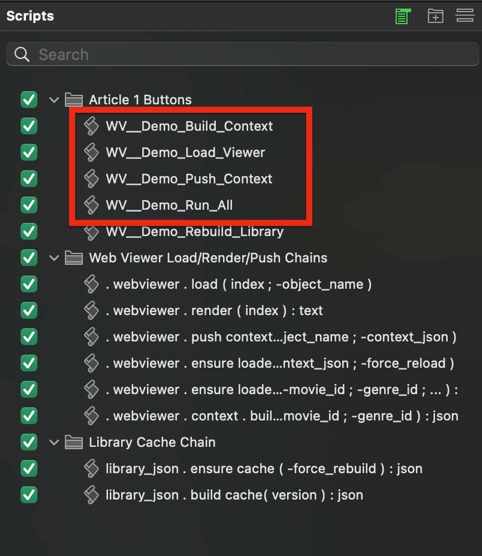
That flow is the point: FileMaker assembles the viewer, builds the context, sends that context into the viewer, and JavaScript renders what it is given. Each stop reinforces one of the contracts established earlier: FileMaker owns context, the cached library owns the code package, and loading code is different from pushing data.
The demo is not trying to be clever about reloads yet. The retained . webviewer . ensure loaded ... scripts exist as framework carry-forward code, but they are not the visible teaching path. We use the direct load script so the reader sees what is happening.
That matters because “only reload when needed” is a convenience pattern, not the lesson. If it appears too early, it hides the basic assembly line. Once the reader understands the assembly line, smart loading becomes a useful refinement instead of another mysterious layer with a friendly name, a private agenda, and a suspiciously calm status message.
Before clicking anything, start on WV Framework - Demo. The layout exposes the FileMaker inputs, the JSON payload, a status field, the wv_main Web Viewer, and separate controls for Build Context, Load Viewer, Push Context, and Run All. The interface is sparse because each control corresponds to one of the contracts introduced above; decorative ambiguity has been postponed indefinitely.
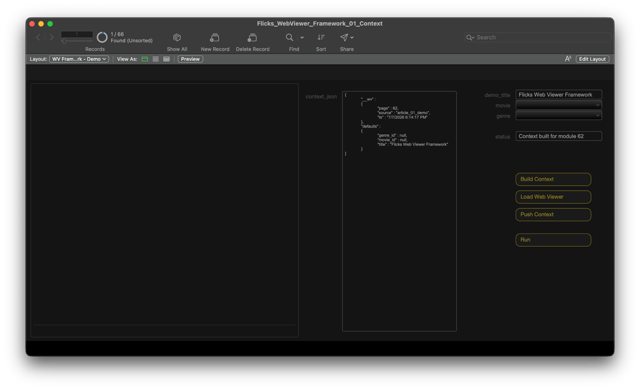
This first walkthrough is deliberately procedural. The reader should do the steps in order once, even though Run All exists. Automation is much more comforting after you have seen what it automates; before that, it is just a button with opinions.
Step 1: Choose FileMaker State
Start by choosing a movie and a genre.
The exact sample values do not matter. What matters is that the values come from FileMaker fields, not from JavaScript fixtures hidden inside the page like contraband. We are teaching the boundary between the FileMaker side and the Web Viewer side, so the source of the values should be boringly obvious.
The demo stores the selections in FileMaker fields and uses module index 62 to identify the page package. Their exact field definitions are available in the demo and DDR; the architectural point is that the Web Viewer should not have to discover values FileMaker already owns. FileMaker packages them and sends them across the boundary intentionally.
Expected result: nothing dramatic happens yet. This is fine. Software that waits until it has been asked to do something is underrated and frankly showing restraint.
Step 2: Build Explicit Context
Click Build Context.
WV__Demo_Build_Context reads the selected demo values, creates a JSON object, stores it in FOCUS::g_wv_context_json, and updates FOCUS::g_wv_status.
The important result is not the status message. It is the visible payload.
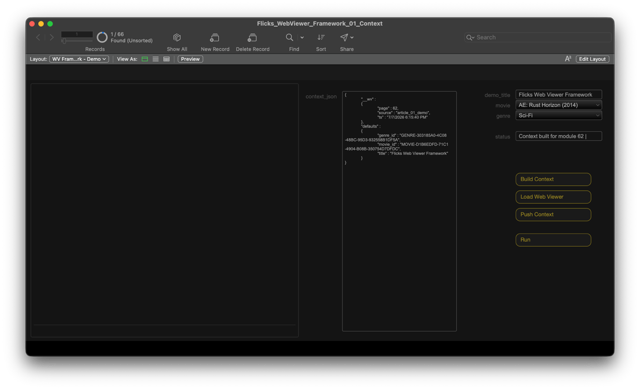
The current payload shape looks like this:
{
  "__wv": {
    "page": 62,
    "source": "article_01_demo",
    "ts": "7/7/2026 10:58:02 AM"
  },
  "defaults": {
    "genre_id": "GENRE-34F2B2FD-8D47-4505-8D4E-5DD9FEADD3F1",
    "movie_id": "MOVIE-8A17DB2C-FEBF-4A7A-BEA6-D88F255D455A",
    "title": "Flicks Web Viewer Framework"
  }
}
Read it like a contract:
| JSON path | Meaning |
|---|---|
__wv.page | the page module FileMaker intends to load |
__wv.source | a small source label for debugging |
__wv.ts | timestamp from the FileMaker script run |
defaults.title | the visible demo title |
defaults.movie_id | selected FileMaker movie id |
defaults.genre_id | selected FileMaker genre id |
There are two design choices worth calling out.
First, the payload uses stable ids. The title is useful for display, but ids are what let FileMaker and JavaScript talk about the same records later without guessing from labels.
Second, the payload is smaller than the framework can support. We are not trying to pass a full ranked list, a callback envelope, or a dashboard state tree yet. This demonstrates one boundary: FileMaker can build context and make that context visible before it is sent into the Web Viewer.
Expected result: FOCUS::g_wv_context_json contains valid JSON, and FOCUS::g_wv_status says the context was built.
If this step fails, the Web Viewer is not the problem yet. The viewer has not been asked to do anything. Look at the selected FileMaker fields, the module index, and the JSON-building script. That is a useful narrowing of blame; cherish it. Blame with boundaries is practically a feature.
Teaching point: visible JSON turns a vague integration problem into a concrete handoff. If the Web Viewer displays the wrong value later, the first question is simple: did FileMaker send the wrong value, or did JavaScript render it incorrectly? This is better than the traditional method of staring at both sides until one confesses.
Step 3: Load The Viewer Package
Click Load Viewer.
WV__Demo_Load_Viewer calls . webviewer . load ( index ; -object_name ) for module 62 and object name wv_main.
The load script asks FileMaker to render the requested page module. The renderer expands library references, assembles the HTML/CSS/JavaScript package, and sets the Web Viewer object. At this point, the viewer has the framework and the page, but it does not yet have the current context payload.
That separation is intentional.
Loading the viewer and pushing context are different operations. Loading is the heavier operation: FileMaker reads the cached library, expands dependencies, assembles the HTML/CSS/JavaScript package, and sets the Web Viewer object. That is the work you do when the viewer package changes.
Pushing context is the lighter operation: FileMaker sends new JSON into a viewer that is already loaded. A page can load once and receive updated context many times; do not rebuild the house just because someone changed the furniture.
Later installments will use that distinction more heavily. For now, we keep it visible so the reader can understand what changes at each step.
The whole load path can be summarized like this:
LIBRARY_CODE records
  -> library cache
  -> dependency expansion
  -> assembled page
  -> Web Viewer object wv_main
Expected result: the Web Viewer loads the framework context page. Depending on the renderer state, it may show an initial/empty card or a page waiting for context. It should not show the old pairwise renderer. It should not show a dependency-cycle error. It should not sit there looking innocent while still running yesterday’s module cache.
If the viewer shows a render error, the problem is likely in module assembly, dependency expansion, or the page/runtime modules. If it shows an older visualization, rebuild the library cache and reload the viewer. If it loads correctly but shows stale values, the problem is probably not the load step; continue to the push step. Resist the urge to fix three things at once. That urge is how debugging becomes folklore.
Teaching point: loading answers the question, “Can FileMaker assemble and display this Web Viewer package?” It does not answer the question, “Did the current FileMaker context reach JavaScript?” Once the viewer package is loaded, changing the visualization should usually be a context push, not a full reload.
Step 4: Push Context
Click Push Context.
WV__Demo_Push_Context takes the JSON in FOCUS::g_wv_context_json and performs JavaScript in the Web Viewer. The JavaScript receiver accepts raw JSON, parses it, stores it as the current context, and asks the renderer to draw.
This is the speed payoff. The Web Viewer does not need to be rebuilt just because the selected movie or genre changed. FileMaker can build a new payload, push it into the existing page, and let JavaScript update the rendered view from that context. The user sees a changed visualization without waiting for the framework to reassemble the whole package.
Module 23 is the context boundary. FileMaker calls WV_FM_PUSH(raw). The bridge parses the JSON, replaces the current context through WV.setContext(ctx), and then notifies the renderer. The renderer can ask for the current value with WV.getContext(), but it does not need to know how FileMaker built or delivered the payload. That is the point; nobody wins when every layer knows everybody else’s plumbing.
The useful excerpt is the bridge contract:
WV.getContext = function () {
  try {
    return WV._state && WV._state.context ? WV._state.context : {};
  } catch (e) {
    return {};
  }
};

// Returns: "ok" | "noRender" | "err"
WV.setContext = function (ctx) {
  try {
    if (!WV._state) WV._state = {};
    if (!WV._state.context) WV._state.context = {};

    if (!ctx || typeof ctx !== "object") {
      ctx = {};
    }

    // Replace, do not merge; predictable context beats clever context.
    WV._state.context = ctx;
    WV._state.lastUpdateTs = Date.now();
    WV._state._ctxLastOp = "replace";
    WV._state._ctxLastMerged = false;

    if (typeof WV.onContextChange === "function") {
      var r = WV.onContextChange(ctx);

      if (typeof WV.render !== "function") {
        return "noRender";
      }

      if (r === "err") {
        return "err";
      }

      return "ok";
    }

    if (typeof WV.render === "function") {
      WV.render(ctx);
      return "ok";
    }

    return "noRender";
  } catch (e) {
    try { console.error("WV.setContext error:", e); } catch (_e) {}
    return "err";
  }
};

window.WV_FM_PUSH = function (raw) {
  try {
    if (!window.WV || typeof WV.setContext !== "function") {
      return "noWV";
    }

    var ctx = raw;

    if (typeof raw === "string") {
      ctx = raw ? JSON.parse(raw) : {};
    }

    var r = WV.setContext(ctx);

    if (r === "ok") return "ok";
    if (r === "err") return "err";

    return "err";
  } catch (e) {
    try { console.error("WV_FM_PUSH error:", e); } catch (_e) {}
    return "err";
  }
};
The renderer then reads from the current context:
FileMaker JSON
  -> WV_FM_PUSH(rawJson)
  -> WV.setContext(ctx)
  -> WV.onContextChange(ctx) or WV.render(ctx)
  -> context card updates
Expected result: the Web Viewer updates to show the context-card renderer using values from the JSON payload, without requiring a full viewer reload.
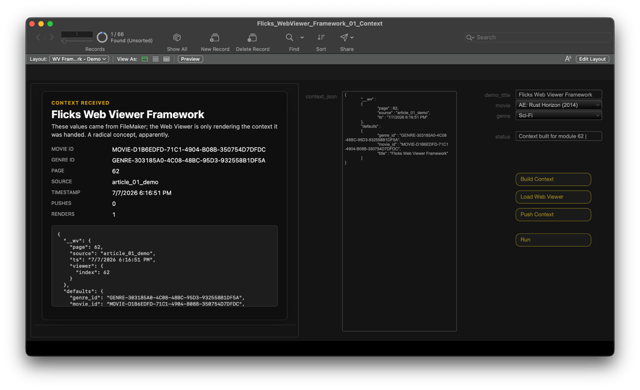
If the push step fails, check three things before getting creative. Creativity is lovely; during debugging it should wait in the hallway:
- Does
FOCUS::g_wv_context_jsoncontain valid JSON? - Is the Web Viewer object name
wv_main? - Has the viewer been loaded before the push script runs?
This is also where the split helps debugging. If loading worked and push failed, inspect the bridge and context receiver instead of rereading the CSS module like it owes you money.
Teaching point: this is the first complete trip from FileMaker-owned data to Web Viewer-owned rendering. Strictly speaking, it is not a loop yet; nothing comes back to FileMaker. That comes next. For now, the important pattern is already useful: load the package when the code changes; push context when the data changes.
Step 5: Run The Whole Path
Now click Run All.
WV__Demo_Run_All is convenience glue. It runs:
WV__Demo_Build_ContextWV__Demo_Load_ViewerWV__Demo_Push_Context
That makes the demo easier to use once the reader understands the individual steps. I would still walk through the separate buttons first. The point is the pipeline, not the button count.
Expected result: the status field should show that context was built and pushed successfully, and the Web Viewer should display the context-card renderer.
Teaching point: Run All is not a different architecture. It is just the three visible steps wrapped for convenience. That distinction matters because later demos will introduce smarter wrappers; the reader should already know what those wrappers are wrapping. Otherwise a wrapper becomes a blanket, and then everyone pretends the shape underneath is obvious.
Step 6: Edit A Module
To see the library model in action, make a small, harmless text change in module 63, the context renderer.
For example, change a label in the rendered card. Do not change the bridge code for this test. The goal is to prove the module edit/rebuild/reload path, not to make this walkthrough troubleshoot JavaScript on purpose. Life provides enough accidental curriculum.
Then:
- Commit the
LIBRARY_CODErecord. - Click
Rebuild LibraryonWV Framework - Modules. - Return to
WV Framework - Demo. - Click
Load Viewer. - Click
Push Context.
Expected result: the Web Viewer reflects the module edit.
If the old label is still visible, the likely issue is cache state. Confirm the record was committed, rebuild the library again, and reload the viewer. For now, we are making the machine say its verbs out loud.
Teaching point: a module edit is not the same as a loaded viewer update. The edit changes a record. The rebuild updates the cached package. The load updates the Web Viewer. The push updates the rendered context. These are separate actions; pretending they are one action is how integration demos start lying with excellent posture.
FileMaker Still Owns The Application
The ownership boundary matters here.
FileMaker owns:
- records
- layouts
- scripts
- selected movie and genre values
- JSON payload construction
- Web Viewer loading
- context push timing
JavaScript owns:
- runtime state inside the loaded Web Viewer
- parsing the raw JSON sent by FileMaker
- storing the current viewer context
- rendering the visible card from that context
The Web Viewer is powerful, but it is still a surface. It should not quietly become the application owner because the first prototype made that easy.
This becomes more important next, when the viewer starts sending actions back to FileMaker. If the ownership boundary is clear before the return trip exists, the two-way version is much easier to reason about. JavaScript can report intent; FileMaker can decide what to do with that intent. That is a healthier relationship than letting browser code rummage around for authority it was never actually given, like a consultant with an admin account.
Why This Helps With AI-Assisted Development
AI is useful here because Web Viewer work often involves iterative visual code. You can ask for a renderer. You can revise CSS. You can generate a first pass at a component, throw away half of it, and keep the useful part. That is a reasonable workflow.
The problem is not that AI writes code. The problem is where that code lands. A bad landing zone can make even decent code look like it arrived by parachute in the dark.
If generated code lands inside a giant blob, review becomes expensive. If it lands inside a named module, the question becomes much sharper:
- Did the renderer only change rendering behavior?
- Did the context manager only change context behavior?
- Did the theme module only change presentation?
- Did the FileMaker scripts keep ownership of application state?
That is the difference between using AI to create a paste and using AI to help maintain a system. One gives you a fast demo; the other gives you a better chance of recognizing your own work next month.
The modular structure also makes failure cheaper. If an experimental renderer is wrong, replace the renderer. If a CSS idea is terrible, revert the theme module. The base shell and FileMaker script path do not have to be collateral damage.
This also changes the prompt you can give an AI assistant. Instead of asking for “a Web Viewer that does everything,” you can ask for a renderer that consumes a specific JSON shape, a CSS revision for one module, or a bridge function with a narrower contract. Smaller requests tend to produce smaller surprises. Not always; we remain in the realm of computers, where humility is enforced by runtime errors. But the odds improve.
Where This Goes Next
This first demo is intentionally one-way:
FileMaker -> Web ViewerThat restraint is intentional. The source Flicks file has richer Web Viewer surfaces available, including a ranked-list visualization, but starting there would force native data shaping, repeated-row rendering, selected-state rules, action handling, and smarter reload behavior into the first example. All useful; too much for the first pass.
So we stop at context in. The viewer does not send actions back to FileMaker yet. It does not update records. It does not own selected state. It does not pretend to be a tiny web app wearing a FileMaker costume and asking for production credentials.
The remaining articles build the framework in layers:
- Beyond the Web Viewer Blob: The Blob Talks Back Actions Out The next piece adds action envelopes: a way for JavaScript to report user intent back to FileMaker without taking ownership of FileMaker state. The return path is another reusable contract, not an invitation for browser code to declare independence.
- Beyond the Web Viewer Blob: Let the Record Show Native FileMaker Records In, Ranked Views Out Then the payload gets more serious. FileMaker shapes native records into richer JSON, and the viewer renders the ranked-list surface from Flicks. The bridge is already established, so the focus shifts to native data shaping, stable ids, repeated rows, and acknowledged selection.
- Beyond the Web Viewer Blob: The Prompt Thickens Working With an AI Co-Developer The fourth pass makes the AI-assisted development loop explicit: brief, supplied context, proposed module changes, human review, native FileMaker testing, failure evidence, and revision. The framework gives that work somewhere disciplined to land; the richer hybrid interface gives it something worth building.
- Beyond the Web Viewer Blob: Cache Me If You Can State, Loading, and the FileMaker Web Viewer Production Pattern The final pass hardens the cumulative framework with dirty/version tokens, cache rebuild rules, loaded-state tracking, smarter loading, and deployment discipline. The point is not to hide the machinery; it is to automate machinery the reader has already seen and can still inspect.
Takeaway
The Web Viewer does not need to be a giant calculated blob.
A better pattern is to let FileMaker assemble a small, named web package and push explicit context into it. The result is easier to inspect, easier to revise, and easier to extend in later demos.
For experienced FileMaker developers, the point is not that FileMaker can run JavaScript. You already know that.
The point is that a mature capability becomes more useful when it has a disciplined delivery pattern.
Next, the viewer stops being read-only. The ownership boundary stays the whole game; everything else is just better lighting.
This piece represents a collaboration between the human authors and AI technologies, which assisted in both drafting and refinement. The authors maintain full responsibility for the final content.