

JavaScript is a great companion for FileMaker, especially when you need a focused tool for something that would be a headache to build natively. In this DevCast, Joe shows how to use JavaScript and web viewers to create lightweight, responsive tools that work well beside FileMaker.
What we cover in this episode:
- Startup screens: Toss up a simple splash screen while FileMaker handles background loading.
- JavaScript pickers: Build fast, responsive ways to search and select data.
- Dynamic interfaces: Let users define parameters and add values on the fly.
- JSON integration: Easily pass structured data back and forth.
- Keeping things light: Add functionality without bloating your app with extra fields or layouts.
How it comes together
Joe’s philosophy is simple: let FileMaker do what it’s best at, and bring in JavaScript when a custom tool makes sense.
For example, he shares a JavaScript picker that quickly filters large amounts of data. FileMaker gathers the source data and hands it off to the web viewer as JSON. You get a responsive interface without adding a bunch of native components.
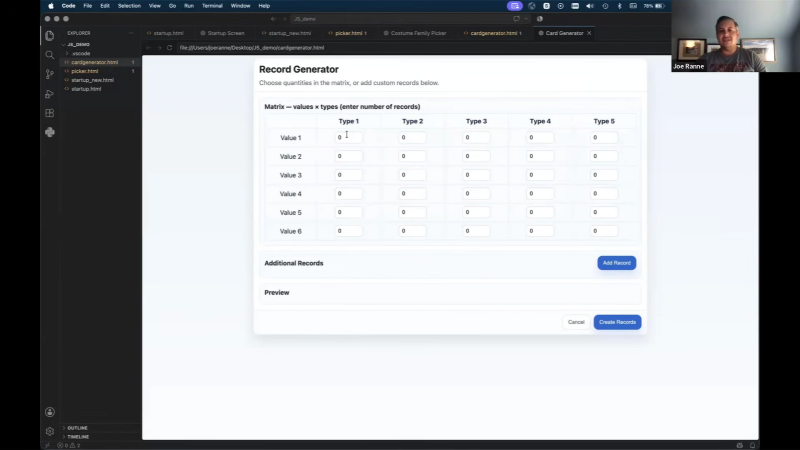
He also demos a tool for batch-generating records. Instead of cluttering up your database with fields for a task that only happens once in a while, users can pick record types and quantities in a flexible JavaScript interface. The tool bundles those choices into a JSON object, sends it back, and FileMaker handles the actual record creation.
AI also played a supporting role, helping troubleshoot the batch-record tool and generate sample data. Joe also experimented with having AI modernize a ten-year-old startup screen, which illustrated that newer code isn’t always better code. Sometimes the older, simple solution is already the right solution.
The takeaway
JavaScript and web viewers give you another way to build sharp, focused tools without overcomplicating your FileMaker solution. The important skill is knowing when to let FileMaker do the work and when a small JavaScript tool can provide a better experience.
Let’s talk
Have a FileMaker solution that could benefit from a more flexible interface or a custom tool? We’d love to help you find the right approach for your project.
This piece represents a collaboration between the human authors and AI technologies, which assisted in both drafting and refinement. The authors maintain full responsibility for the final content.