

Did you know the web viewer in FileMaker can do a lot more than just load a website? Mixing a little HTML with FileMaker can create flexible, app-like screens, saving you from having to build and manage a million different layouts. J. Warner walks through two real-world examples: a bulk image uploader and an interactive dining room seating map.
What can you do with web viewers:
- Upload in bulk: Let users grab and upload multiple photos at once.
- Quick edits: Rotate images right on the screen without leaving the app.
- Smarter screens: Build interfaces that change automatically based on your data, rather than forcing you to build a new layout for every scenario.
- Interactive maps: Combine adjoining tables and manage seating charts on the fly.
- Built-in guardrails: Set rules so your team can’t accidentally make invalid selections.
- Custom views: Create specific screens for desktop use, printing, or quick tasks.
How it works in the real world
Project 1: The photo uploader
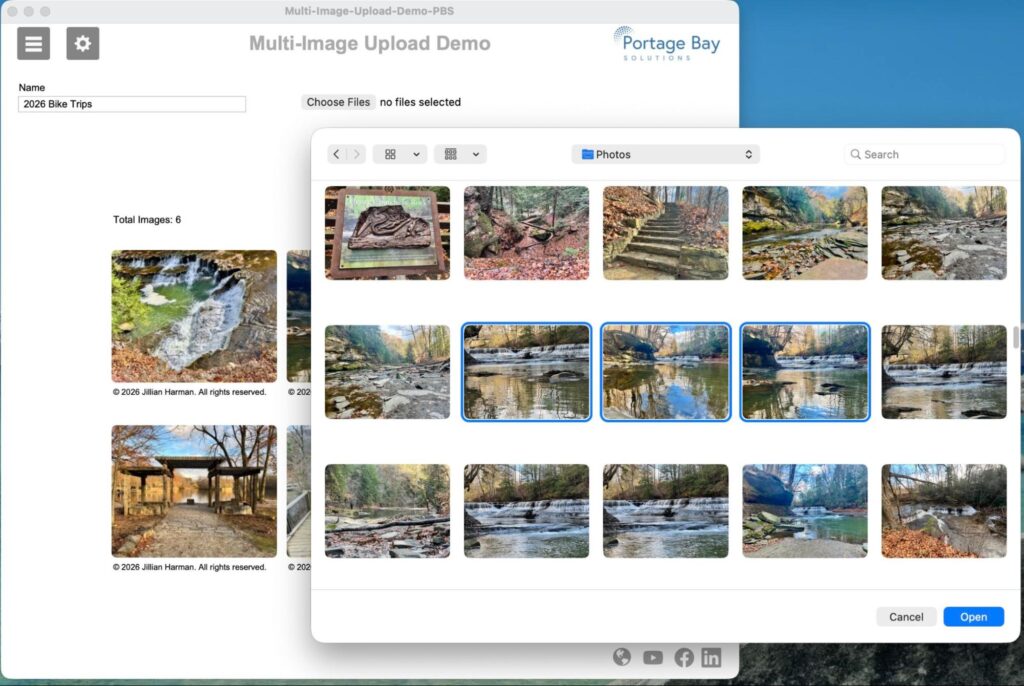
Field technicians for Joshua Bate Trading Bermuda Ltd. (JBT), in Bermuda, needed an easy way to upload and manage photos from their iPads. The old setup used a rigid grid that maxed out at 17 photos. Instead of endlessly redesigning the screen to add more slots, Warner used a web viewer. Now, techs have a clean, simple interface to upload, view, and rotate as many images as they need, all in one place.
Project 2: The dining room
Wollaston Lake Lodge is a remote fishing lodge in northeastern Saskatchewan, Canada. They needed a way to manage dining room seating, specifically combining tables for larger parties. Doing this the traditional FileMaker way would have meant building over 200 separate layouts to cover every possible table combination. Instead, Warner used a web viewer to draw the dining room dynamically. FileMaker handles all the data in the background, while the web viewer gives the staff an interactive, easy-to-use map to group tables and assign seats.

The takeaway
If your FileMaker app is getting bogged down with too many layouts, messy slide panels, or rigid fields, a web viewer might be the shortcut you need. You can create flexible tools that actually fit how your team works, rather than forcing your team to work around your software.
We fix stuck and clunky
Have a FileMaker database that feels a little stuck or clunky? Let’s chat about what you’d like to see instead. Our developers can help you build practical, easy-to-use screens that make running your business a lot smoother. And more fun!
This piece represents a collaboration between the human authors and AI technologies, which assisted in both drafting and refinement. The authors maintain full responsibility for the final content.