
With the release of Claris FileMaker 2026, Claris introduced two significant features that are sure to delight developers who need to manage FileMaker Servers. Remote Backup offers automatic, off-site data protection. Standby Server maintains a copy of your entire system that can be deployed in minutes if your primary server goes down.
Implications for developers and solution providers
With Remote Backup and Standby Server, FileMaker 2026 expands beyond application development and deployment into operational resilience, enabling partners and developers to deliver solutions designed for continuous business operation rather than simple uptime management. Developers can now offer built-in disaster recovery and high-availability strategies without requiring complex third-party infrastructure, custom scripting, or specialized IT expertise, making business continuity accessible to organizations of all sizes. Automatic off-site backups protect against ransomware, hardware failure, and human error, while Standby Server enables rapid failover that reduces downtime risk.
For partners, this introduces new opportunities to position FileMaker solutions as mission-critical systems—supporting premium service offerings, managed hosting models, and stronger customer trust by ensuring that business operations can continue even when unexpected disruptions occur.
Remote Backup
FileMaker Server Remote Backup introduces a more streamlined and centralized approach to off-site disaster recovery. The feature is designed to protect FileMaker deployments against hardware failures, ransomware attacks, accidental data loss, and site-level disasters by automatically copying backups to secure cloud storage every 20 minutes. Rather than relying on manually maintained scripts or third-party backup workflows, administrators gain a built-in mechanism for continuously protecting critical systems while simplifying restore operations when recovery is needed.
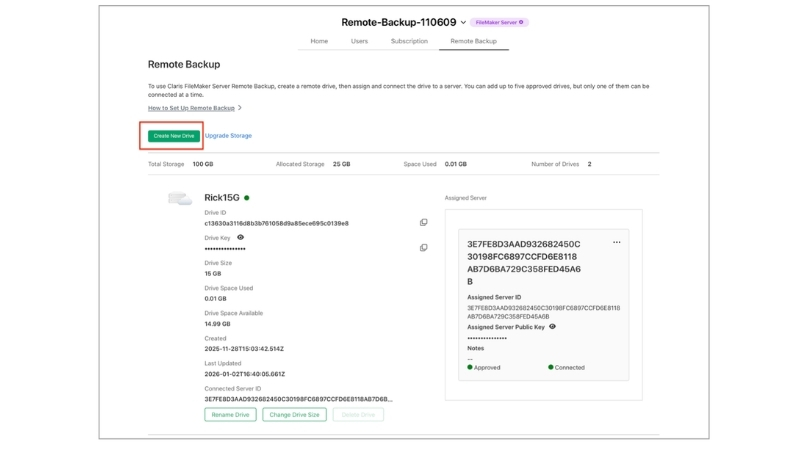
At the center of the system is centralized cloud storage management through the Claris Customer Console (CCC). Administrators can provision and manage cloud storage connections, monitor storage consumption, identify which FileMaker Servers are associated with specific storage locations, and remove unused backup data when necessary. This centralized visibility becomes particularly valuable in larger deployments where multiple servers or environments may share backup infrastructure.
The backup process itself has also been designed with reliability and recovery validation in mind. FileMaker Server uploads backups directly to connected cloud storage while maintaining timestamp consistency and ensuring redo logs remain synchronized with the correct backup state. Expired backups and associated logs are automatically cleaned up over time to reduce storage sprawl and administrative overhead. When restoration is required, administrators can initiate a guided restore workflow that downloads the appropriate backup set and validates data integrity before bringing systems back online.

For third-party developers, hosting providers, and enterprise IT teams, the new architecture substantially improves the disaster recovery story around FileMaker deployments. Hosting companies gain clearer visibility into customer backup infrastructure and storage health, while enterprise organizations can more confidently support compliance requirements related to restore validation, retention management, and auditability. The feature is also likely to appeal to cost-conscious organizations that want better insight into cloud storage consumption and lifecycle management without building their own tooling around external backup platforms.
The overall result is a more mature and operationally practical backup system that moves FileMaker closer to the expectations organizations now place on modern business infrastructure. FileMaker 2026 strengthens remote backup capabilities with centralized cloud management, improved restore reliability, automated retention handling, and better visibility into backup infrastructure across deployments.
Standby Server
FileMaker Server Standby Server introduces built-in high availability capabilities designed to minimize downtime during outages or maintenance events. The feature maintains a secondary FileMaker Server in a synchronized standby state so organizations can recover more quickly if the primary server becomes unavailable. Instead of rebuilding environments or manually restoring backups after a failure, administrators can promote the standby system and resume operations with minimal disruption.

The architecture relies on a one-to-one pairing between a primary and standby server. After the initial synchronization process is completed, the primary server continuously ships redo logs to the standby server at configurable intervals, with a default cadence of every five minutes. Using a combination of full backups and incoming redo logs, the standby system incrementally reconstructs and maintains a near-current version of the production environment in the background.
In practice, the workflow is relatively straightforward. The primary FileMaker Server continues normal operations while the standby server passively receives redo logs and applies incremental updates. If an outage occurs, an administrator manually initiates a switchover process, applies any remaining logs, and promotes the standby machine to become the active production server. This approach reduces recovery time significantly compared to traditional restore-based disaster recovery workflows.
Claris also appears to be designing the feature with modern infrastructure flexibility in mind. The system supports Docker and Ubuntu deployments, works alongside progressive backup strategies, and can integrate with hypervisor snapshots for initial synchronization or recovery workflows. Optional reverse transition support further simplifies moving services back to the original primary server after maintenance or remediation work has been completed.
For developers, hosting providers, and enterprise administrators, the addition of built-in standby support substantially improves FileMaker’s positioning in environments where uptime expectations are high. Organizations that previously depended on custom synchronization systems, complex scripting, or external replication strategies now have a more structured and integrated option for maintaining service continuity. This is especially relevant for hosting providers, hybrid cloud deployments, and geographically separated disaster recovery environments where minimizing downtime is critical.
Standby Server ultimately brings a more enterprise-oriented approach to resilience within the FileMaker ecosystem. FileMaker 2026 introduces structured high availability with near-real-time synchronization, integrated redo log shipping, and manual failover workflows that significantly reduce operational complexity during outages and recovery scenarios.
Have questions?
We’re here to help you plan smarter, fix faster, and roll out with confidence. Contact us for expert support at any stage of the process.
This piece represents a collaboration between the human authors and AI technologies, which assisted in both drafting and refinement. The authors maintain full responsibility for the final content.