

Claris FileMaker 2026 is one of the platform’s most consequential releases in years. While previous versions often focused on incremental feature additions, this release is a foundational modernization effort centered around operational resilience, AI readiness, accessibility, infrastructure scalability, and developer productivity. It also finally aligns the platform version number with the calendar year, bringing long-requested consistency to product naming and version tracking.
The release spans improvements across FileMaker Pro, Server, Go, Cloud, and APIs, as well as WebDirect, and Developer Tools. But the larger story is less about individual features and more about where Claris appears to be positioning the platform long term. FileMaker 2026 moves closer toward becoming a resilient, enterprise-capable application platform designed for modern infrastructure and AI-assisted workflows.
- Disaster Recovery & Business Continuity
- AI-Ready Architecture
- Developer Productivity & Quality of Life
- Accessibility & User Experience
- Stability, Scalability & Platform Support
Disaster Recovery & Business Continuity
One of the biggest shifts in FileMaker 2026 is the introduction of native disaster recovery and business continuity tooling directly within FileMaker Server. Historically, organizations wanting enterprise-grade failover or off-site backup strategies often depended on third-party infrastructure, custom synchronization scripts, or hosting-provider-specific tooling. FileMaker 2026 begins changing that equation by introducing both Remote Backup and Standby Server capabilities.
Remote Backup
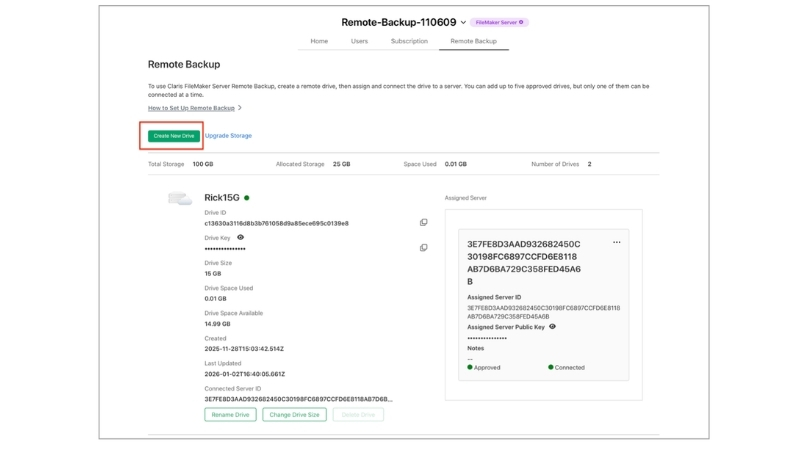
FileMaker Server Remote Backup introduces automated off-site protection designed to safeguard systems against hardware failure, ransomware, accidental deletion, or site-level disasters. The system automatically copies backups to secure cloud storage every 20 minutes, giving organizations a much more practical built-in recovery strategy than traditional local-only backup workflows.
What makes the feature more significant is the operational infrastructure surrounding it. Administrators can centrally manage cloud storage associations through the Claris Customer Console, monitor storage usage, identify which servers are tied to specific backup locations, and manage retention and cleanup workflows. FileMaker validates backup integrity during restore operations and automatically removes expired backups and associated logs to reduce storage sprawl.
For developers and hosting providers, this substantially improves disaster recovery. Smaller organizations can now implement off-site protection without maintaining complex third-party backup systems, while hosting providers gain more centralized visibility into customer backup infrastructure. The result is a more mature and accessible approach to operational resilience across deployments of all sizes.

Standby Server
Standby Server complements Remote Backup by introducing built-in, high availability support designed to reduce downtime during outages or maintenance events. The feature maintains a secondary synchronized server that can be promoted if the primary system becomes unavailable. Instead of rebuilding systems or restoring backups manually, organizations can switch over to a near-current standby environment in minutes rather than hours.

The underlying architecture uses one-to-one server pairing combined with redo log shipping and incremental synchronization. After the initial synchronization is completed, the primary server continuously sends redo logs to the standby system at defined intervals. The standby server then reconstructs and maintains a near-live copy of the production environment in the background.
Failover is manual, which is worth noting. This is not an invisible automatic failover system where a server silently promotes itself without administrator involvement. When an outage occurs, an administrator initiates the switchover, any final logs are applied, and the standby server becomes the primary server. That manual step keeps the process controlled while still reducing downtime from hours to minutes in many scenarios.
Other new features include:
- Support for Docker and Ubuntu deployments
- Hypervisor snapshot compatibility
- Progressive backup workflows
- Optional reverse-transition capabilities for moving services back to the original primary server after maintenance or recovery events.
These features are designed with modern deployment patterns in mind, giving hosting providers and internal IT teams more flexibility when designing recovery plans, especially in hybrid environments where one server may be on-premise and the standby server may run in a cloud VM.
Collectively, Remote Backup and Standby Server push FileMaker into territory traditionally reserved for larger enterprise database ecosystems. More importantly, they allow developers and solution providers to position FileMaker deployments as true business continuity platforms rather than simply departmental applications.
AI-Ready Architecture
Perhaps the most strategically important part of FileMaker 2026 is its growing focus on AI-ready architecture. Rather than simply integrating external AI APIs, Claris appears to be redesigning parts of the platform so AI systems can understand FileMaker solutions semantically and structurally.
AI-Aware Schema Metadata
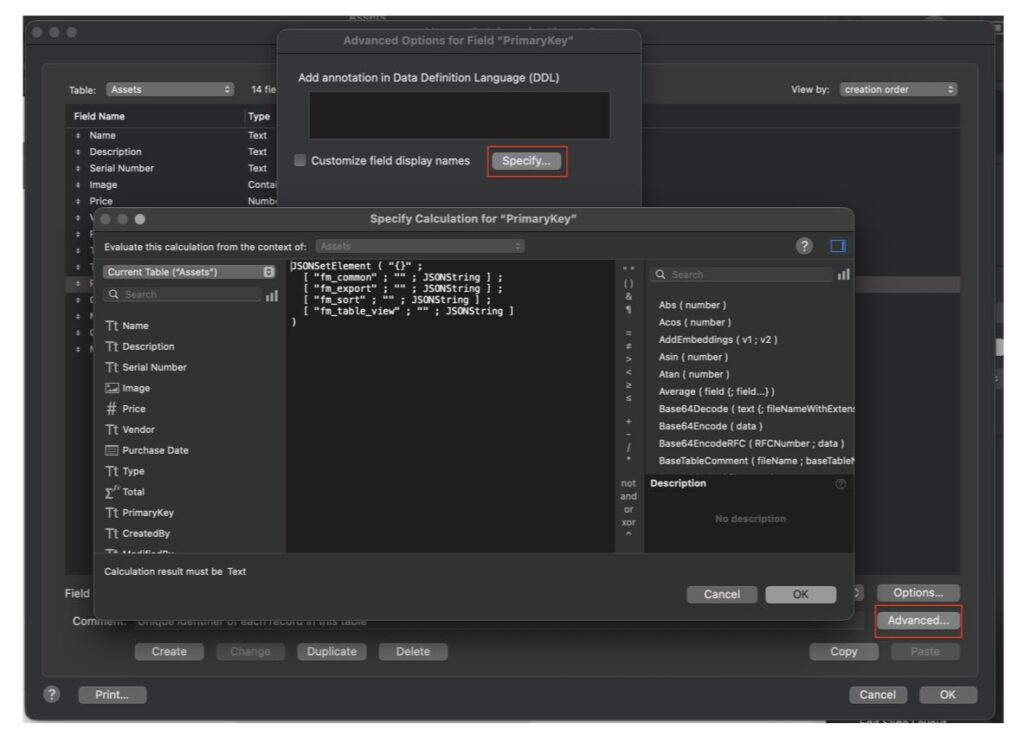
A major piece of this effort involves schema annotations and metadata exposure. FileMaker 2026 introduces field annotations designed specifically to help AI systems understand the meaning and purpose of fields beyond their raw names alone. New calculation functions such as FieldAnnotation() and BaseTableComment() expose this metadata programmatically, making it accessible to automation workflows and AI systems.
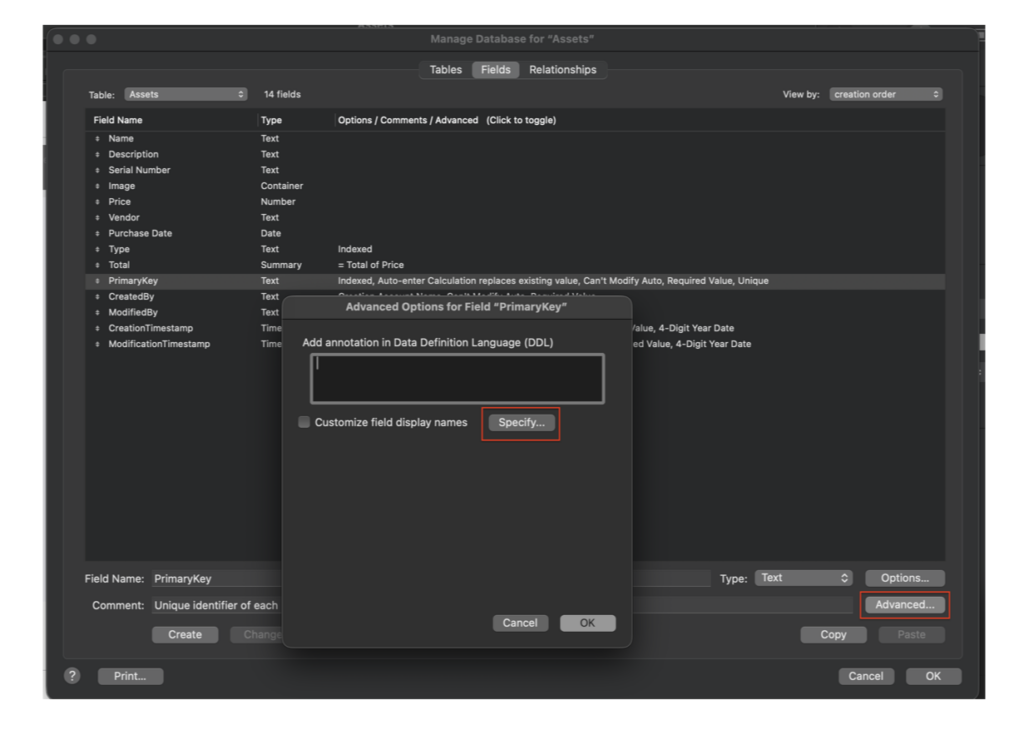
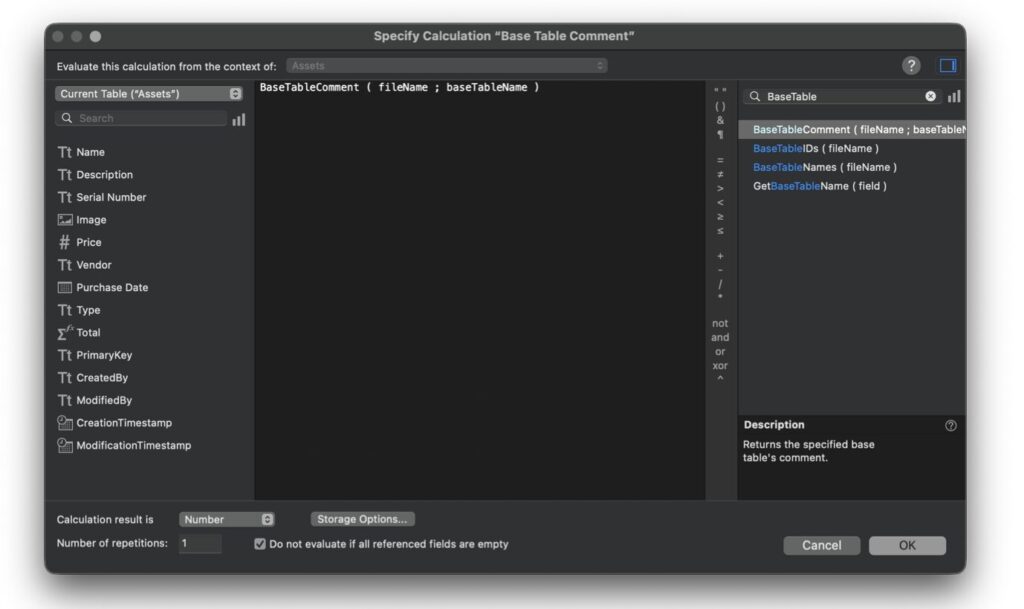
Developers can now specify whether fields should be included when generating Data Definition Language (DDL) structures for AI models, allowing solutions to expose meaningful schema information intentionally rather than relying on inference. The new AI-related settings are directly integrated into the Field Options dialog.
Gemini, RAG, OCR, and Multilingual Embeddings
FileMaker 2026 adds support for Google Gemini and expands the supporting infrastructure around retrieval-augmented generation (RAG). The update uses UUIDs as IDs in RAG spaces to avoid conflicts when managing and merging spaces. It also moves the RAG cache key file into the CStore/LLMKeys folder so it is not removed during a FileMaker Server uninstall.
The release also includes support for paraphrase-multilingual-MiniLM-L12-v2 for multilingual text embeddings and adds OCRed PDF support to ExtractTextFromPDF, GetLiveText, and GetLiveTextAsJSON. For developers, that means FileMaker can work more effectively with scanned or OCR-processed PDFs and can support more language-aware AI workflows.
FOREIGN KEY Support in FQL DDL
FileMaker Server 2026 also improves FQL by accepting DDL statements with FOREIGN KEY syntax. This is particularly relevant to AI-driven schema creation because a model can describe not only tables and fields, but also relationships. If FileMaker can parse that structure and create corresponding relational elements, AI-assisted database generation becomes more practical.
This is another example of Claris preparing FileMaker for more structured AI workflows. The goal is not simply to generate text from data. It is to make FileMaker solutions more understandable, describable, and eventually more automatable.
Save as XML Evolves Beyond DDR
FileMaker’s Save as XML feature also receives major expansion, including multi-file support and command-line enhancements.
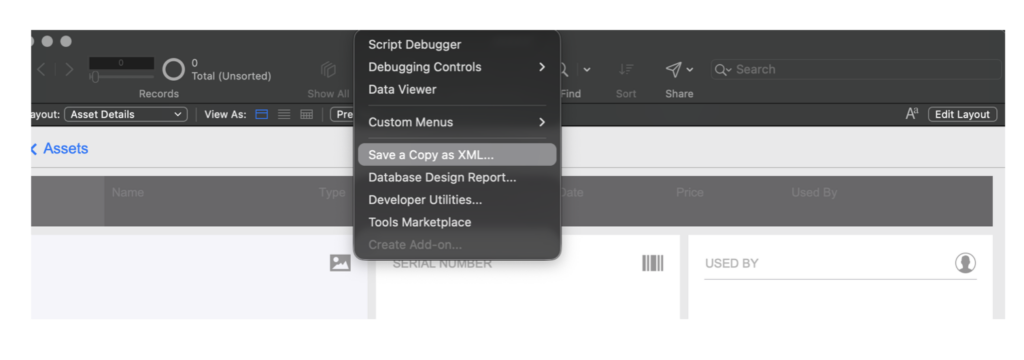
Developers can now generate XML for specific portions of a solution rather than exporting entire databases, enabling more targeted automation, analysis, version tracking, and tooling integration. FileMaker 2026 also adds more control over where binary data is stored in XML output. Binary data can be placed in the Library catalog or directly under each relevant node. Centralized storage can reduce duplication, while node-level storage can make individual components more self-contained. That kind of control matters when XML is being used for comparison, migration planning, source control, or third-party tooling.
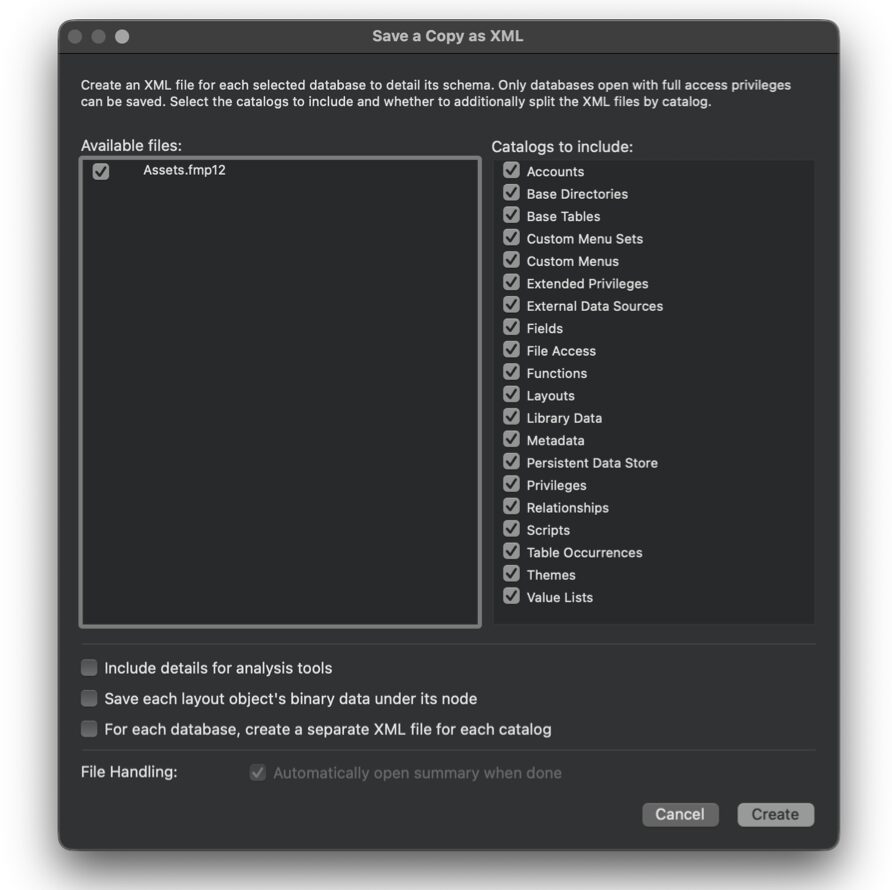
The upgraded Solution Upgrade Tool can now create a new .fmp12 file from a properly formatted XML file that follows the XML 2.0 grammar. While developers may not start hand-writing FileMaker files in XML this feature opens the door for new kinds of automation. External tools could generate database structures, create starting-point solutions, rebuild portions of a system, or assist with refactoring workflows.
Persistent Metadata and the Draco Catalog
One of the more developer-focused additions in FileMaker 2026 is the introduction of the Draco Catalog, a new persistent metadata storage mechanism designed specifically for solution-level configuration and add-on metadata. This addition has practical implications for developers building JavaScript add-ons, reusable components, deployment tooling, and more sophisticated solution frameworks.
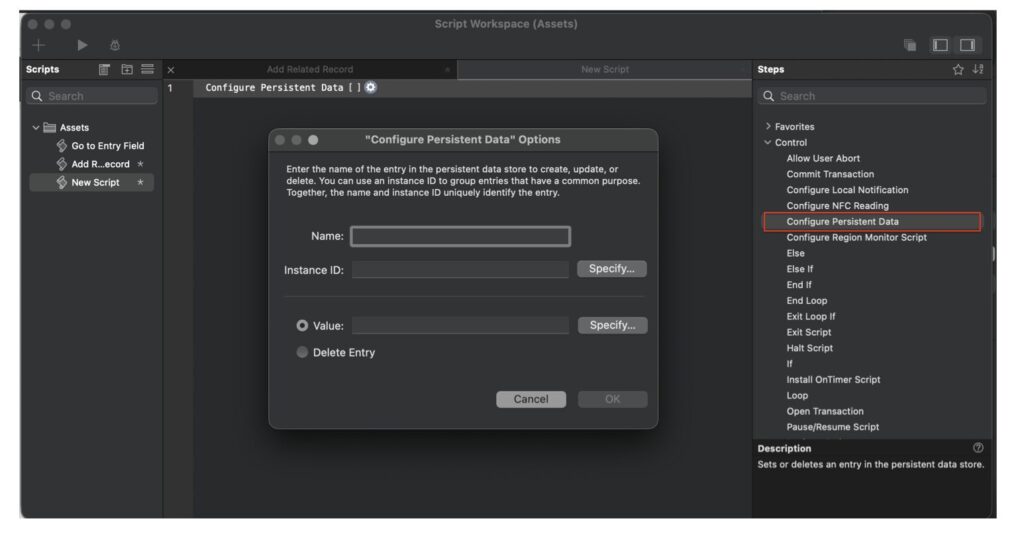
Draco Catalog is designed to survive FileMaker restarts and Data Migration Tool processes, making it more reliable than traditional workarounds. In the past, developers often stored configuration data in global fields, global variables, preferences tables, dummy tables, utility records, or single-record config tables. Those approaches work, but they also add structural noise to a solution and can become fragile during migration, upgrades, or add-on deployment.
Draco Catalog gives developers a cleaner place to store key-value metadata that belongs to the solution or add-on architecture, rather than to normal user data. Functionality includes setting, updating, deleting, checking existence, retrieving stored values, and returning metadata programmatically. In practical terms, this gives add-ons and developer tools a native way to maintain configuration settings, runtime system flags, upgrade-tracking data, and solution-level metadata without inventing another table-based storage pattern.
For JavaScript add-ons, this becomes especially important. Add-ons often need to store internal configuration, component settings, install state, version information, or deployment metadata. Draco Catalog gives those add-ons a preferred storage mechanism that is better aligned with Data Migration Tool workflows and less dependent on user-created schema. That means fewer hidden config tables, fewer accidental dependencies, and a more predictable structure for add-on modernization.
This also matters for teams building reusable FileMaker frameworks. A developer could use Draco Catalog to store add-on configuration, installation status, upgrade flags, or solution-wide settings that need to persist safely across development, deployment, and migration cycles. The result is not just cleaner architecture, but a more mature foundation for maintaining complex FileMaker systems over time.
Why Draco Catalog Matters for Add-On Modernization
The larger significance of Draco Catalog is that it moves FileMaker closer to a more formal component model. If add-ons are going to become more powerful, especially JavaScript-based add-ons, they need a durable way to store metadata without polluting the host solution’s schema. Draco Catalog appears designed to solve exactly that problem.
For third-party developers, this creates a more dependable foundation for distributing reusable tools. Add-ons can carry and maintain their own metadata more cleanly, while developers can avoid creating extra tables or requiring manual setup steps just to preserve configuration data. This should make add-ons easier to install, easier to migrate, and easier to support.
It also supports better DevOps alignment. Because the Draco Catalog is migration-safe and structured for metadata persistence, it can help reduce the friction that occurs when solutions move between development, staging, and production environments. Configuration and internal add-on metadata can be handled more predictably, rather than scattered across tables, globals, or custom scripts.
In short, Draco Catalog is not just another developer convenience. It’s infrastructure for a more modular FileMaker ecosystem.
Developer Productivity & Quality of Life
While AI and infrastructure enhancements dominate much of the conversation around FileMaker 2026, the release also includes dozens of smaller developer-focused improvements that collectively remove a significant amount of everyday friction from the development experience.
A Smarter Inspector
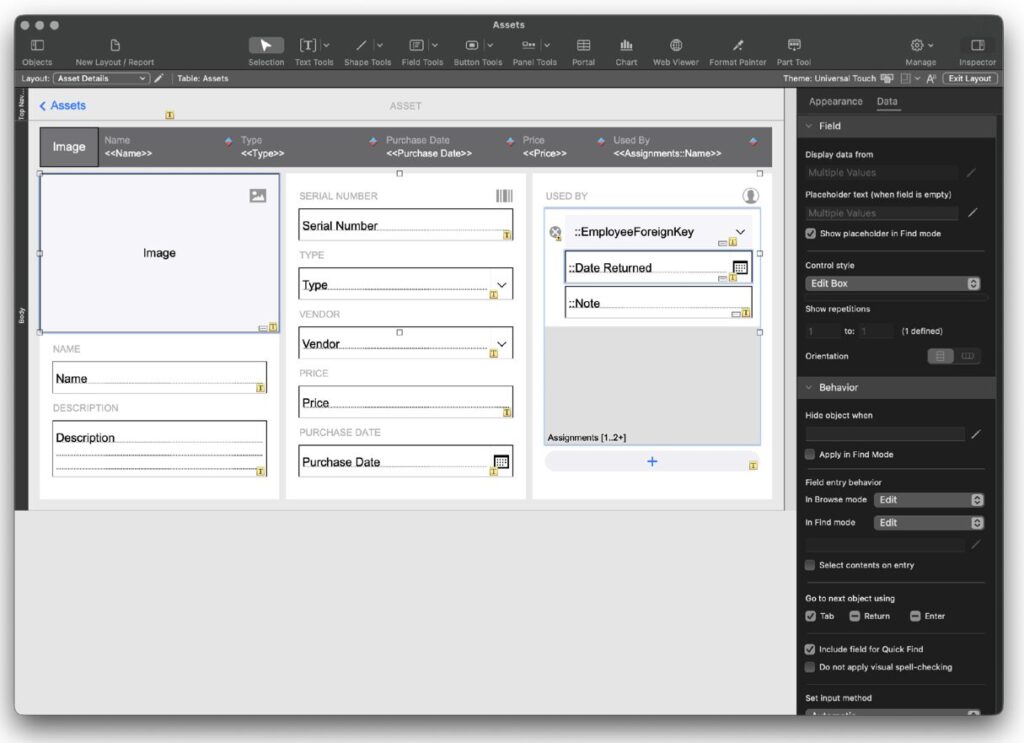
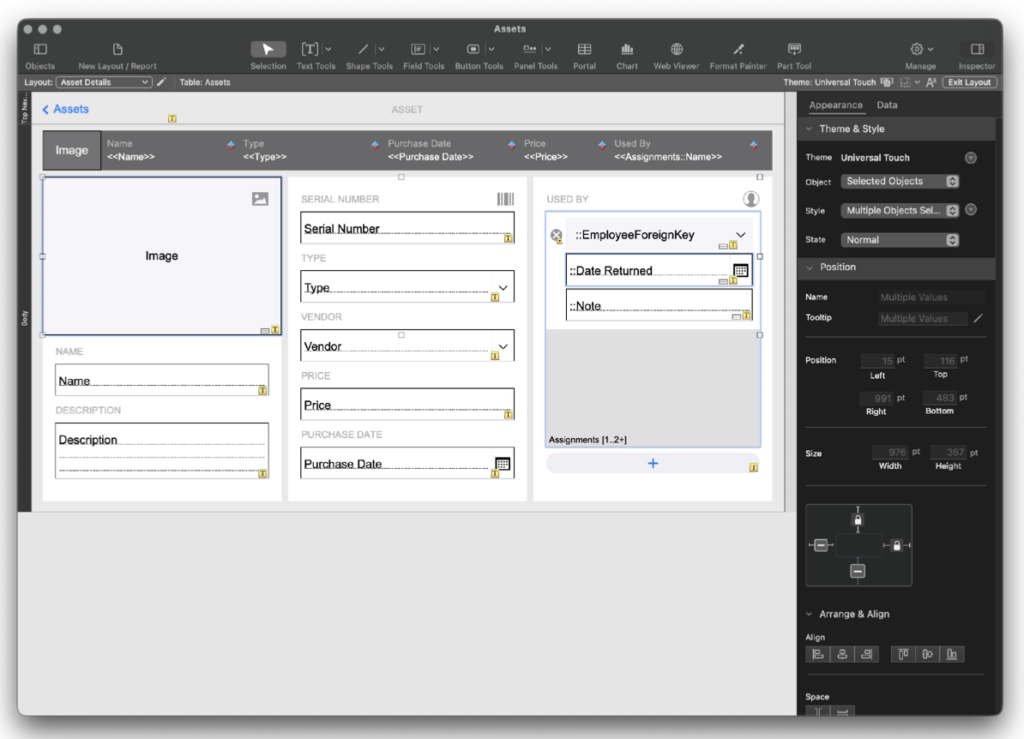
One of the most visible improvements is the redesigned macOS Inspector. The interface now consolidates Position, Style, and Appearance settings into a more focused layout while reducing clutter and surfacing the most relevant controls contextually. The number of tabs has been reduced from four to two, simplifying navigation and reducing visual overload during layout work. Legacy Inspector support remains available for developers who prefer the previous interface.
Better Organization and Precision
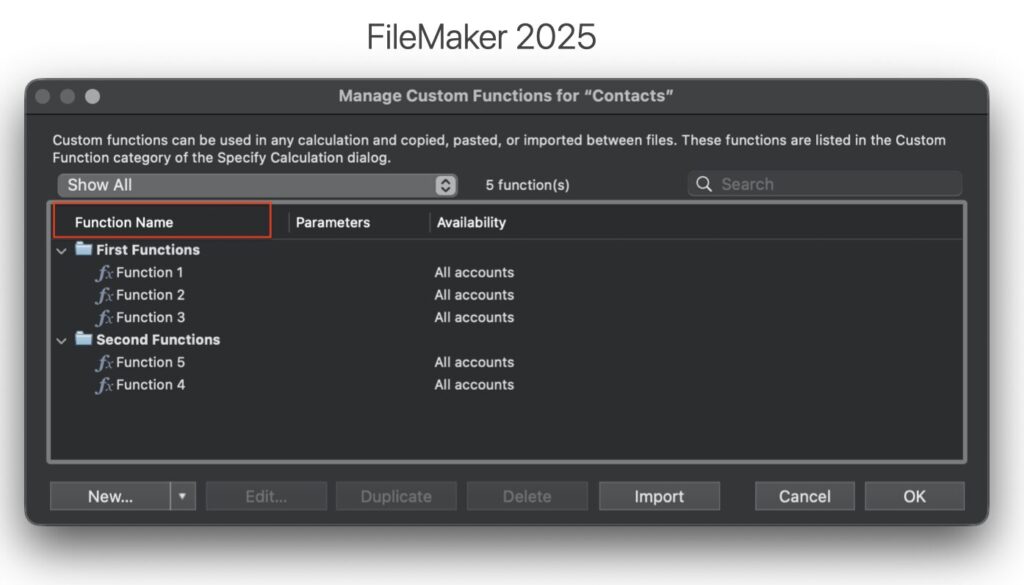
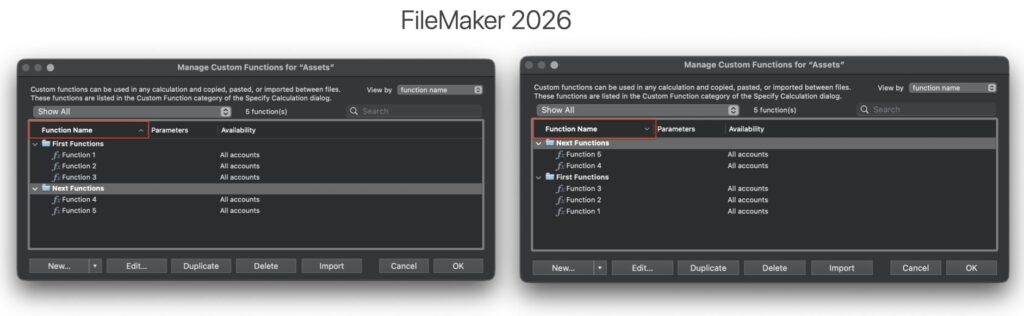
Custom Functions regain sorting support within folder hierarchies, allowing developers to organize functions by creation date, name, or custom order.
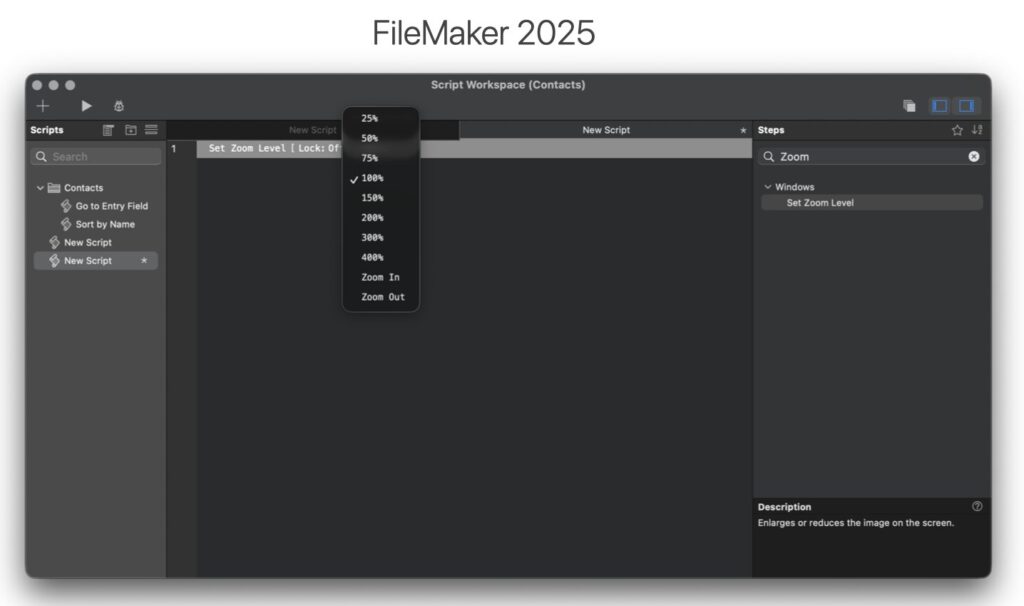
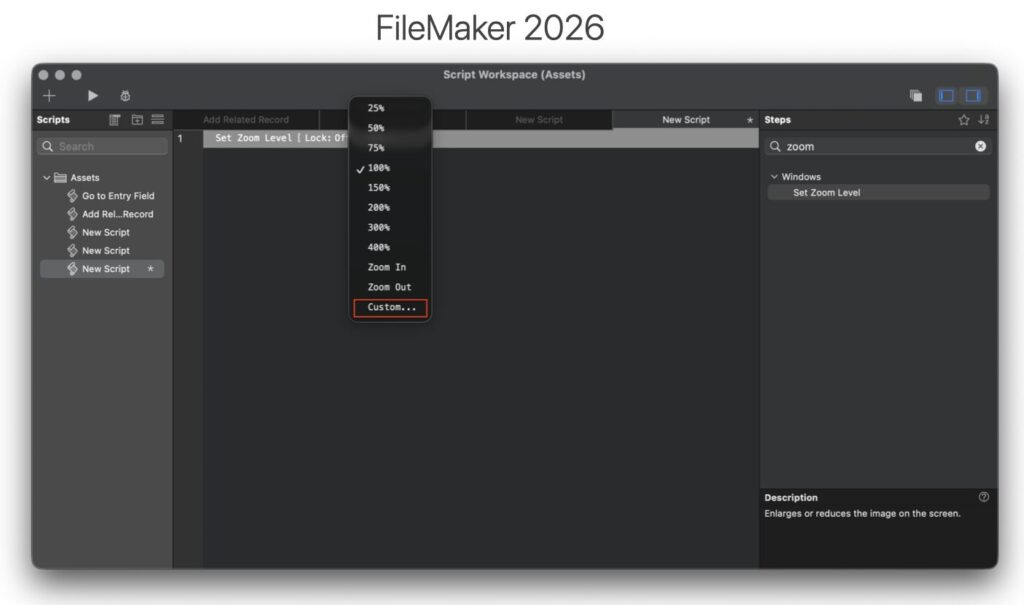
Layout zoom levels can now be specified with precise decimal percentages instead of relying solely on fixed preset increments.
More Dynamic Interface Control
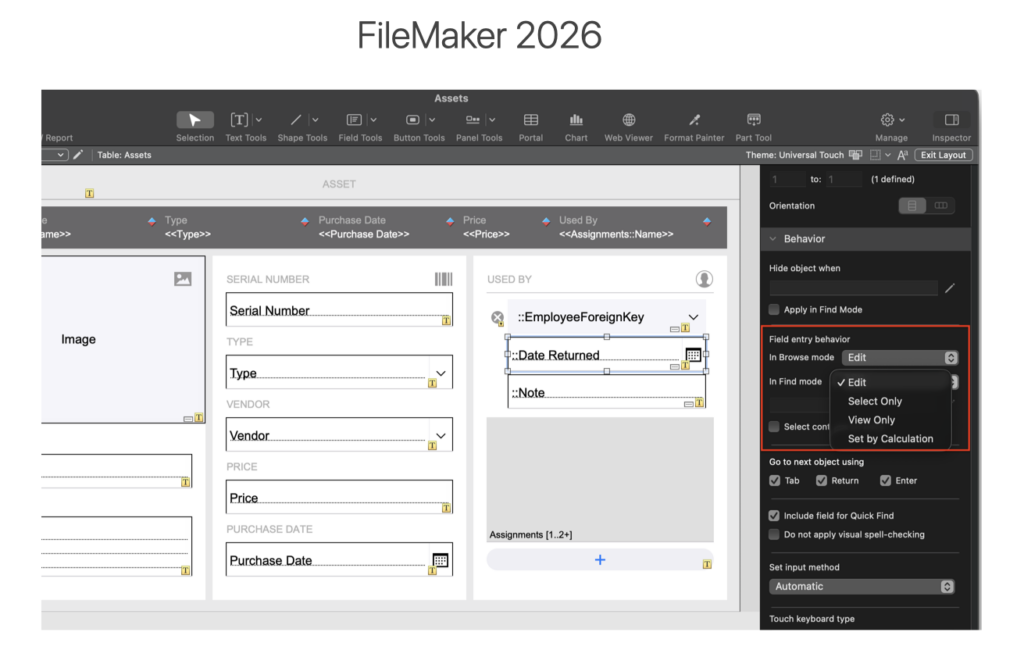
FileMaker 2026 also introduces more granular interface behavior controls. Developers can now define field-entry behavior through boolean calculations directly in the Layout Inspector, allowing users to interact with fields while selectively preventing modification. This replaces many of the workaround UI techniques developers previously relied on for conditional interaction control.
PDF and Image Handling
FileMaker 2026 expands PDF workflow scripting so developers can programmatically create, open, append, print, and save PDFs from Script Workspace. This turns PDF handling into a more flexible document assembly process, especially for solutions that generate reports, packets, or multi-step documents.
Container fields also gain WebP image support. WebP files are often significantly smaller than PNG or JPEG files without a noticeable quality loss, which could reduce container storage requirements for solutions that store a large number of images.
Import and replace workflows also get more precise. The import process adds an option to keep original data, and Replace Field Contents gains a Skip Auto-Enter option for full-access users. That makes it possible to update key fields without triggering modified-by and modified-timestamp changes that may not be desirable during controlled maintenance operations.
Dialogs, JSON, Credentials, and Other Useful Improvements
Custom dialogs gain size and position settings that can be specified by calculation, along with scrollbars when content exceeds the display area. This should reduce the need to use card windows or plug-ins for situations where a standard dialog is otherwise sufficient.
FileMaker Pro 2026 introduces support for developer-defined display names for fields. This feature allows developers to create context-appropriate field names for exports and sorting. The new FieldAnnotation function can be used to return the field’s annotation
Insert From URL and Execute REST workflows also improve. When a JSON payload is inserted into a variable and the MIME type is application/json, FileMaker can attempt to parse and cache the JSON automatically. This reduces the need for developers to call JSONParse separately in common API workflows.
ODBC credentials can now be specified by calculation in script steps such as Import Records, Execute SQL, and Convert File. That makes scripted integrations more flexible and easier to deploy across environments where credentials may vary by user, server, or deployment stage.
Other developer-focused additions include
- options for sorting blank records last,
- preserving user-selected layout views
- Get ( AccountPasswordDaysRemaining ),
- a Flush Web Viewer Cookies script step,
- support for –proxy-negotiate in Insert from URL curl options,
- a Tools-only installer option on macOS, and
- an assisted install option for Developer Tools only.
Accessibility & User Experience
FileMaker 2026 also introduces substantial accessibility improvements to FileMaker WebDirect, helping modernize the platform for organizations facing increasing accessibility and compliance requirements. Rather than forcing developers to redesign existing applications, these improvements occur directly within WebDirect’s rendering engine itself, allowing existing layouts to benefit automatically.
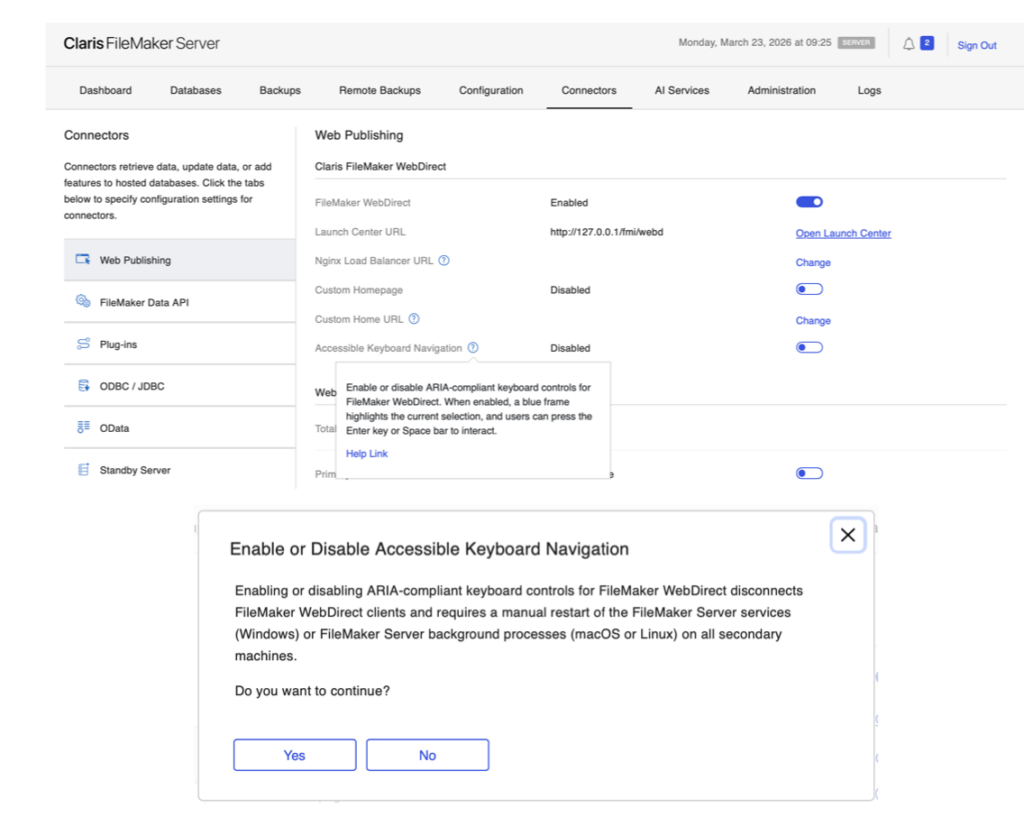
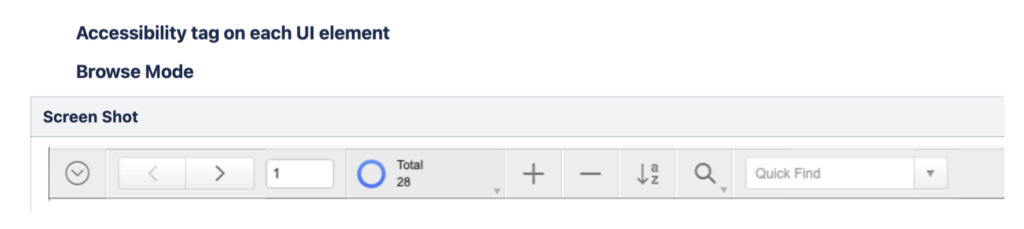
Screen reader compatibility has been significantly improved through better semantic HTML rendering, expanded ARIA support, improved focus management, and more predictable keyboard navigation behavior. Interactive elements such as fields, portals, buttons, and popovers now provide clearer structural and contextual information to assistive technologies.
The update also improves how dynamic content changes are communicated to screen readers, making notifications, focus changes, validation messages, and refreshed content easier for visually impaired users to detect and understand.
Beyond accessibility itself, WebDirect receives broader infrastructure modernization improvements, including JDK 21 support, improved cookie handling, IPv6 compatibility, and various performance enhancements. Together, these changes strengthen WebDirect’s viability in enterprise and regulated IT environments where accessibility, security, and compliance standards increasingly influence deployment decisions.
Stability, Scalability & Platform Support
The final major theme throughout FileMaker 2026 is operational maturity. Claris continues strengthening FileMaker Server as an always-on application platform capable of supporting larger deployments, heavier automation workloads, and modern infrastructure standards.
Improved Resilience and Scalability
FileMaker Server can now automatically restart key services such as the Web Publishing Engine, OData, and Data API if crashes occur, reducing downtime and minimizing manual intervention requirements. Multiple Secure Assisted Session Engine (SASE) processes can also run concurrently on the same machine, improving scalability for environments supporting large numbers of simultaneous remote sessions.
Server-side Export Field Contents is another practical improvement. Workflows that previously depended on a client can now move to server-side scripts, which is especially useful for backups, logging, report generation, and scheduled automation.
Platform support has also been updated. FileMaker Server 2026 supports Windows Server 2025 and macOS 2026, improves IPv6 compatibility, upgrades to OpenSSL 3.5 LTS, and updates Apache Tomcat to address security vulnerabilities. Ubuntu deployments gain an option to install FileMaker Server as a specified OS user rather than always using fmserver.
FileMaker Go and Cloud
FileMaker Go 2026 receives several targeted improvements. The Insert from Device script step gains a new flash or torch option for barcode and camera workflows. A Japanese calendar option has been added to the drop-down calendar. FileMaker Go also supports WindowUUID in the Select Window script step, along with a new Get ( WindowUUID ) calculation that returns the UUID of the active window.
FileMaker Cloud 2026 is expected to become available approximately 30 days after the FileMaker 2026 launch.
What This Release Means
FileMaker 2026 is not just a collection of isolated feature updates. It is a broad platform release aimed at making FileMaker more resilient, more accessible, more AI-ready, and easier to manage in modern business environments.
For developers, the release removes friction in several important places: schema metadata, XML tooling, add-on storage, layout work, field behavior, dialogs, JSON handling, PDF workflows, and server-side automation. For administrators, it adds stronger disaster recovery options, better continuity planning, automatic service recovery, updated platform support, and more scalable server behavior.
The practical takeaway is that FileMaker 2026 gives teams more built-in infrastructure for the kinds of work they were already doing: protecting systems, documenting schema, supporting users, building integrations, automating workflows, and preparing for AI-assisted development. That makes this release less about novelty and more about long-term maintainability.
Planning Your Upgrade
As with any major release, organizations should review compatibility, test critical workflows, validate plug-ins and integrations, and plan the upgrade path before moving production systems. The new disaster recovery and standby options also create a good opportunity to revisit backup strategy, recovery expectations, and hosting architecture.
For teams already planning a FileMaker 2026 upgrade, the best next step is to identify which changes matter most to your environment. Some organizations will care most about Remote Backup and Standby Server. Others will benefit first from WebDirect accessibility, AI field annotations, XML tooling, or developer quality-of-life improvements.
Ready to Upgrade?
FileMaker 2026 is a big update, and we’re here to help you make the most of them. Whether you’re already planning your update process, troubleshooting along the way, or just want a second set of eyes before you roll things out, our team is ready to jump in. You can talk with us about your upgrade strategy, get hands-on support, and ensure everything goes smoothly from start to finish.
This piece represents a collaboration between the human authors and AI technologies, which assisted in both drafting and refinement. The authors maintain full responsibility for the final content.