

Claris FileMaker 2026 introduces one of the platform’s most important architectural shifts in years: a move toward AI-aware development and machine-readable solution design. Earlier AI features mostly focused on connecting FileMaker to outside AI services. This release starts building AI awareness directly into the platform itself through improvements to schema metadata, XML tooling, field annotations, relational DDL support, and retrieval-augmented generation (RAG) infrastructure.
The overall direction is pretty clear: making FileMaker solutions easier for AI systems, automation tools, and external developer workflows to understand and work with structurally instead of relying entirely on inference from layouts, field names, and scripts.
- Enhanced XML Output
- XML Reconstruction Opens New Possibilities
- AI Field Annotations and Semantic Schema Design
- FOREIGN KEY Support
- Expanded RAG Infrastructure and AI Services
Enhanced XML Output
FileMaker 2026 expands the Save as XML workflow with a more flexible interface and better tooling support aimed at automation, analysis, and AI-assisted development.
The updated Save as XML interface brings back and modernizes several capabilities previously associated with the legacy DDR workflow, including multi-file support, selective catalog export, and improved control over how solution metadata and binary assets are structured during export.
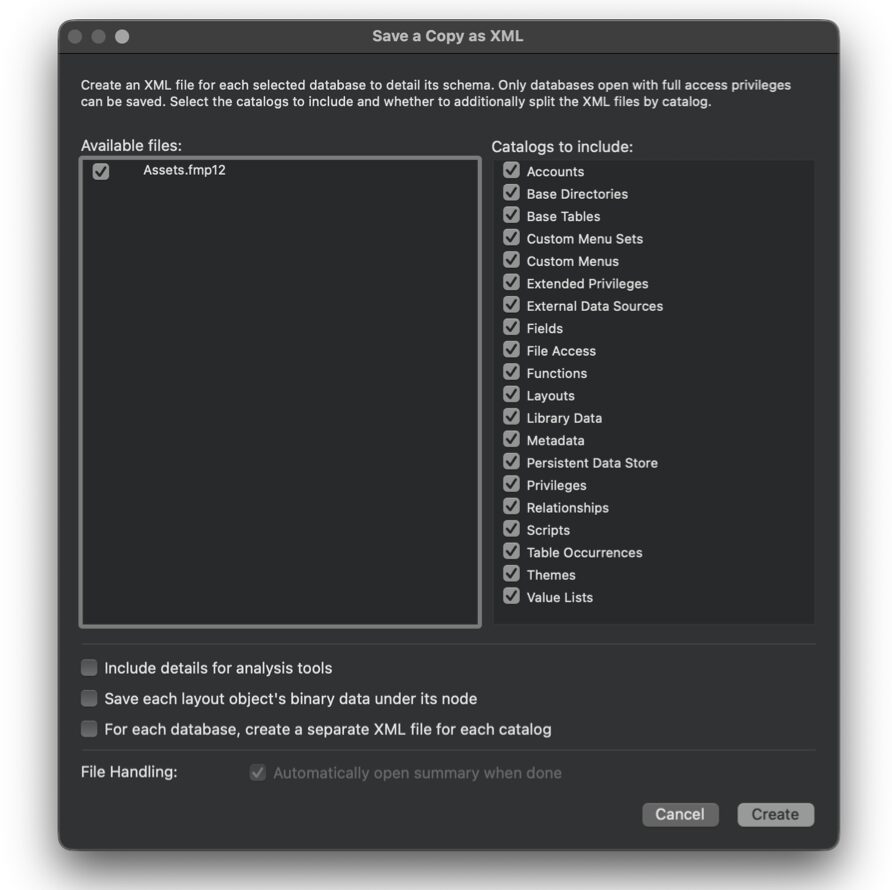
Developers can now choose exactly which catalogs to export, split catalogs into separate XML files, and control whether binary data is stored centrally or inline within individual nodes. Instead of generating one large XML representation of an entire solution, developers can create smaller targeted exports focused on scripts, layouts, custom functions, table definitions, relationships, value lists, or other specific schema areas.
FileMaker 2026 also expands XML generation directly within the Developer Tools command-line environment. Specific catalogs and nodes can now be exported independently, making XML workflows more useful for automation pipelines, source control, schema comparison, documentation generation, and AI-assisted analysis.
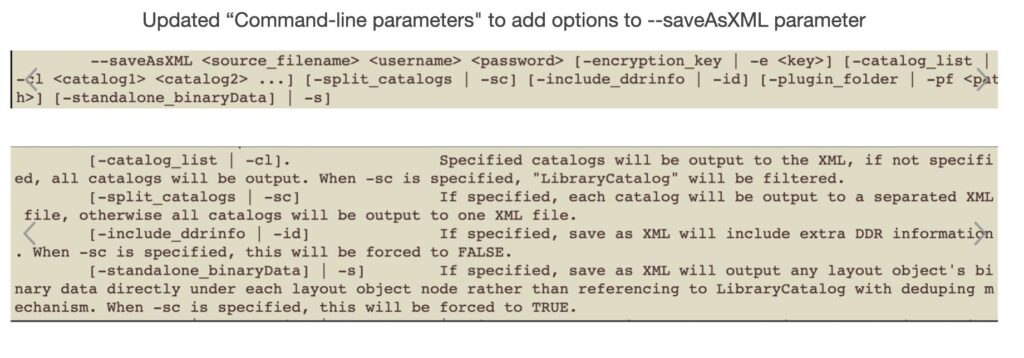
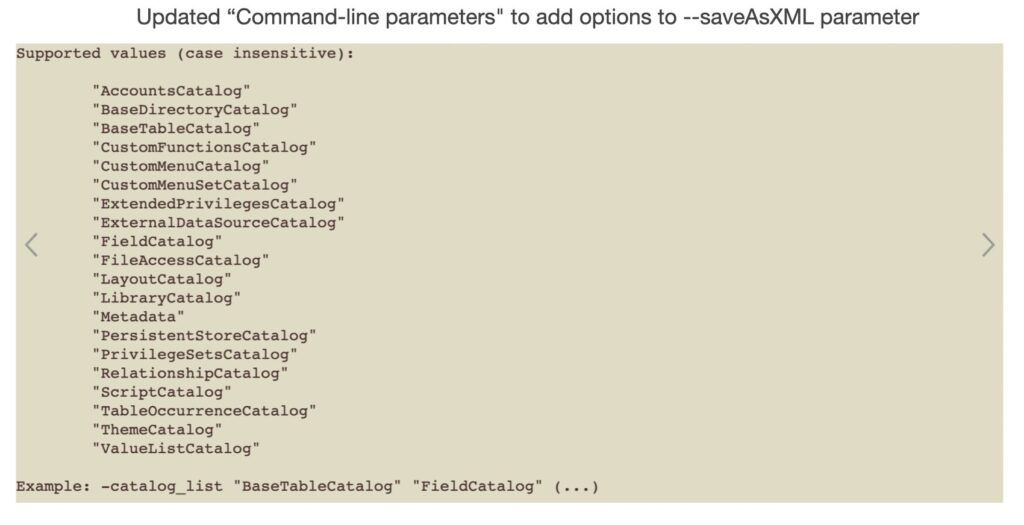
The XML output itself has also been improved for third-party parser compatibility, making it easier to work with external utilities, diff tools, documentation systems, and developer tooling.
Key components
- New Save as XML Dialog
- Selective Catalog Export
- Multi-File Output
- Binary Data Placement Control
- Improved Third-Party Parser Compatibility
How it works
- When selecting Save as XML, developers are presented with a new configuration dialog.
- Developers choose: Which catalogs to export, whether to split catalogs into separate files, how to store binary data (library vs. inline), whether to open the summary file afterward.
- The system generates: Individual XML files per selected catalog (if chosen), a summary XML file that ties them together, binary data formatted according to the selected option.
- The resulting XML can be: Parsed by third-party tools, compared using diff utilities, used for change tracking, potentially leveraged to reconstruct schema.
3rd-party developer benefits
- Massive Performance & File Size Improvements
- Precision in Change Management
- Better Tooling Ecosystem Support
- Application Lifecycle Management (ALM) Enablement
- Foundation for Schema Reconstruction
Potential use cases
- Schema Diffing
- Layout-Only Review
- Enterprise CI/CD Pipelines
- Error & Reference Analysis
- Binary Asset Control
- Incremental Solution Updates
Summary
The new Save as XML UI is more than a cosmetic refresh — it is a structural upgrade to FileMaker’s development and lifecycle tooling. FileMaker Pro 2026 now enables selective catalog exports, multi-file schema output, binary data placement control, improved third-party parser compatibility, stronger ALM and DevOps alignment. For small files, this improves efficiency. For large enterprise solutions, it changes the workflow. For modern development practices, it’s foundational.
XML Reconstruction Opens New Possibilities
Another major enhancement is the ability for the Solution Upgrade Tool to generate a fully functional .fmp12 file directly from a properly structured XML file using the XML 2.0 grammar.

Historically, XML exports were useful primarily for inspection, reporting, and documentation. FileMaker 2026 changes that by making XML part of a two-way workflow. Developers can now export a database structure as XML, modify that XML externally, and rebuild a functioning FileMaker file from the edited structure.
That creates entirely new possibilities for automation and large-scale schema manipulation. Bulk renaming operations, global refactoring, mass script updates, and broad schema changes become much more practical when working against text-based XML representations instead of manually editing individual objects through the FileMaker interface.
This also introduces intriguing possibilities for AI-assisted development. AI systems could theoretically generate or modify FileMaker architectures programmatically before rebuilding them into working files through the Solution Upgrade Tool.
There are a few caveats. Certain operations, such as modifying individual script steps or changing custom function formulas, still require broader object replacement strategies. Additionally, the Solution Upgrade Tool currently reports successful patch application even when no actual changes occur, meaning developers still need to validate generated output carefully inside FileMaker itself.
Even with those limitations, this represents one of the most significant structural changes to FileMaker development tooling in years.
Key components
- Developer Tool Command Enhancement: Updated Save as XML command with arguments to target specific catalogs or nodes.
- Selective Catalog Export: Export one or multiple catalogs.
- Structured XML Sections: Ability to generate XML focused on a specific component area (for example: scripts and related objects).
- Catalog-Based Architecture
How it works
- Developers run the Save as XML command from the Developer Tool.
- Command arguments specify which catalogs or nodes should be exported.
- FileMaker generates XML output containing only the selected solution components.
- The resulting XML can be used for analysis, automation workflows, tooling, or version comparison.
3rd-party developer benefits
- Faster tooling workflows by exporting only the components required for analysis.
- Improved CI/CD and automation pipelines when integrating FileMaker with external tooling.
- More precise solution inspection for documentation, testing, and refactoring tools.
- Better support for AI and code-analysis tools that operate on structured XML representations of FileMaker solutions.
Potential use cases
- Export only scripts to feed into documentation or AI code-analysis tools.
- Generate schema-only XML for version comparison or source control workflows.
- Extract layout or UI definitions for design review or tooling.
- Build automated developer utilities that operate on specific solution components
- Enable third-party developer tools to process smaller, targeted XML datasets
Summary
Selective XML export gives developers and tool creators a much more precise way to work with FileMaker solution metadata, making it easier to automate workflows, build advanced developer tooling, and integrate FileMaker into modern development pipelines.
AI Field Annotations and Semantic Schema Design
FileMaker 2026 adds a new layer of schema metadata through field annotations and developer-defined display names. Using the new FieldAnnotation() function and annotation settings in Manage Database, developers can attach JSON-based metadata to fields. That metadata can include user-friendly labels, localization information, or contextual descriptions that help explain what a field represents.
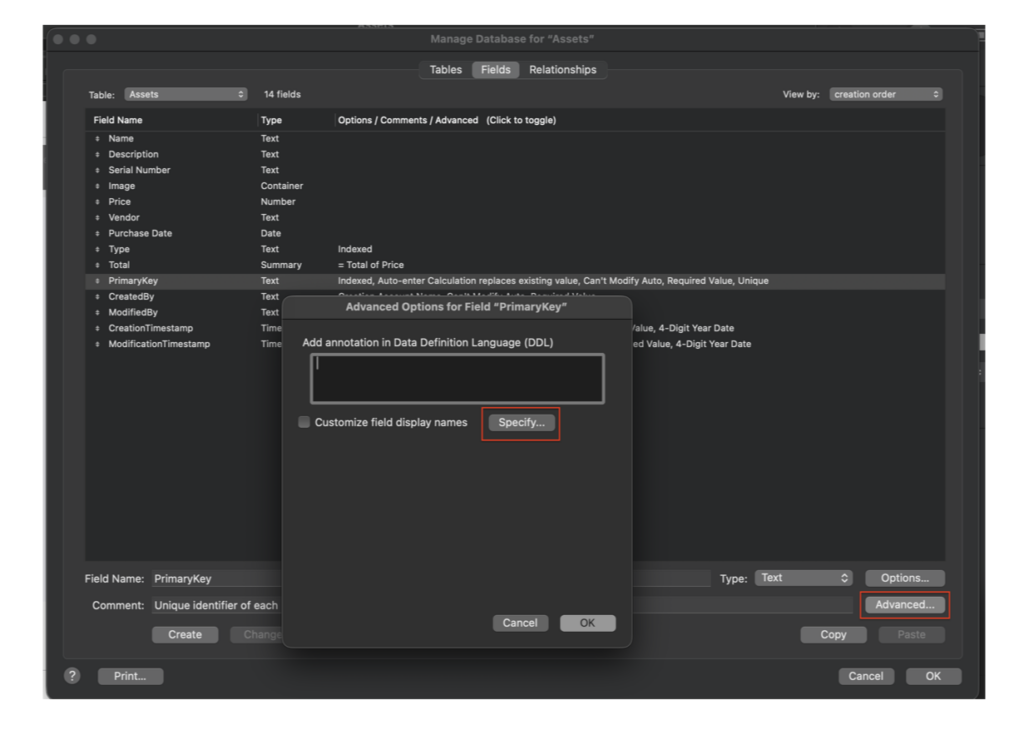
This helps solve a long-standing issue in FileMaker development: balancing structured internal naming conventions with cleaner user-facing terminology. Developers can continue using field names like cust_firstName internally while exposing something more readable like “Customer Name” in export dialogs, sort dialogs, or schema-aware interfaces.
Annotations can also return different values dynamically based on language or environment, allowing display labels to adapt without changing the underlying schema.
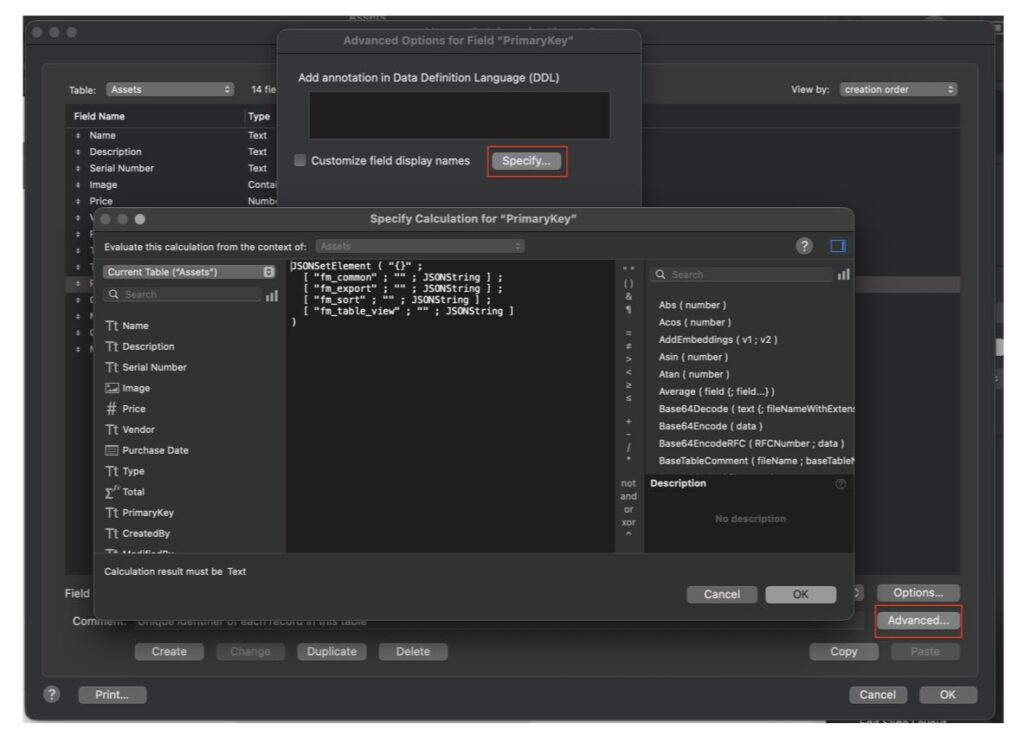
FileMaker 2026 also adds AI-specific controls directly into Field Options. Developers can now determine whether fields should be included when FileMaker sends Data Definition Language (DDL) information to AI systems. This gives developers more control over how schema information is exposed to large language models and AI-assisted tooling.
Key components
- Field Annotation Metadata: A new JSON-based calculation field in Manage Database allows developers to define display names and related metadata for a field.
- New Calculation Function: FieldAnnotation ( fileName ; fieldName ), Returns the specified field’s annotation JSON.
- Context-Aware Display: Display names can be used in contexts such as: Export field selection dialogs, Sort dialogs, potentially other user-facing schema interactions.
- Localization Support: Annotation calculation can dynamically return localized display names based on user language or environment variables.
How it works
- In Manage Database, developers configure a field annotation using a calculation that returns JSON.
- This JSON can define one or more display name values, including logic for: Alternate user-facing labels, language-specific labels, context-specific naming.
- When FileMaker encounters a context such as export or sort, it can reference the annotation rather than exposing the internal field name.
- Developers can programmatically access annotation data using: FieldAnnotation ( fileName ; fieldName )
3rd-party developer benefits
- Clean Separation of Internal vs. Public Schema
- Professional Export Experiences
- Native Localization
- Reduced Schema Compromises
- Programmatic Metadata Access
Potential use cases
- Localized Enterprise Solutions: One schema, multiple languages, display “Customer Name” in English and “Nom du client” in French without renaming fields
- Export Configuration Tools: Automatically display user-friendly column names in export dialogs or generated CSV headers
- Developer Naming Standards: Maintain internal conventions like cust__firstName, z_sortKey; while presenting clean UI labels to users
- Custom Admin Interfaces: Dynamically build user-facing schema maps using FieldAnnotation()
- Regulated or Public-Facing Solutions: Ensure exported data columns match regulatory terminology without altering database architecture.
Summary
Display Names for Fields / Field Annotation delivers a long-requested capability: true “friendly field names” without sacrificing internal schema integrity.
FOREIGN KEY Support
FileMaker 2026 adds support for FOREIGN KEY syntax within FQL Data Definition Language (DDL) statements.
FileMaker relationships still work through the relationship graph as they always have, but developers can now express those relationships using more familiar SQL-style syntax when working with generated DDL, automation workflows, or AI-assisted schema generation.
This is especially useful for AI workflows since large language models already understand relational database patterns and FOREIGN KEY syntax. That gives AI systems more context when generating or interpreting FileMaker schema structures.
For developers coming from SQL environments, it also makes FQL feel a bit more natural and easier to follow when reading generated schema definitions or working with external tooling.
Key components
- FQL Parser Enhancement
- DDL Relationship Expression
- AI Script Step Compatibility
- Schema Communication Improvement
How it works
- FQL parser accepts FOREIGN KEY syntax within CREATE TABLE statements.
- The relational intent is captured during schema creation.
- When used with AI-driven script steps: LLMs can generate relational DDL statements, the platform can interpret and construct corresponding FileMaker relationships.
- The schema becomes more understandable both to humans and to AI systems.
- Bridges traditional SQL semantics and FileMaker’s relationship model more direct.
3rd-party developer benefits
- Improved AI Schema Generation
- More Familiar SQL Semantics
- Stronger Model Comprehension: LLMs understand FOREIGN KEY semantics natively. By supporting this syntax: AI can reason more effectively about relationships, Query generation improves, Schema-aware code generation becomes more reliable.
- Future-Proofing FQL: This enhancement modernizes FQL’s DDL capabilities and positions it for deeper AI integration, automated schema tooling, advanced developer workflows.
Potential use cases
- AI-Driven Solution Creation
- Rapid Prototyping
- Enterprise Integration Projects
- Education & Onboarding: developers familiar with SQL can more easily understand and author relational definitions in FileMaker.
Summary
FileMaker 2026 adds support for FOREIGN KEY syntax in FQL DDL statements, enabling clearer, declarative expression of relational intent. This enhancement improves AI-driven schema generation, makes FQL more SQL-aligned, strengthens machine-readable schema communication, enhances developer onboarding, supports Claris’ broader AI integration strategy.
Expanded RAG Infrastructure and AI Services
FileMaker 2026 expands its AI integration capabilities with new support for Google Gemini, multilingual embeddings, OCR-enhanced PDF processing, and improvements to retrieval-augmented generation (RAG) infrastructure.
The platform now supports the paraphrase-multilingual-MiniLM-L12-v2 embedding model, allowing AI-powered solutions to work more effectively with multilingual text and search workflows. Improvements to ExtractTextFromPDF also add support for OCR-processed PDFs, enabling FileMaker to extract text from scanned documents using Apple’s Live Text capabilities on macOS and iOS.
Several under-the-hood RAG improvements are included as well. FileMaker now uses UUID-based identifiers for RAG chunk management, helping prevent conflicts when combining or maintaining multiple RAG spaces. RAG cache key files have also been moved to a more persistent storage location so they are preserved during FileMaker Server uninstall and reinstall workflows.
Fully Embedded AI Finally Arrives
FileMaker 2026 feels like the first release where AI is being built into the platform itself rather than simply attached to it through external integrations.
XML exports are becoming modular and reconstructable. Schema metadata is becoming machine-readable. Developers can annotate fields with contextual information for both users and AI systems. FQL now supports more familiar relational syntax. AI models can work with structured schema information instead of relying entirely on inference from field names and layouts.
What emerges is a much more open and automation-friendly architecture. FileMaker solutions become easier to analyze, document, refactor, version, and potentially even generate through external tooling and AI-assisted workflows.
For developers already experimenting with AI, the release introduces a number of practical building blocks. For everyone else, it signals where the platform is heading over the next several years.
Have Questions?
We’re here to help. Contact us today for strategy, troubleshooting, or a final check before launch.
This piece represents a collaboration between the human authors and AI technologies, which assisted in both drafting and refinement. The authors maintain full responsibility for the final content.