

Claris FileMaker 2026 delivers dozens of quality-of-life improvements that make daily development work faster and less frustrating, including a cleaner, context-aware Inspector, custom function sorting, precise zoom control, and field entry calculations. These enhancements allow developers to spend less time working around platform limitations and more time building solution value.
Expanded automation capabilities, including calculated credentials, metadata access, and improved installation options, enable faster iteration, cleaner architectures, and more maintainable solutions.
- Draco Catalog Brings Persistent Metadata
- Enhanced Inspector for macOS
- Custom Functions Sort
- Custom layout zoom level
- New calculation: BaseTableComment
- Control field entry by calculation
- Additional Enhancements
Draco Catalog Brings Persistent Metadata
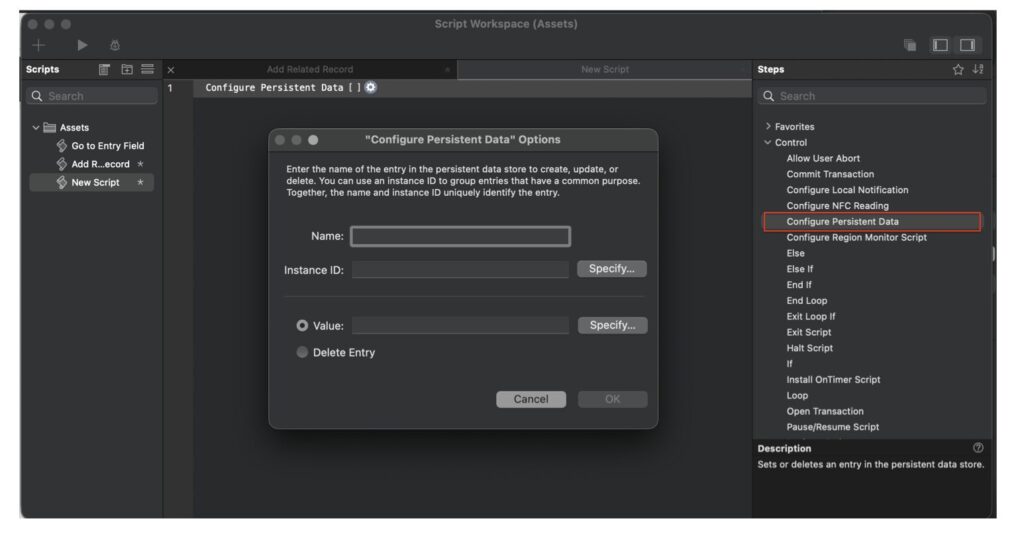
FileMaker Pro 2026 introduces Draco Catalog, a new persistent metadata storage capability that allows developers to store key-value metadata that persists beyond user sessions and survives the Data Migration Tool process. This creates a durable, structured way to maintain configuration, state, and add-on metadata without relying on globals, dummy tables, or workaround architectures.
Key components
- Persistent Metadata Store: Key-value style storage, survives FileMaker restarts, survives Data Migration Tool workflows.
- New Script Steps: Set, update, and delete metadata value.
- New Calculation Functions: Retrieve stored metadata, check existence, return metadata values programmatically.
- Add-on Metadata Support: Dedicated catalog support for JavaScript add-ons and eliminates need for dummy tables.
How it works
- Draco Catalog functions like a persistent variable store, replacing the need for global fields, global variables, preferences tables, and hidden utility tables.
- Draco Catalog metadata does not require schema workarounds, does not rely on record context, and survives migration.
- For JavaScript add-ons, this becomes the preferred storage mechanism for add-on configuration and internal metadata.
3rd-party developer benefits
- Survives Data Migration
- Cleaner Architecture
- Add-on Modernization
- Predictable metadata persistence
Potential use cases
- Add-on Configuration Storage
- Solution-Level Settings
- Upgrade Tracking
- Runtime System Flags
Summary
Draco Catalog introduces persistent, migration-safe metadata storage to FileMaker Pro 2026. It replaces workaround patterns like global fields, single-record config tables, and dummy add-on tables.
For advanced developers, this is a foundational infrastructure improvement, especially for those building JavaScript add-ons, managing complex deployments, or using the Data Migration Tool. Draco Catalog significantly modernizes how developers manage persistent state in FileMaker solutions.
Enhanced Inspector for macOS
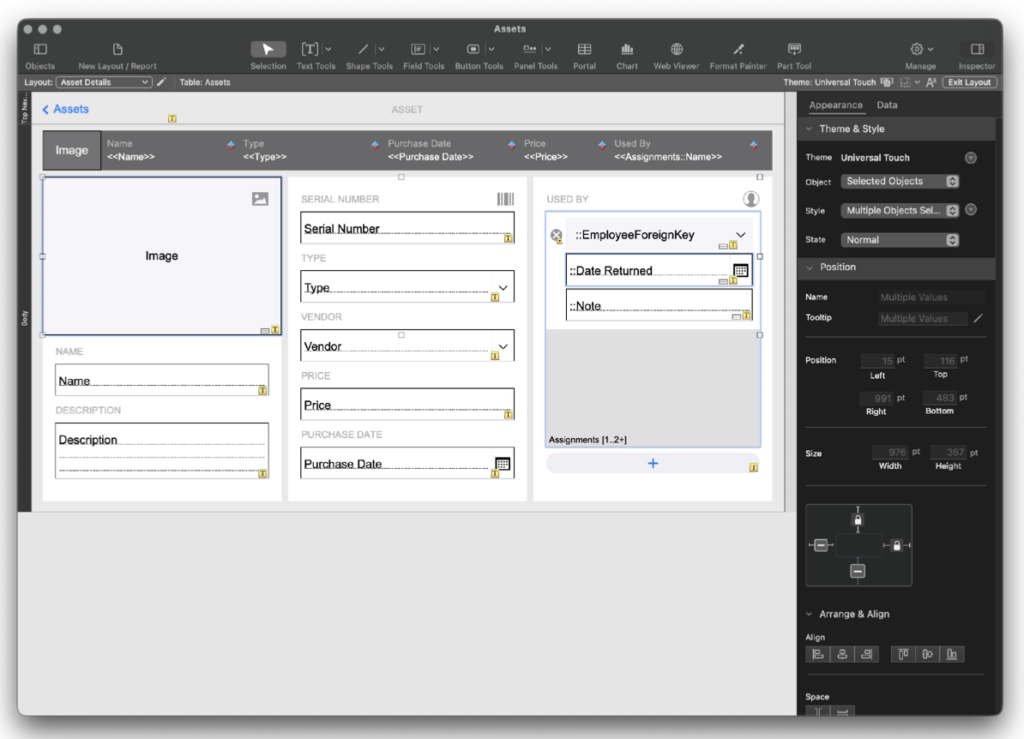
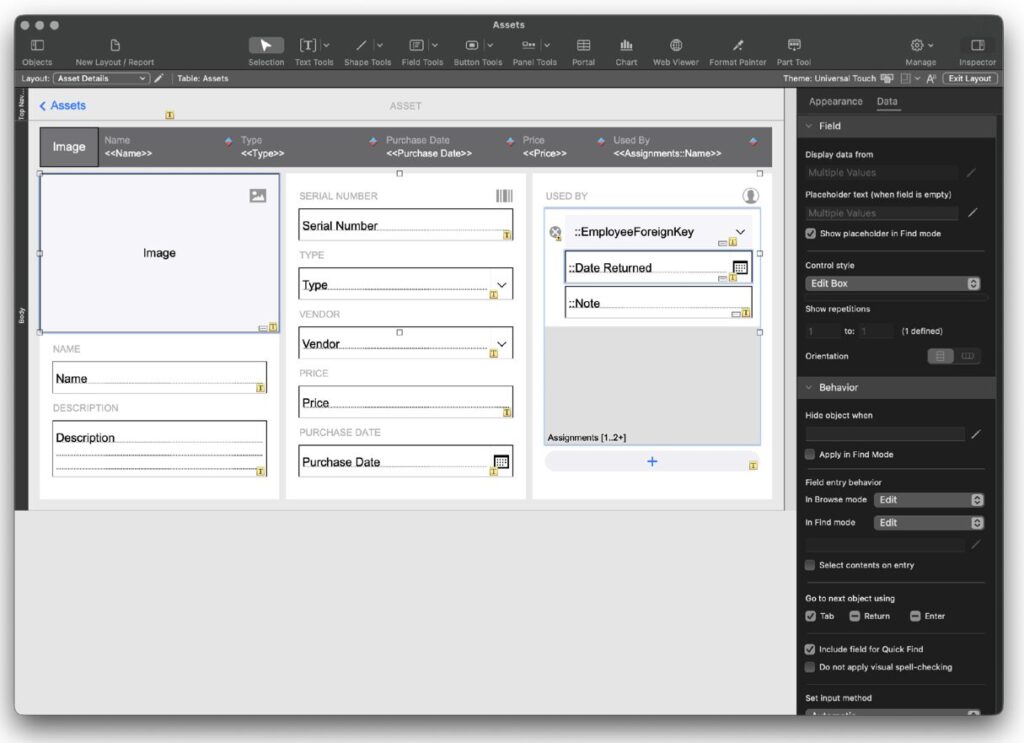
FileMaker Pro 2026 introduces a redesigned Inspector on macOS. It is a more focused, context-aware utility that shows only the most relevant and actionable controls for the selected object. The new Inspector consolidates Position, Style, and Appearance into a simplified structure, reducing the number of tabs from four to two. It dynamically shows and hides controls based on the selected object. Developers who prefer the legacy Inspector can still access it.
Key components
- Two Primary Tabs: Appearance and Data.
- Context-Aware Controls: dynamically adjusts based on Field objects, Text objects, Buttons, Layout parts, Other layout elements.
- Consolidated Controls: Position, Style, and Appearance are intelligently grouped, Reduces unnecessary panel switching.
- Legacy Inspector Option: Developers can open the traditional Inspector in a separate window, provides full visibility for those who prefer the previous interface.
How it works
- In Layout Mode on macOS, selecting an object activates the Smart Inspector
- The Inspector automatically: Displays only controls relevant to the selected object. Hides irrelevant options.
- Developers can switch to the legacy Inspector if they prefer seeing all available options at once.
- The system reduces navigation friction by minimizing tab switching and clutter.

3rd-party developer benefits
- Faster Layout Development
- Reduced Cognitive Load
- Cleaner Design Experience
- Onboarding-Friendly
- Power-User Flexibility Preserved
Potential use cases
- High-Velocity UI Development: Rapid iteration on layout design with fewer distractions
- New Developer Training: Reduced intimidation factor when first entering Layout Mode
- Complex Layout Adjustments: Quickly surface relevant formatting and data options without navigating multiple panels
- Part-Level Editing: Cleaner experience when modifying layout parts (Body, Header, Footer)
- Preference-Based Workflows: Individual developers can opt for legacy mode if desired
Summary
The macOS Smart Inspector modernizes and simplifies Layout Mode without sacrificing capability. Context-aware property visibility, consolidated controls under two focused tabs, reduced visual clutter, faster layout editing, optional access to the legacy Inspector.
Custom Functions Sort
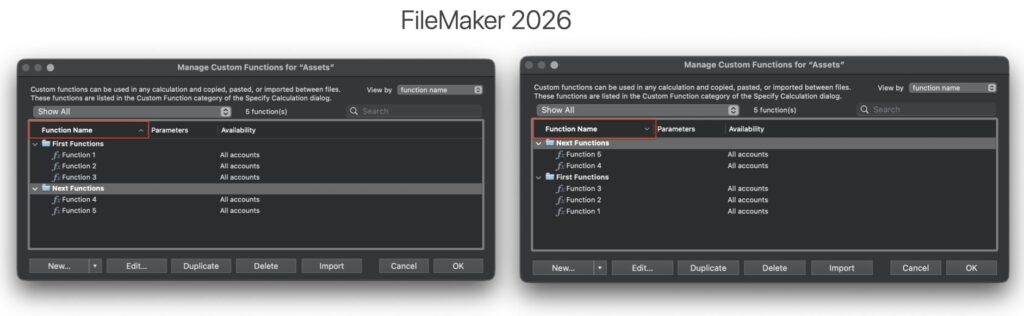
FileMaker Pro 2026 restores and enhances sorting capabilities for Custom Functions within the newer folder-based management interface.
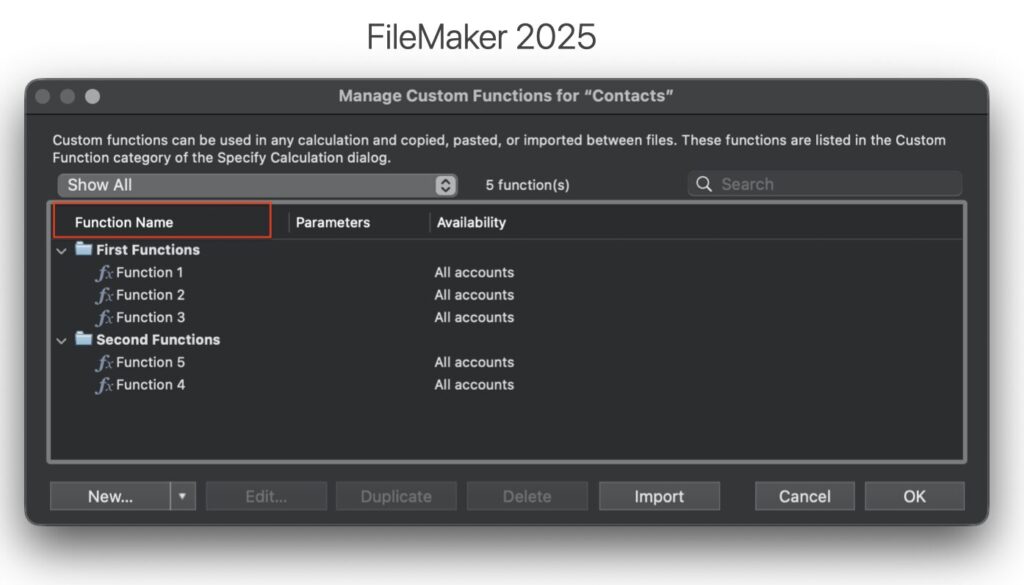
In the previous release, developers gained the ability to organize Custom Functions into folders but lost the ability to sort them. This release delivers the best of both worlds: folder organization, sorting by creation date, name, or custom order, sorting applied at each folder level.
Key components
- Sorting Options Restored
- Folder-Aware Sorting
- Hierarchical Support
- Custom Order Persistence
How it works
- Developers organize Custom Functions into folders using the existing folder management system.
- Within the Custom Functions dialog, they can now select their preferred sorting method: Alphabetical (Name), Chronological (Creation Date), Manual (Custom Order).
- The selected sort behavior applies independently within each folder and subfolder.
- Folder structure remains intact, sorting does not flatten or override organizational hierarchy.
3rd-party developer benefits
- Scalable Function Management
- Predictable Organization
- Framework-Friendly
- Improved Team Collaboration
- Reduced Cognitive Load
Potential use cases
- Modular Function Libraries
- Enterprise Codebases: Sort by creation date to identify legacy functions, recently added utilities, audit trail patterns
- Framework Distribution: Deliver curated custom function sets in intentional display order
- Large Team Development: Standardize sorting rules across teams to reduce friction
- Refactoring Projects: Sort by date to isolate older functions needing modernization
Summary
Sorting Custom Functions with folders restores lost functionality while preserving modern organization capabilities.
FileMaker Pro 2026 now enables: folder-based structure, sorting by name, creation date, or custom order, sorting applied at each hierarchy level.
Custom layout zoom level
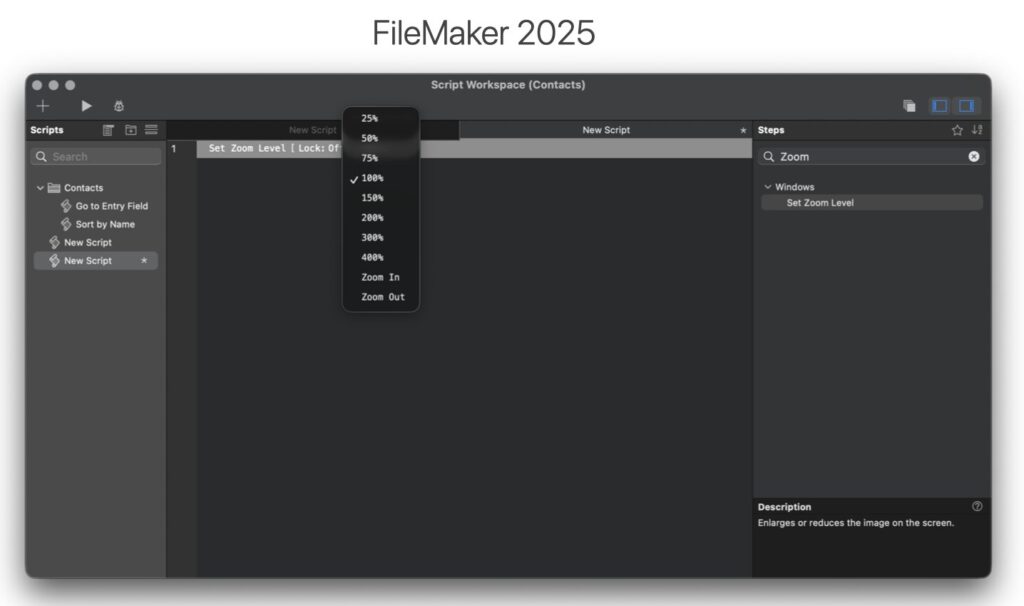
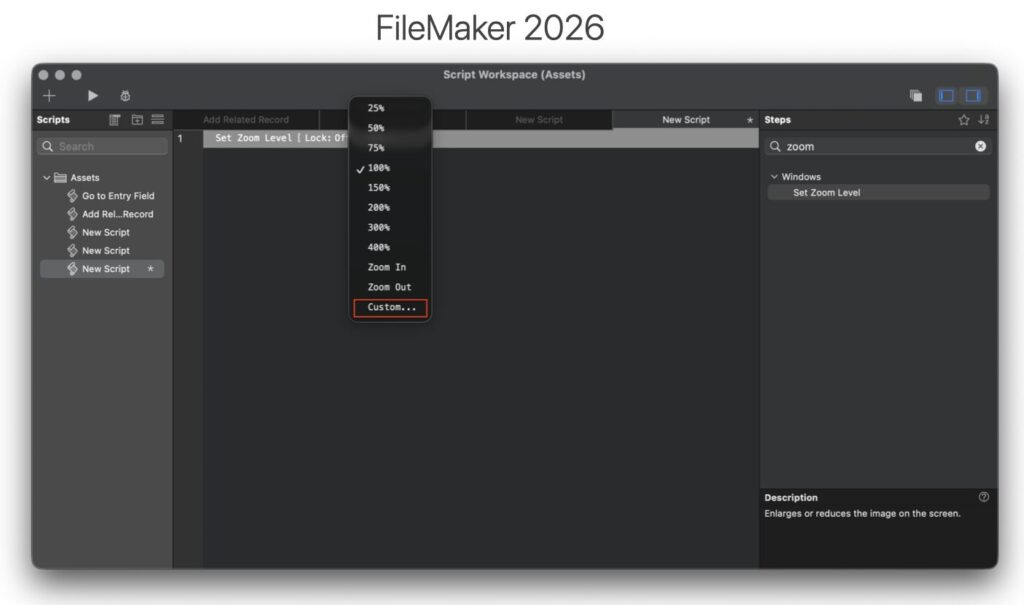
FileMaker Pro 2026 enhances layout zoom control by allowing developers and users to set zoom levels using precise decimal percentages rather than being limited to fixed preset values. Zoom levels can now be set programmatically to any supported percentage (e.g., 22%, 87.5%, 133%), offering far greater precision and flexibility in both UI design and scripted workflows. This small enhancement delivers meaningful usability improvements, WebDirect deployments, kiosk environments, accessibility scenarios, and device-specific layouts.
Key components
- Granular Zoom Percentages: Zoom is no longer restricted to fixed preset levels, accepts decimal values for precise control
- Scriptable Zoom Control: Developers can set layout zoom via script step
- Improved UI Adaptability: Better control over how layouts render across different screen sizes and resolutions
- Backwards Compatibility: Existing preset zoom behaviors continue to work
How it works
- Developers specify a zoom percentage directly, including non-integer or non-preset values.
- When used in scripts, the zoom level can be dynamically calculated based on: Window size, device type, screen resolution, user preference, accessibility settings
- FileMaker applies the specified percentage to the current layout instantly.
- Zoom precision allows layouts to better fit target display environments without redesigning the layout itself.
3rd-party developer benefits
- Fine-tune layouts for: iPads, large monitors, kiosk displays, embedded browser windows.
- Improved Accessibility: Adjust zoom precisely for users needing larger text or UI elements, dynamically adjust zoom based on user preference settings.
- WebDirect UI Refinement: Better control over layout presentation without redesign, helps mitigate screen-scaling inconsistencies.
- Scripted Responsiveness: Create intelligent UI scaling, detect window width, calculate ideal zoom, apply automatically.
- Reduced Layout Duplication: Instead of creating multiple layouts for minor scaling differences, developers can adjust zoom programmatically.
Potential use cases
- Kiosk Mode Applications
- Tablet Deployments
- Accessibility Profiles
- Dynamic Window Resizing
- Embedded FileMaker Interfaces
Summary
Set Layout Zoom Level – Granular Control delivers precise UI scaling where previously only preset levels were available.
New calculation: BaseTableComment
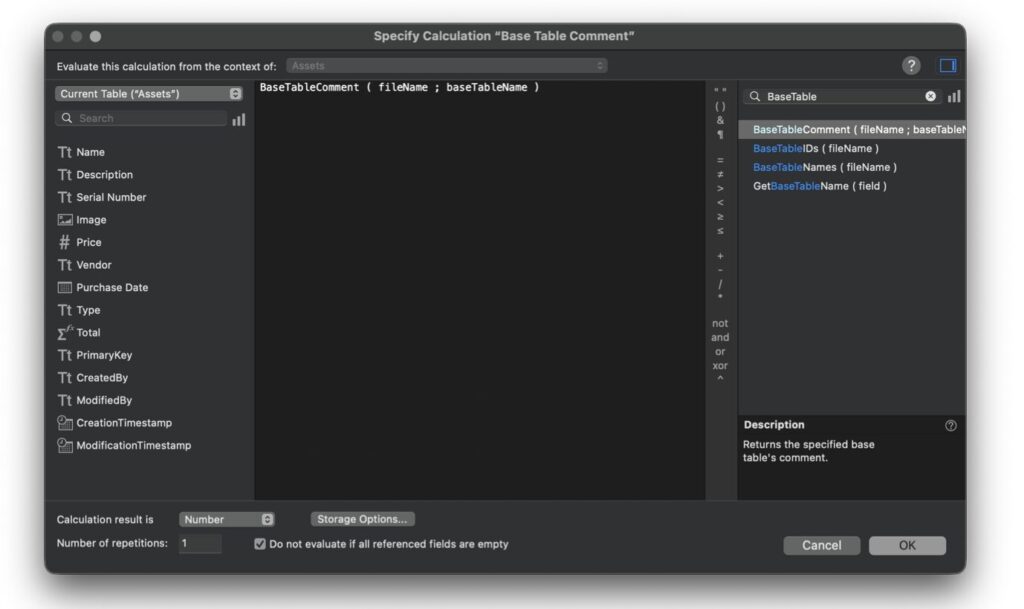
FileMaker Pro 2026 introduces a new calculation function: BaseTableComment ( fileName ; tableName ). This function returns the developer-defined comment for a specified base table. This enhancement makes comments programmatically accessible anywhere calculations can be used and unlocks powerful new possibilities, particularly for AI-driven workflows, schema introspection, documentation automation, and dynamic developer tooling.
Key components
- New Calculation Function: BaseTableComment ( fileName ; tableName ), returns the comment associated with a specified base table.
- Existing Table Comment Field (Now Accessible): Developers can define descriptive comments for tables in Manage Database. These comments are now retrievable at runtime.
- Available Anywhere Calculations Are Used: Scripts, Custom functions, JSON generation, Schema introspection tools, Save as XML workflows.
- AI-Ready Metadata Access: Enables structured schema descriptions to be sent to LLMs or AI services.
How it works
- In Manage Database, developers define comments for each base table.
- The new function retrieves that comment dynamically: BaseTableComment ( fileName ; tableName )
- The returned text can be: Embedded in JSON, sent to APIs, included in AI prompts, used in documentation generators, exported through Save as XML
3rd-party developer benefits
- AI-Optimized Schema Context
- Metadata-Driven Architectures
- Improved Save as XML Workflows
- Better Developer Discipline
- Enterprise & API Abstraction
Potential use cases
- AI Query Assistants
- Natural Language Reporting Interfaces
- Automated Documentation Systems
- Dynamic Admin Consoles
- Schema Auditing Tools
- Metadata-Aware Integrations
Summary
The BaseTableComment function provides access to table comments within scripts and calculations. This enhances AI-optimized schema communication, metadata-driven architectures, automated documentation workflows, improved enterprise solution transparency, more intelligent integrations.
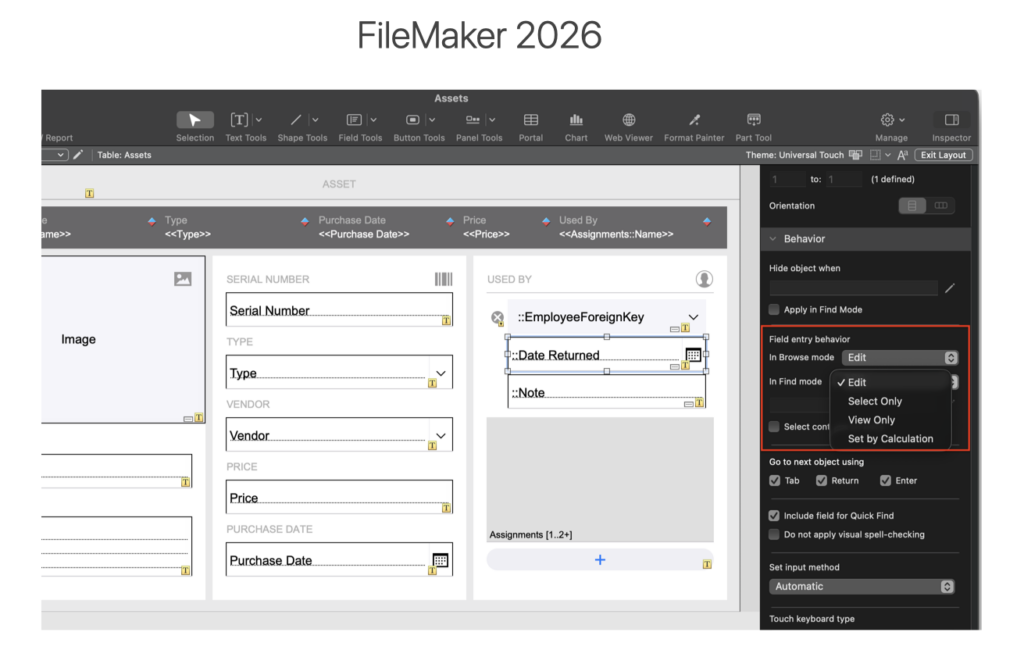
Control field entry by calculation
FileMaker Pro 2026 enhances field-level interaction control by allowing developers to define field entry behavior using a boolean calculation in the Data pane of the Layout Inspector. Previously, field entry was essentially binary: Editable or Non-Editable. Now, developers can allow entry interaction (focus, selection, scrolling) while preventing modification, and can dynamically control this behavior with calculations. This delivers more granular UX control without requiring workaround UI patterns.
Key components
- New “Can Enter When” Calculation Option: Boolean calculation determines entry permission dynamically; Configured in Layout Inspector > Data pane
- Expanded Field Interaction Modes: Edit, Select Only, View Only, Controlled by logic rather than static checkbox alone
- Dynamic Entry Logic: Entry behavior can respond to: User role, Privilege set, Record state, Workflow stage, Field values
- Improved Interaction Model: Allows focus and selection without enabling edits
How it works
- In Layout Inspector > Data pane, developers configure the “Can enter field” setting.
- Instead of simply enabling/disabling entry, they can specify a boolean calculation
- The calculation evaluates at runtime to determine whether the field is editable
- Even when editing is disabled, users can: Click into the field, Scroll through long content, Select and copy text
- Modification is prevented unless the calculation resolves to true.
- Available in both Browse and Find modes.

3rd-party developer benefits
- Eliminates UI Workarounds
- Workflow-Aware Field Control
- Better Data Protection
- Role-Based UX Refinement
- Cleaner Layout Architecture
Potential use cases
- Approval Workflows
- Audit & Compliance Systems
- Customer Service Applications
- Long Text Fields: Enable scrolling and selection without granting edit access
- State-Driven UI
Summary
Control Field Entry by Calculation introduces granular, logic-driven control over how users interact with fields. FileMaker Pro 2026 now enables: Calculation-based entry permissions, Select-only access without edit capability, Workflow-aware editing control, Cleaner UI architecture, Reduced layout workarounds
Additional Enhancements
- GetLiveText() and GetLiveTextAsJSON support for PDFs: Text can now be extracted from PDFs that have had text recognition applied via OCR. Specifying a language flag ensures that the text is recognized in the correct language
- Change Database Account Password: Enhanced developer tool allows FileMaker developer/admin to change database account passwords.
- Sort blank records last: The Sort Records dialog now includes an option to sort blank records last, when sort ascending.
- Install Tools only (macOS): During installation, developers can select to only install FMDeveloperTool, FMUpgradeTool, or DataMigrationTool
- Size and Position for Show Custom Dialog: The Show Custom Dialog script step now allows dialog height, width, and distance from top and left to be specified by calculation in pt.
- Optional Name added to GetRecordIDsFromFoundSet: GetRecordIDsFromFoundSet( Type { ; optionalname } ). The optional name parameter pulls the name of a related table occurrence or the name of a portal object on the current layout.
- Cache JSON results: For Insert From URL (and Execute Rest) with mime type “application/json”, this option attempts to parse and cache the JSON so that the user doesn’t have to use JSONParse themselves.
- Keep User Layout View: New option in layout panel for preserving user’s default view for other users.
- Specify ODBC credentials by calculation: for Import Records/Execute SQL/Convert File
- Get ( AccountPasswordDaysRemaining ): new calculation that returns the number of days remaining until a password expires.
- Flush Web Viewer Cookies: New script step that allow users to Immediately flushes the web viewer cookies of application.
- —proxy-negotiate: Support -for -proxy-negotiate for Insert from cURL
- Schema File Options: Application setting to enable/disable default field functionality, default field related options in new place in Settings and File Options.
- Custom Dialog scrollbar: Add scrollbar for the dialog if the content exceeds the display space.
- Webp: New image support in container fields.
- Keep Original Data: Add the ability to allow users to select field types in both Specify Import Order and Convert File dialog.
- Skip auto-enter: Replace Field Contents dialog has a Skip Auto-Enter option if the access privileges are [Full Access]..
- Scriptable PDF workflow: Programmatically create, open, append, print, and save PDFs entirely within Script Workspace.
Improved Developer Experience
We’re excited at the changes in Filemaker 2026 that directly improve the developer experience. Draco Catalog will be a boon for optimizing javascript and add-ons. The new UI enhancements, sorting options, calculations and layout tools will make designing and maintaining apps in FileMaker more convenient.
Have Questions?
Big changes are on the way, and we’re here to help you navigate them. Contact us today for guidance, support, or a second opinion before you roll things out.
This piece represents a collaboration between the human authors and AI technologies, which assisted in both drafting and refinement. The authors maintain full responsibility for the final content.