

Many organizations rely on paper because it has always been part of the process. Forms get printed, filled out in the field, returned to the office, and eventually typed into a system or scanned for storage. These steps feel familiar, and for a long time they seem manageable. But as the volume of work increases, paper quietly becomes a source of delays, inconsistencies, and extra effort that slows down the entire operation.
Why paper creates workflow problems
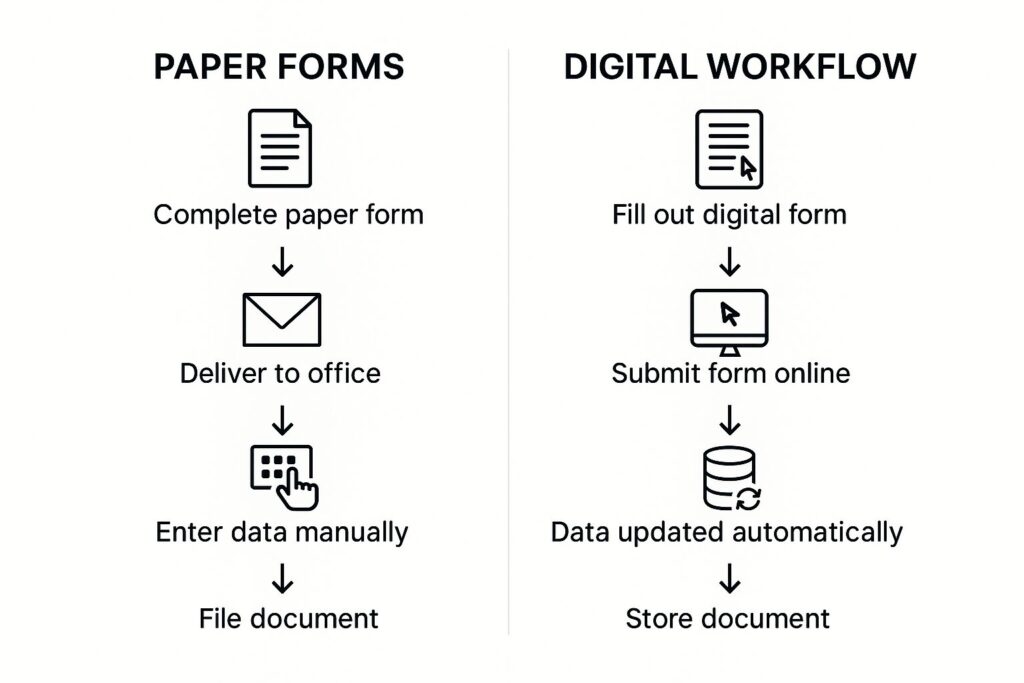
Paper introduces friction at every stage of a process, though the impact isn’t always obvious at first. Each form must be distributed, completed by hand, carried or emailed back to the office, interpreted, entered into a system, checked for accuracy, and filed. Any missing field, unreadable note, or misplaced page introduces another round of follow-up.
These small interruptions accumulate. A form filled out during a site visit may not return to the office until the next day. A supervisor might spend time clarifying handwriting or resolving conflicting information. Meanwhile, other teams continue working without the most up-to-date details, causing additional backtracking later.
Paper also makes it difficult to spot incomplete steps or missing information. Because there’s no built-in structure guiding users through the workflow, staff rely on memory and habit to ensure everything is filled in. When someone forgets a field or skips a step, the gap may not be visible until much later.
A realistic scenario
For example, a technician might complete several paper inspection forms during the day. At the end of their shift, they hand them off to the office, where someone enters each line manually. If a measurement is unclear or a section has been skipped, the office must reach back out to the field for clarification. By the time the data is entered, it may already be outdated for teams relying on it.
These delays aren’t caused by lack of effort; they’re built into the structure of paper-based processes. Even a well-organized team can only move as quickly as their tools allow. Paper creates gaps—gaps in timing, gaps in accuracy, and gaps in visibility.
Why digital workflows make such a difference
Digital forms remove the limitations of paper by guiding users through the workflow in real time. Required fields ensure nothing is overlooked. Dropdowns and checkboxes reduce ambiguity. Photos, signatures, timestamps, and GPS details can be captured on the spot. Once submitted, the information becomes immediately available to everyone who needs it.
This immediate visibility changes more than just speed. It helps teams respond sooner, plan better, and maintain a more complete picture of what is happening across the organization. Instead of waiting for end-of-day updates, managers can review work as it happens.
Digital workflows also reduce the cognitive load on staff. When the system handles the structure—what needs to be captured, in what order, and under what conditions—employees can focus on the work itself rather than remembering every step.
How FileMaker supports a smooth transition
One of the advantages of building digital workflows in FileMaker is adaptability. The system can reflect your existing process without forcing you into a template that doesn’t match how your team works. If your forms need conditional sections, specialized terminology, or unique approval paths, those elements can be built directly into the interface.
FileMaker also supports offline data entry, which is essential for teams working in the field. Technicians can complete forms on a mobile device even without connectivity and sync the data when they’re back online. This keeps the workflow consistent regardless of location.
Because FileMaker solutions can be developed incrementally, organizations don’t have to switch everything at once. Many begin by digitizing one or two forms, observe how the new workflow improves efficiency, and expand from there. This approach reduces disruption and helps teams adopt the new process naturally.
What improves when paper is removed
Organizations that move away from paper often notice several immediate changes:
- Fewer errors and less rework
- Faster communication between departments
- More accurate, complete records
- Better insight into workflow status
- Reduced administrative burden
- Shorter turnaround times for customers and internal teams
The shift isn’t just about technology—it’s about reclaiming the time and clarity that paper-based processes quietly erode.
If you’re ready to move beyond paper
Portage Bay Solutions can help you transition from manual, paper-dependent workflows to digital processes that improve accuracy and reduce delays. If you’d like to explore how quickly your organization could benefit from a FileMaker-based solution, contact us to schedule a free consultation.