

Would you like to look at this topic from a business owner's perspective? Read our article which talks about those considerations.
AI features are now built into FileMaker, but adding an AI button to a solution does not automatically make the solution intelligent. FileMaker 2026 can perform semantic finds, generate responses, caption images, work with embeddings, and use richer schema context through field and table annotations. The hard question is whether your data is organized well enough for those features to produce useful, trustworthy results.
Before adding AI, make sure your FileMaker app aligns with the following:
- The schema is clean enough to explain.
- Fields and tables have useful annotations.
- Naming is consistent across the solution.
- The data is defensible.
- There is a real use case.
We explore each of these areas in more detail below.
1. The schema is clean enough to explain.
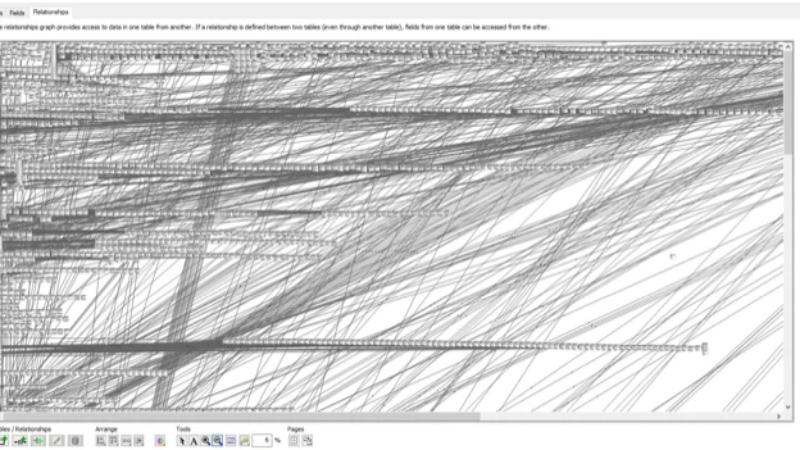
AI can work with a complicated schema, but it still needs a coherent one. Tables should represent clear business entities. Relationships should have an understandable purpose. Duplicate fields, calculation workarounds, repeating fields used as pseudo-related records, and ambiguous table occurrences all make it harder for a model to understand the system.
Does every FileMaker solution need to have a textbook-perfect schema? No. But a developer should be able to explain where a customer, order, invoice, or product belongs and how those records relate.
If you cannot confidently describe the relationship graph, your first AI project may need to be schema documentation or cleanup.
2. Fields and tables have useful annotations.
A field named Status does not tell an AI model whether it means an order status, payment status, project status, or something else. A field named Date is even less helpful.
FileMaker 2026 adds dedicated field annotations, along with BaseTableComment() and FieldAnnotation() functions, so developers can provide AI-specific context without crowding existing field comments. That context can improve natural-language queries, semantic search, and other features that depend on the model understanding your schema. Claris describes these additions as a way to give AI models richer context about what fields and tables actually mean.
Annotations should answer practical questions:
- What does this field represent?
- What values are valid?
- What unit is being used?
- Is the value current, historical, calculated, or user-entered?
- Should this field be used for search, reporting, or filtering?
An annotation is not a substitute for good design, but it is a valuable layer of developer-maintained metadata.
3. Naming is consistent across the solution.
AI is sensitive to ambiguity, and inconsistent naming creates plenty of it.
If the same concept appears as Client, Customer, Account, and Bill To, a model has to guess whether those are synonyms or different entities. If one table uses ID, another uses RecordID, and a third uses UUID, the underlying meaning should be documented clearly.
Consistent naming for tables, fields, table occurrences, statuses, and key fields makes the system easier for both humans and models to navigate. It also makes generated queries easier to inspect and debug.
FileMaker 2026 can provide better context, but it cannot infer your naming conventions reliably when the solution itself has not established them.
4. The data is defensible.
AI does not make questionable data more reliable. It makes answers from that data sound more convincing.
Before exposing a field to natural-language search, semantic search, summarization, or retrieval-augmented generation, ask:
- Are required values actually present?
- Are dates and statuses stored consistently?
- Are duplicate records expected and handled?
- Are inactive or test records excluded?
- Can you explain where a number came from?
- Would a user trust this value in a report or an audit?
In some cases, imperfect data is acceptable. An internal “find similar notes” tool may still be useful even if some records are incomplete. A tool that recommends pricing, summarizes compliance records, or answers financial questions needs to meet a much higher standard.
The right question is not, “Is every record perfect?” Instead, we should ask, “Is the data reliable enough for this particular decision?”
5. There is a real use case.
“Add AI” is not a use case for your business any more than “provide food” is an acceptable request to a caterer, or “build a fence” would work for your contractor. Start with a specific problem, a measurable outcome, and detailed and coherent steps to get there.
Good first projects are often narrow:
- Find customer records using natural language.
- Search service notes by meaning rather than keywords.
- Summarize a long project history.
- Generate captions for images stored in container fields.
- Retrieve relevant policies or procedures from a controlled document set.
- Help users draft, classify, or route information while keeping a human in the loop.
FileMaker 2026 expands the available AI-enhancement tools in great ways. (See the release notes for more details.) It provides image-captioning script steps, configurable semantic-search parameters, Google Gemini support, and additional RAG controls.
But as fancy and future as those tools sound, you need an existing, real reason to use them. A problem you are currently experiencing may be solved more accurately with a calculation, a relationship, a summary field, or a better layout instead of throwing AI at it.
Sometimes the answer is, “Not yet.”
Not all FileMaker apps need or are ready for AI integration.
If the schema is unclear, the data is unreliable, or nobody can identify a specific workflow that needs AI, adding a model will create more maintenance and more opportunities for misleading answers. Start by documenting the schema, normalizing the data that matters, establishing naming conventions, and choosing a small pilot with an observable outcome.
AI readiness is a fit between the quality of the system, the sensitivity of the data, and the risk of the proposed integration. FileMaker by itself has a decades-long history of capability and will continue to take you into the future.
FileMaker 2026 makes it easier to give AI better context. The developer’s job is still to make sure the context is accurate and that there is a good reason to use AI in the first place.
This piece represents a collaboration between the human authors and AI technologies, which assisted in both drafting and refinement. The authors maintain full responsibility for the final content.