

If your team relies on spreadsheets to run your business, you already know the pain. You know the frustration of broken formulas, the nightmare of version control (Final_Report_v4_USE_THIS_ONE.xlsx), and the hours wasted manually copying and pasting data from one system to another just to prepare for a Monday meeting.
Your data is only as valuable as the insights you can gain from it. Whether you’re tracking sales, monitoring inventory, analyzing customer activity, or measuring operational performance, having the right reports at the right time can make all the difference.
One of FileMaker’s greatest strengths is its ability to create highly customized reports that are tailored to the way your business operates. You aren’t forced into the limitations of off-the-shelf reporting tools, and you aren’t stuck with messy spreadsheets. Instead, you can have the reports you want – your unique workflows, metrics, and decision-making processes in readily usable formats.
Reports designed for your business
Your company needs to see specific things, not generalizations. If you’re a manufacturing company you want production summaries and inventory forecasts. If you’re a service business, you are helped with order reports, employee availability, or customer billing summaries.
FileMaker makes it possible to show you exactly what you and your team want to see. Reports can include:
- Summary and detail reports
- Grouped and sub-summary reports
- Charts and visual dashboards
- Financial and sales reporting
- Inventory and purchasing reports
- Customer activity and CRM reporting
- Project and resource tracking
- Scheduled and automated reports
Because these reports are built specifically for you, they can be updated, expanded, consolidated, or even tossed as your business grows.

Deliver information in the format you need
You don’t use every report in the same way – FileMaker adapts to that. In some cases your staff need printable PDFs, while in others interactive dashboards or exported spreadsheets make additional analysis possible.
FileMaker supports a variety of output options, allowing reports to be:
- Viewed on-screen
- Printed or saved as PDFs
- Exported to Microsoft Excel or CSV
- Distributed automatically by email
- Generated on a scheduled basis
- Accessed from laptops and phones
This flexibility helps ensure that decision-makers have access to the right information whenever they need it.
[IMAGE]
Interactive dashboards and real-time visibility
Modern reporting goes beyond printed or PDF documents.
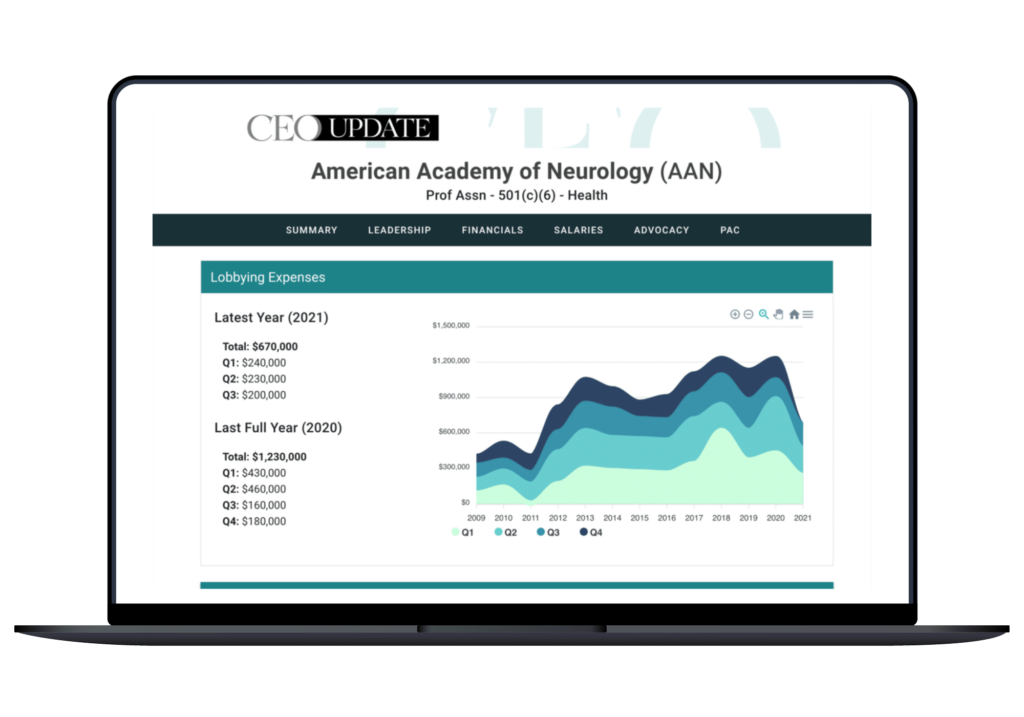
Custom dashboards can display key performance indicators, charts, graphs, and real-time metrics that update in real-time as your data changes. Instead of waiting for monthly reports, managers can monitor business performance throughout the day and identify trends before they become problems.
These dashboards can also be customized for different departments, giving each team visibility into the information most relevant to their role.
Instead of your sales manager spending three hours every Monday compiling spreadsheets from five different reps, a FileMaker dashboard gives them that exact summary the second they open their laptop.
AI-powered reporting is changing what’s possible
One of the most powerful developments in FileMaker Pro 2026 is the introduction of built-in AI capabilities that can help you interact with your data in entirely new ways.
Rather than relying solely on pre-designed reports, you can ask questions in regular language and receive meaningful summaries, insights, and analyses based on your FileMaker data. Imagine asking questions like:
- Which customers generated the most revenue this quarter?
- Show me inventory items that are consistently running low.
- Identify projects that are behind schedule.
- Summarize sales trends over the past six months.
These AI features reduce the need for you to assemble complex reporting structures and they make business intelligence more accessible across your organization.
As these capabilities continue to expand, you’ll be able to integrate AI into your existing FileMaker solutions to generate on-the-fly reports, identify trends, summarize lots of data, and conduct deeper analysis without requiring custom reports for every possible question.
Because our developers hold official Claris AI certifications, we can help you integrate these exact natural-language capabilities into your custom solution from day one.


Building reports that grow with your business
Reporting requirements rarely stay the same. As your organization expands, new questions emerge and new metrics become important to you.
A custom FileMaker solution allows your reporting environment to grow alongside your business, ensuring your team always has access to accurate, relevant, and actionable information.
At Portage Bay Solutions, we help organizations design reporting solutions that turn your raw data into meaningful business intelligence. Whether you need operational reports, executive dashboards, automated reporting, or AI-enhanced data analysis, we can build the tools that support better decisions and greater efficiency. Contact us for a free consultation.
Additional reading
Build a Polished Web Portal for Clients & Vendors
Create Accurate Inventory Reports: When Numbers Stop Matching Reality
This piece represents a collaboration between the human authors and AI technologies, which assisted in both drafting and refinement. The authors maintain full responsibility for the final content.